


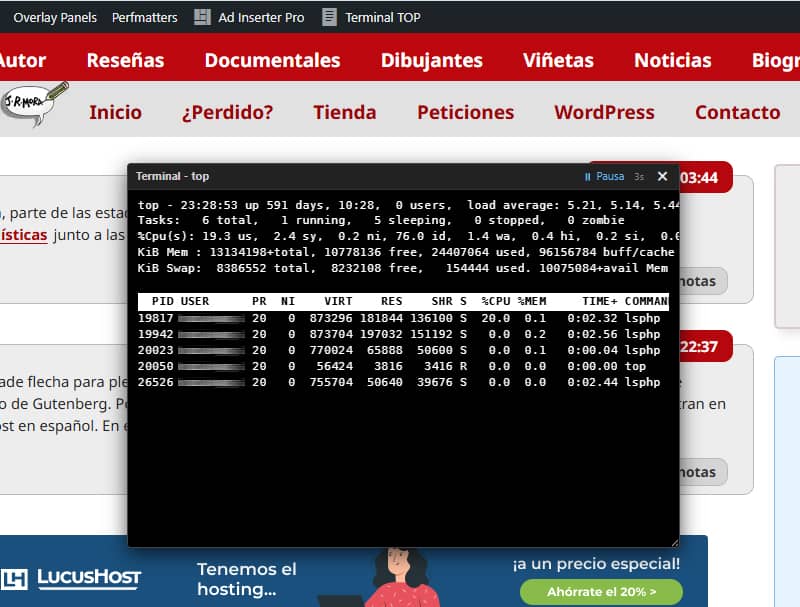
Si administras tu propio servidor o usas un hosting con acceso a comandos de consola, seguro que conoces top (o htop): la herramienta de terminal clásica para ver el consumo de CPU, la memoria RAM y los procesos activos en tiempo real.
Es una solución útil si gestionas sitios en producción y quieres vigilar picos de carga, procesos PHP atascados o consumo de memoria al realizar tareas pesadas (importaciones, mantenimiento o pruebas de rendimiento) sin salir del navegador y en el momento que se producen para tener más pistas a la hora de identificar posibles las causas.
Hasta hoy usaba el terminal de cPanel para esto, pero como otra ventana de navegador es un estorbo e incómoda para redimensionar y colocar en una esquina, y para no tener que abrir una sesión SSH cada vez que quiero controlar procesos, he creado este snippet ligero para WordPress que integra un visor o mini terminal flotante con el estilo del terminal de cPanel. Se puede abrir y cerrar directamente desde la barra superior de administración o desde un widget en el Escritorio.
Características principales
- Acceso rápido universal: Un botón "Terminal TOP" en la barra superior de administración (disponible tanto en el panel
/wp-admin/como navegando por la web) y un widget interactivo en el Escritorio de WordPress. - Ventana flotante y persistente:
- Arrastrable: Puedes moverla por la pantalla haciendo clic y arrastrando la cabecera.
- Redimensionable: Se ajusta en tamaño y el texto de la terminal escala dinámicamente (
ResizeObserver) para mantener la legibilidad. - Memoria de estado: Guarda la posición, el tamaño y si estaba abierta o cerrada utilizando
localStorage. Al cambiar de página, la terminal se mantiene justo como la dejaste.
- Controles integrados: Botón para pausar y reanudar la actualización en tiempo real (por defecto refresca cada 3 segundos) y botón de cierre rápido.
- Inmune a la caché de página (Frontend): La ventana no se imprime como HTML estático en el servidor. Un script comprueba en el navegador si la barra de administración (
#wpadminbar) está presente y genera el DOM dinámicamente solo si el usuario es un administrador autenticado.
Seguridad y Rendimiento
Cuando se trabaja con la ejecución de comandos del sistema desde PHP, la seguridad debe ser siempre la máxima prioridad y el rendimiento ni se discute.
- Restricción estricta de permisos:
Tanto la adición del botón en la Admin Bar como el renderizado del código y la respuesta AJAX están blindados bajo la capacidadcurrent_user_can('manage_options'). Solo los usuarios con rol de Administrador pueden invocar o ver este recurso. - Sanitización del output:
La salida cruda del terminal se pasa porhtmlspecialchars()antes de inyectarse en el navegador, evitando cualquier riesgo de inyección de código o XSS reflejado a través de los nombres de los procesos. - Cero impacto para visitantes anónimos:
Para los usuarios no logueados o roles sin permisos, el PHP no ejecuta ninguna función, no realiza peticiones al servidor ni inyecta scripts o HTML en el frontend. La web carga exactamente con el mismo peso para el público general. - Respeto a la caché:
Gracias a la inyección dinámicamente diferida mediante JS en el cliente, ningún plugin de caché de página pública (LiteSpeed Cache, WP Rocket, FastCGI Cache, etc.) guardará la ventana del terminal en el HTML estático de la web.
Requisitos del servidor (Compatibilidad)
El snippet es muy ligero porque utiliza los recursos nativos del sistema operativo. Sin embargo, para que funcione correctamente, el entorno de hosting debe cumplir las siguientes condiciones:
- Sistema Operativo Linux / Unix: El comando
topdebe estar disponible en la consola del servidor (no funcionará en servidores locales sobre Windows/IIS). - Función
shell_exec()habilitada: PHP requiere permiso para ejecutar comandos del sistema. Muchos hostings compartidos restringen esta función por seguridad en el archivophp.ini(disable_functions). Funciona idealmente en VPS, servidores dedicados o alojamientos con acceso de terminal habilitado. - Permisos del usuario del servidor web: El usuario que ejecuta PHP (p. ej.
www-datao el usuario cPanel) debe tener permisos de lectura sobre la tabla de procesos.
Cuando ejecutes el código, te avisará si no es compatible con tu entorno.
El snippet PHP
Para implementarlo, basta con añadir el código en el archivo functions.php de tu tema hijo o mediante tu plugin de snippets habitual (asegurándote de seleccionar la ejecución en todas partes / global) o empaquetándolo como plugin.
// 1. Terminal "top" para WordPress

// 1. Nodo en la Admin Bar
add_action('admin_bar_menu', function($wp_admin_bar) {
    if (!current_user_can('manage_options')) {
        return;
    }

    $wp_admin_bar->add_node([
        'id'    => 'cpanel-top-terminal-toggle',
        'title' => '<span class="ab-icon dashicons dashicons-text-page" style="top:2px;"></span> Terminal TOP',
        'href'  => '#',
        'meta'  => [
            'onclick' => 'if(window.toggleCpanelTop){ window.toggleCpanelTop(); } return false;',
            'title'   => 'Abrir/Cerrar Terminal TOP'
        ]
    ]);
}, 9999);

// 2. Widget en el Escritorio (Dashboard)
add_action('wp_dashboard_setup', function() {
    wp_add_dashboard_widget(
        'cpanel_top_control_widget',
        'Terminal Status',
        function() {
            ?>
            <div style="text-align: center; padding: 10px;">
                <p>Monitor de procesos en tiempo real estilo cPanel.</p>
                <button type="button" class="button button-primary button-large" onclick="window.toggleCpanelTop()">
                    Abrir Terminal TOP
                </button>
            </div>
            <?php
        }
    );
});

// 3. Inyección dinámica en el cliente (Admin + Frontend a prueba de caché)
function render_cpanel_top_terminal_widget() {
    if (!current_user_can('manage_options')) {
        return;
    }

    static $already_rendered = false;
    if ($already_rendered) return;
    $already_rendered = true;
    ?>
    <script id="cpanel-top-terminal-loader">
    (function() {
        const ajaxUrl = '<?php echo esc_url(admin_url('admin-ajax.php')); ?>';
        const baseWidth = 580;
        const baseFontSize = 12;
        let timer = null;
        let isPaused = false;

        function injectWidgetDOM() {
            if (document.getElementById('cpanel-top-terminal-widget')) return;

            const widget = document.createElement('div');
            widget.id = 'cpanel-top-terminal-widget';
            widget.style.cssText = 'display: none; position: fixed; bottom: 20px; right: 20px; z-index: 99999999; background: #000000; color: #ffffff; border: 1px solid #444; border-radius: 4px; box-shadow: 0 6px 20px rgba(0,0,0,0.7); width: 580px; height: 300px; resize: both; overflow: hidden; flex-direction: column; font-family: "Courier New", Courier, monospace;';

            widget.innerHTML = `
                <div id="cpanel-top-header" style="display: flex; justify-content: space-between; align-items: center; background: #222222; color: #cccccc; padding: 4px 8px; border-bottom: 1px solid #333333; cursor: move; font-family: -apple-system, BlinkMacSystemFont, 'Segoe UI', Roboto, sans-serif; font-size: 11px; user-select: none;">
                    <span><strong>Terminal - top</strong></span>
                    <div style="display: flex; align-items: center; gap: 6px;">
                        <span id="cpanel-top-pause-btn" style="cursor: pointer; font-size: 11px; color: #64b5f6; padding: 0 4px;" title="Pausar / Reanudar" onclick="window.toggleCpanelTopPause()">⏸ Pausa</span>
                        <span id="cpanel-top-status" style="font-size: 10px; color: #888888; margin-right: 4px;">3s</span>
                        <span style="cursor: pointer; font-weight: bold; padding: 0 4px; color: #ffffff;" onclick="window.toggleCpanelTop()">✕</span>
                    </div>
                </div>
                <div id="cpanel-top-body" style="flex: 1; overflow: hidden; padding: 8px 10px; background: #000000; color: #ffffff; font-family: 'DejaVu Sans Mono', 'Bitstream Vera Sans Mono', 'Courier New', Consolas, monospace; font-size: 12px; line-height: 1.4; letter-spacing: 0.3px; white-space: pre; user-select: text;">Cargando terminal...</div>
            `;
            document.body.appendChild(widget);
        }

        function getElements() {
            return {
                widget: document.getElementById('cpanel-top-terminal-widget'),
                header: document.getElementById('cpanel-top-header'),
                output: document.getElementById('cpanel-top-body'),
                pauseBtn: document.getElementById('cpanel-top-pause-btn')
            };
        }

        function startTimer() {
            if (isPaused) return;
            fetchTopData();
            if (!timer) timer = setInterval(fetchTopData, 3000);
        }

        function stopTimer() {
            if (timer) { clearInterval(timer); timer = null; }
        }

        window.toggleCpanelTopPause = function() {
            const { pauseBtn } = getElements();
            isPaused = !isPaused;
            if (isPaused) {
                stopTimer();
                if (pauseBtn) { pauseBtn.textContent = '▶ Play'; pauseBtn.style.color = '#81c784'; }
            } else {
                if (pauseBtn) { pauseBtn.textContent = '⏸ Pausa'; pauseBtn.style.color = '#64b5f6'; }
                startTimer();
            }
        };

        window.toggleCpanelTop = function() {
            let { widget } = getElements();
            if (!widget) {
                injectWidgetDOM();
                initWidgetEvents();
                widget = getElements().widget;
            }

            if (!widget) return;

            if (widget.style.display === 'none' || widget.style.display === '') {
                widget.style.display = 'flex';
                localStorage.setItem('cpanel_top_open', 'true');
                startTimer();
            } else {
                widget.style.display = 'none';
                localStorage.setItem('cpanel_top_open', 'false');
                stopTimer();
            }
        };

        function fetchTopData() {
            const { output } = getElements();
            if (!output) return;

            fetch(ajaxUrl + '?action=get_cpanel_top_formatted')
                .then(r => r.json())
                .then(res => {
                    if (res.success && output) {
                        output.innerHTML = res.data.formatted_output;
                    }
                })
                .catch(() => {});
        }

        function initWidgetEvents() {
            const { widget, header, output } = getElements();
            if (!widget) return;

            const resizeObserver = new ResizeObserver(entries => {
                for (let entry of entries) {
                    const currentWidth = entry.contentRect.width;
                    if (currentWidth > 0 && output) {
                        let newSize = Math.max(8, (currentWidth / baseWidth) * baseFontSize);
                        output.style.fontSize = newSize.toFixed(1) + 'px';

                        if (widget.style.display !== 'none') {
                            localStorage.setItem('cpanel_top_width', widget.offsetWidth + 'px');
                            localStorage.setItem('cpanel_top_height', widget.offsetHeight + 'px');
                        }
                    }
                }
            });
            resizeObserver.observe(widget);

            const savedLeft = localStorage.getItem('cpanel_top_left');
            const savedTop = localStorage.getItem('cpanel_top_top');
            const savedWidth = localStorage.getItem('cpanel_top_width');
            const savedHeight = localStorage.getItem('cpanel_top_height');

            if (savedLeft && savedTop) {
                widget.style.left = savedLeft;
                widget.style.top = savedTop;
                widget.style.bottom = 'auto';
                widget.style.right = 'auto';
            }
            if (savedWidth) widget.style.width = savedWidth;
            if (savedHeight) widget.style.height = savedHeight;

            let isDragging = false, offX = 0, offY = 0;
            if (header) {
                header.addEventListener('mousedown', (e) => {
                    if (e.target.tagName === 'SPAN' && e.target.onclick) return;
                    isDragging = true;
                    offX = e.clientX - widget.offsetLeft;
                    offY = e.clientY - widget.offsetTop;
                });
                document.addEventListener('mousemove', (e) => {
                    if (!isDragging) return;
                    const newLeft = (e.clientX - offX) + 'px';
                    const newTop = (e.clientY - offY) + 'px';

                    widget.style.left = newLeft;
                    widget.style.top = newTop;
                    widget.style.bottom = 'auto';
                    widget.style.right = 'auto';

                    localStorage.setItem('cpanel_top_left', newLeft);
                    localStorage.setItem('cpanel_top_top', newTop);
                });
                document.addEventListener('mouseup', () => isDragging = false);
            }
        }

        function autoInitIfOpen() {
            // Solo actuar si existe la barra de WP en la pantalla (Admin o Frontend)
            const hasAdminBar = document.getElementById('wpadminbar');
            const isOpen = localStorage.getItem('cpanel_top_open');

            if (hasAdminBar && isOpen === 'true') {
                injectWidgetDOM();
                initWidgetEvents();
                const { widget } = getElements();
                if (widget) {
                    widget.style.display = 'flex';
                    startTimer();
                }
            }
        }

        if (document.readyState === 'loading') {
            document.addEventListener('DOMContentLoaded', autoInitIfOpen);
        } else {
            autoInitIfOpen();
        }
    })();
    </script>
    <?php
}

add_action('admin_footer', 'render_cpanel_top_terminal_widget');
add_action('wp_footer', 'render_cpanel_top_terminal_widget');

// 4. Endpoint AJAX (Versión portable con diagnósticos)
add_action('wp_ajax_get_cpanel_top_formatted', function() {
    if (!current_user_can('manage_options')) {
        wp_send_json_error('No autorizado');
    }

    // 1. Comprobar si la función shell_exec existe y no está bloqueada por php.ini
    $disabled_functions = array_map('trim', explode(',', (string)ini_get('disable_functions')));
    if (!function_exists('shell_exec') || in_array('shell_exec', $disabled_functions, true)) {
        wp_send_json_success([
            'formatted_output' => '<span style="color: #ff5252;">Error: La función PHP "shell_exec" está deshabilitada en este servidor.</span>'
        ]);
    }

    // 2. Intentar ejecutar el comando 'top' en el sistema
    $raw = @shell_exec('top -b -n 1 2>&1');

    // 3. Comprobar si el servidor devolvió alguna respuesta
    if (empty($raw)) {
        wp_send_json_success([
            'formatted_output' => '<span style="color: #ffb74d;">Error: El comando "top" no devolvió respuesta. (Sistema no Linux o permisos de ejecutor restringidos).</span>'
        ]);
    }

    // 4. Procesar y formatear las líneas de salida de top
    $lines = explode("\n", trim($raw));
    $html_lines = [];

    foreach ($lines as $line) {
        if (preg_match('/\s+sh$/', trim($line))) {
            continue;
        }

        if (strpos($line, 'PID') !== false && strpos($line, 'USER') !== false) {
            $html_lines[] = '<div style="background-color: #ffffff; color: #000000; font-weight: bold; width: 100%; display: inline-block; padding: 1px 0;">' . htmlspecialchars($line) . '</div>';
        } else {
            $html_lines[] = htmlspecialchars($line);
        }
    }

    wp_send_json_success([
        'formatted_output' => implode("\n", $html_lines)
    ]);
});








Buenas:
Te aconsejo que uses htop en vez del top. Es más personalizable y mejor que el top. El top es minimalista, pero el htop es mejor aun. Y si quieres probar el btop... Pero mucho mejor es el htop.
Saludos.
Eo, Santiago. Buenas noches. Tiré de lo que hay por defecto en el terminal de cPanel, pero intentaré probar ambos.