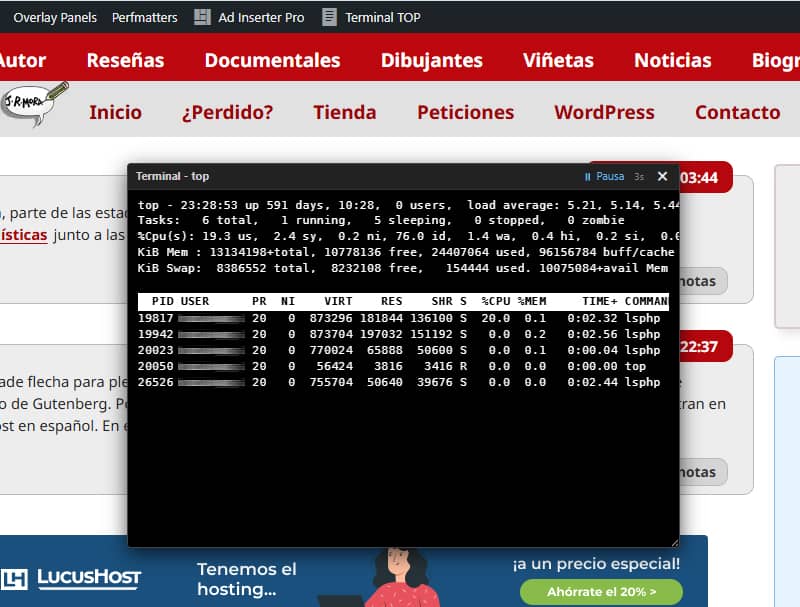
If you manage your own server or use a hosting service with console access, you’re bound to be familiar with top (or htop): the classic terminal tool for viewing CPU usage, RAM usage and active processes in real time.
It’s a useful solution if you manage production sites and want to monitor load spikes, stalled PHP processes or memory usage whilst carrying out resource-intensive tasks (imports, maintenance or performance tests) – all without leaving your browser and as and when these issues occur – to give you more clues when identifying possible causes.
Until now, I’ve been using the cPanel terminal for this, but as having another browser window open is a nuisance and it’s awkward to resize and position it in a corner, and to avoid having to open an SSH session every time I want to monitor processes, I’ve created this lightweight snippet for WordPress that integrates a floating viewer or mini-terminal in the style of the cPanel terminal. It can be opened and closed directly from the top admin bar or from a widget on the Dashboard.
Key features
- Universal quick access: A ‘Terminal TOP’ button on the top administration bar (available both in the
/wp-admin/dashboard and when browsing the website) and an interactive widget on the WordPress Dashboard. - Floating, persistent window:
- Draggable: You can move it around the screen by clicking and dragging the header.
- Resizable: The size can be adjusted and the text in the terminal scales dynamically (
ResizeObserver) to maintain legibility. - State memory: Saves the position, size and whether it was open or closed using
localStorage. When you switch pages, the terminal remains exactly as you left it.
- Built-in controls: A button to pause and resume real-time updating (refreshes every 3 seconds by default) and a quick-close button.
- Immune to page caching (Frontend): The window is not rendered as static HTML on the server. A script checks in the browser whether the administration bar (
#wpadminbar) is present and generates the DOM dynamically only if the user is an authenticated administrator.
Safety and Performance
When working with the execution of system commands from PHP, security must always be the top priority, and performance is a given.
- Strict permission restrictions:
Both the addition of the button to the Admin Bar and the rendering of the code and the AJAX response are restricted to users with the‘current_user_can(‘manage_options’)’ capability. Only users with the Administrator role can call or view this resource. - Output sanitisation:
The raw output from the terminal is passed throughhtmlspecialchars()before being sent to the browser, thereby preventing any risk of code injection or reflected XSS via process names. - Zero impact for anonymous visitors:
For users who are not logged in or roles without permissions, PHP does not execute any functions, does not make requests to the server, nor does it inject scripts or HTML into the frontend. The website loads with exactly the same load for the general public. - Regarding caching:
Thanks to dynamically deferred injection via JavaScript on the client-side, no front-end caching plugins (LiteSpeed Cache, WP Rocket, FastCGI Cache, etc.) will store the terminal window in the website’s static HTML.
Server requirements (Compatibility)
The snippet is very lightweight because it uses the operating system’s native resources. However, for it to work correctly, the hosting environment must meet the following conditions:
- Linux/Unix operating system: The
‘top’command must be available on the server console (it will not work on local Windows/IIS servers). - The
shell_exec()function is enabled: PHP requires permission to execute system commands. Many shared hosting providers restrict this function for security reasons in thephp.inifile (disable_functions). It works best on VPS, dedicated servers or hosting plans with terminal access enabled. - Web server user permissions: The user running PHP (e.g.
www-dataor the cPanel user) must have read permissions for the processes table.
When you run the code, it will let you know if it is not compatible with your environment.
The PHP snippet
To implement this, simply add the code to the functions.php file of your child theme, or use your usual snippet plugin (making sure to select ‘Execute everywhere’ / ‘Global’), or package it as a plugin.
// 1. Terminal "top" para WordPress

// 1. Nodo en la Admin Bar
add_action('admin_bar_menu', function($wp_admin_bar) {
    if (!current_user_can('manage_options')) {
        return;
    }

    $wp_admin_bar->add_node([
        'id'    => 'cpanel-top-terminal-toggle',
        'title' => '<span class="ab-icon dashicons dashicons-text-page" style="top:2px;"></span> Terminal TOP',
        'href'  => '#',
        'meta'  => [
            'onclick' => 'if(window.toggleCpanelTop){ window.toggleCpanelTop(); } return false;',
            'title'   => 'Abrir/Cerrar Terminal TOP'
        ]
    ]);
}, 9999);

// 2. Widget en el Escritorio (Dashboard)
add_action('wp_dashboard_setup', function() {
    wp_add_dashboard_widget(
        'cpanel_top_control_widget',
        'Terminal Status',
        function() {
            ?>
            <div style="text-align: center; padding: 10px;">
                <p>Monitor de procesos en tiempo real estilo cPanel.</p>
                <button type="button" class="button button-primary button-large" onclick="window.toggleCpanelTop()">
                    Abrir Terminal TOP
                </button>
            </div>
            <?php
        }
    );
});

// 3. Inyección dinámica en el cliente (Admin + Frontend a prueba de caché)
function render_cpanel_top_terminal_widget() {
    if (!current_user_can('manage_options')) {
        return;
    }

    static $already_rendered = false;
    if ($already_rendered) return;
    $already_rendered = true;
    ?>
    <script id="cpanel-top-terminal-loader">
    (function() {
        const ajaxUrl = '<?php echo esc_url(admin_url('admin-ajax.php')); ?>';
        const baseWidth = 580;
        const baseFontSize = 12;
        let timer = null;
        let isPaused = false;

        function injectWidgetDOM() {
            if (document.getElementById('cpanel-top-terminal-widget')) return;

            const widget = document.createElement('div');
            widget.id = 'cpanel-top-terminal-widget';
            widget.style.cssText = 'display: none; position: fixed; bottom: 20px; right: 20px; z-index: 99999999; background: #000000; color: #ffffff; border: 1px solid #444; border-radius: 4px; box-shadow: 0 6px 20px rgba(0,0,0,0.7); width: 580px; height: 300px; resize: both; overflow: hidden; flex-direction: column; font-family: "Courier New", Courier, monospace;';

            widget.innerHTML = `
                <div id="cpanel-top-header" style="display: flex; justify-content: space-between; align-items: center; background: #222222; color: #cccccc; padding: 4px 8px; border-bottom: 1px solid #333333; cursor: move; font-family: -apple-system, BlinkMacSystemFont, 'Segoe UI', Roboto, sans-serif; font-size: 11px; user-select: none;">
                    <span><strong>Terminal - top</strong></span>
                    <div style="display: flex; align-items: center; gap: 6px;">
                        <span id="cpanel-top-pause-btn" style="cursor: pointer; font-size: 11px; color: #64b5f6; padding: 0 4px;" title="Pausar / Reanudar" onclick="window.toggleCpanelTopPause()">⏸ Pausa</span>
                        <span id="cpanel-top-status" style="font-size: 10px; color: #888888; margin-right: 4px;">3s</span>
                        <span style="cursor: pointer; font-weight: bold; padding: 0 4px; color: #ffffff;" onclick="window.toggleCpanelTop()">✕</span>
                    </div>
                </div>
                <div id="cpanel-top-body" style="flex: 1; overflow: hidden; padding: 8px 10px; background: #000000; color: #ffffff; font-family: 'DejaVu Sans Mono', 'Bitstream Vera Sans Mono', 'Courier New', Consolas, monospace; font-size: 12px; line-height: 1.4; letter-spacing: 0.3px; white-space: pre; user-select: text;">Cargando terminal...</div>
            `;
            document.body.appendChild(widget);
        }

        function getElements() {
            return {
                widget: document.getElementById('cpanel-top-terminal-widget'),
                header: document.getElementById('cpanel-top-header'),
                output: document.getElementById('cpanel-top-body'),
                pauseBtn: document.getElementById('cpanel-top-pause-btn')
            };
        }

        function startTimer() {
            if (isPaused) return;
            fetchTopData();
            if (!timer) timer = setInterval(fetchTopData, 3000);
        }

        function stopTimer() {
            if (timer) { clearInterval(timer); timer = null; }
        }

        window.toggleCpanelTopPause = function() {
            const { pauseBtn } = getElements();
            isPaused = !isPaused;
            if (isPaused) {
                stopTimer();
                if (pauseBtn) { pauseBtn.textContent = '▶ Play'; pauseBtn.style.color = '#81c784'; }
            } else {
                if (pauseBtn) { pauseBtn.textContent = '⏸ Pausa'; pauseBtn.style.color = '#64b5f6'; }
                startTimer();
            }
        };

        window.toggleCpanelTop = function() {
            let { widget } = getElements();
            if (!widget) {
                injectWidgetDOM();
                initWidgetEvents();
                widget = getElements().widget;
            }

            if (!widget) return;

            if (widget.style.display === 'none' || widget.style.display === '') {
                widget.style.display = 'flex';
                localStorage.setItem('cpanel_top_open', 'true');
                startTimer();
            } else {
                widget.style.display = 'none';
                localStorage.setItem('cpanel_top_open', 'false');
                stopTimer();
            }
        };

        function fetchTopData() {
            const { output } = getElements();
            if (!output) return;

            fetch(ajaxUrl + '?action=get_cpanel_top_formatted')
                .then(r => r.json())
                .then(res => {
                    if (res.success && output) {
                        output.innerHTML = res.data.formatted_output;
                    }
                })
                .catch(() => {});
        }

        function initWidgetEvents() {
            const { widget, header, output } = getElements();
            if (!widget) return;

            const resizeObserver = new ResizeObserver(entries => {
                for (let entry of entries) {
                    const currentWidth = entry.contentRect.width;
                    if (currentWidth > 0 && output) {
                        let newSize = Math.max(8, (currentWidth / baseWidth) * baseFontSize);
                        output.style.fontSize = newSize.toFixed(1) + 'px';

                        if (widget.style.display !== 'none') {
                            localStorage.setItem('cpanel_top_width', widget.offsetWidth + 'px');
                            localStorage.setItem('cpanel_top_height', widget.offsetHeight + 'px');
                        }
                    }
                }
            });
            resizeObserver.observe(widget);

            const savedLeft = localStorage.getItem('cpanel_top_left');
            const savedTop = localStorage.getItem('cpanel_top_top');
            const savedWidth = localStorage.getItem('cpanel_top_width');
            const savedHeight = localStorage.getItem('cpanel_top_height');

            if (savedLeft && savedTop) {
                widget.style.left = savedLeft;
                widget.style.top = savedTop;
                widget.style.bottom = 'auto';
                widget.style.right = 'auto';
            }
            if (savedWidth) widget.style.width = savedWidth;
            if (savedHeight) widget.style.height = savedHeight;

            let isDragging = false, offX = 0, offY = 0;
            if (header) {
                header.addEventListener('mousedown', (e) => {
                    if (e.target.tagName === 'SPAN' && e.target.onclick) return;
                    isDragging = true;
                    offX = e.clientX - widget.offsetLeft;
                    offY = e.clientY - widget.offsetTop;
                });
                document.addEventListener('mousemove', (e) => {
                    if (!isDragging) return;
                    const newLeft = (e.clientX - offX) + 'px';
                    const newTop = (e.clientY - offY) + 'px';

                    widget.style.left = newLeft;
                    widget.style.top = newTop;
                    widget.style.bottom = 'auto';
                    widget.style.right = 'auto';

                    localStorage.setItem('cpanel_top_left', newLeft);
                    localStorage.setItem('cpanel_top_top', newTop);
                });
                document.addEventListener('mouseup', () => isDragging = false);
            }
        }

        function autoInitIfOpen() {
            // Solo actuar si existe la barra de WP en la pantalla (Admin o Frontend)
            const hasAdminBar = document.getElementById('wpadminbar');
            const isOpen = localStorage.getItem('cpanel_top_open');

            if (hasAdminBar && isOpen === 'true') {
                injectWidgetDOM();
                initWidgetEvents();
                const { widget } = getElements();
                if (widget) {
                    widget.style.display = 'flex';
                    startTimer();
                }
            }
        }

        if (document.readyState === 'loading') {
            document.addEventListener('DOMContentLoaded', autoInitIfOpen);
        } else {
            autoInitIfOpen();
        }
    })();
    </script>
    <?php
}

add_action('admin_footer', 'render_cpanel_top_terminal_widget');
add_action('wp_footer', 'render_cpanel_top_terminal_widget');

// 4. Endpoint AJAX (Versión portable con diagnósticos)
add_action('wp_ajax_get_cpanel_top_formatted', function() {
    if (!current_user_can('manage_options')) {
        wp_send_json_error('No autorizado');
    }

    // 1. Comprobar si la función shell_exec existe y no está bloqueada por php.ini
    $disabled_functions = array_map('trim', explode(',', (string)ini_get('disable_functions')));
    if (!function_exists('shell_exec') || in_array('shell_exec', $disabled_functions, true)) {
        wp_send_json_success([
            'formatted_output' => '<span style="color: #ff5252;">Error: La función PHP "shell_exec" está deshabilitada en este servidor.</span>'
        ]);
    }

    // 2. Intentar ejecutar el comando 'top' en el sistema
    $raw = @shell_exec('top -b -n 1 2>&1');

    // 3. Comprobar si el servidor devolvió alguna respuesta
    if (empty($raw)) {
        wp_send_json_success([
            'formatted_output' => '<span style="color: #ffb74d;">Error: El comando "top" no devolvió respuesta. (Sistema no Linux o permisos de ejecutor restringidos).</span>'
        ]);
    }

    // 4. Procesar y formatear las líneas de salida de top
    $lines = explode("\n", trim($raw));
    $html_lines = [];

    foreach ($lines as $line) {
        if (preg_match('/\s+sh$/', trim($line))) {
            continue;
        }

        if (strpos($line, 'PID') !== false && strpos($line, 'USER') !== false) {
            $html_lines[] = '<div style="background-color: #ffffff; color: #000000; font-weight: bold; width: 100%; display: inline-block; padding: 1px 0;">' . htmlspecialchars($line) . '</div>';
        } else {
            $html_lines[] = htmlspecialchars($line);
        }
    }

    wp_send_json_success([
        'formatted_output' => implode("\n", $html_lines)
    ]);
});