几天前,我完成了一项早该处理却一直拖延已久的任务。我找回了所有缺失的特色图片,并为这些图片添加了缺失的替代文本。我还写完了所有缺失的元描述。 总共,我利用自己编写的三个一次性代码片段,添加或编辑了超过15,000条记录。今天,我在此分享用于检索缺失特色图片的代码片段,我之前也用它在其他网站上完成了这项任务。
如果你写博客有一段时间了,很可能有不少旧文章还没有设置特色图片。 在经典编辑器时代,这种情况曾经常发生:当时我们会将图片直接插入文章正文中,却忘记在“特色图片”框中将其选中。
发布文章时不添加特色图片,不仅涉及美观问题(此外还有其他方面),还会直接影响网站的搜索引擎优化和用户体验:
- 社交SEO与Open Graph:在社交媒体、即时通讯应用或内容聚合平台上分享帖子时,Open Graph标签(
og:image)无法找到明确的资源进行显示,这会大幅降低点击率(CTR)。 - 主题的视觉一致性:现代模板(例如使用 GeneratePress 或 GenerateBlocks 设计的模板)依赖于特色图片来构建归档网格、相关文章列表或页眉。如果没有特色图片,版面布局会失效,或者出现对齐不齐的空隙。
- 内容发现与订阅源(RSS / Google Discover):Google Discover 或 RSS 阅读器等工具会优先显示或要求内容附带高分辨率缩略图,以提升文章卡片的效果。
为了在不依赖插件(例如这个)或耗时较长的处理流程的情况下解决这个问题,我编写了这段简单轻量的 PHP 代码片段,它可以直接在 WordPress 管理后台将每篇帖子的第一张图片自动设为特色图片。如果你的帖子没有图片,可以在代码中添加图片的 URL 来指定一张默认图片。
这段代码到底起什么作用?
该代码为 WordPress 文章列表(wp-admin/edit.php)添加了一个智能的内置批量处理工具:
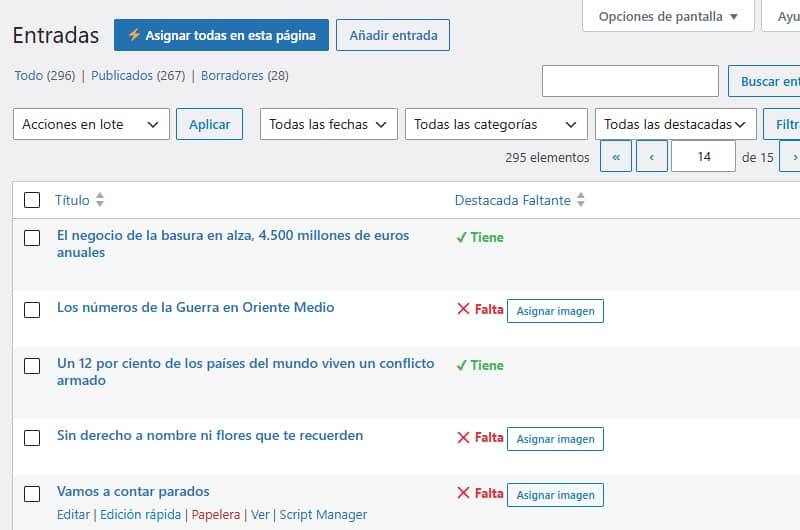
- 添加自定义栏目:在文章列表中创建“缺少特色图片”栏目,以便一目了然地查看哪些文章缺少缩略图。
- 三层处理:当您为某篇帖子启用分配功能时,系统会按照以下确切顺序搜索图片:
- 请检查媒体库中是否有直接附加到该帖子的图片。
- 如果不存在直接附件(例如,通过图片块或 HTML 插入的附件),请扫描内容以查找第一个
<img>标签,并使用attachment_url_to_postid()函数提取其 ID。 - 如果条目中完全没有图片,系统会使用配置中指定的默认(备用)图片。
- AJAX 批量处理(批处理):页眉中包含一个按钮(“⚡分配本页所有内容”),该按钮会通过连续的异步请求依次处理屏幕上可见的所有条目。您也可以通过列表中每个帖子的单独按钮手动执行此操作。
- 筛选草稿:自动排除处于草稿状态的条目,以便您仅关注已发布的内容。
- 可排序列:可对列表进行排序,使所有没有特色图片的条目都集中显示在顶部。
为什么它这么轻量级,而且不会影响服务器性能吗?
在使用此类自动化工具时,人们常担心在拥有数千篇文章的网站上会导致数据库卡死或使 PHP 内存过载。此代码片段的设计遵循了以下优化标准:
1. 它仅在“管理员”区域运行(is_admin())
该代码专为管理面板的输入界面(edit.php)打包。它不会给公共网站的请求增加任何额外负担。这绝不会对您的用户和速度指标产生任何影响。
2. 将查询直接发送到元数据缓存
为了判断一篇帖子是否包含图片,该代码片段不会对每一行都进行复杂的数据库查询。它使用_thumbnail_id元数据键,WordPress 在渲染列表时会通过元数据缓存将该键原生加载到内存中。该表几乎能瞬间加载完成。
3. 级联异步处理(顺序 AJAX 循环)
与其在数据库上执行一个庞大的查询来一次性更新 700 或 1,000 条记录(这可能会导致超时或耗尽服务器的内存),“全部分配”按钮会利用 JavaScript 承诺(Promises)逐条处理这些记录:
POST 1(AJAX)⟶返回“OK”⟶POST 2(AJAX)⟶返回“OK”……
这确保了资源的稳定和一致使用,使您能够逐行实时查看进度。
4. 无文件重复
该代码片段不会从您的硬盘下载、重组或复制图片。它只是获取媒体库中现有图片的ID,并通过在wp_postmeta表中分配相应的meta_value值,将其与文章建立关联。
代码(PHP + JavaScript)
您可以将这段代码添加到子主题的functions.php文件中、添加到自定义插件中,或者通过Code Snippets等自定义函数插件来实现。
注意:请记得将第 56 行中的
$default_image_url变量设置为通用图片的完整 URL,该图片将用于替换文本中未包含任何图片的文章。
PHP
// 1. Añadir columna personalizada en el listado de entradas
add_filter( 'manage_posts_columns', 'custom_featured_status_column' );
function custom_featured_status_column( $columns )
    $columns['featured_missing'] = 'Destacada Faltante';
    return $columns;
}

// 2. Hacer la columna ordenable al hacer clic en el encabezado
add_filter( 'manage_edit-post_sortable_columns', 'custom_featured_sortable_column' );
function custom_featured_sortable_column( $columns ) {
    $columns['featured_missing'] = 'featured_missing';
    return $columns;
}

// 3. Modificar la consulta para ordenar por presencia de _thumbnail_id
add_action( 'pre_get_posts', 'custom_featured_column_orderby' );
function custom_featured_column_orderby( $query ) {
    if ( ! is_admin() || ! $query->is_main_query() ) return;

    if ( $query->get( 'orderby' ) === 'featured_missing' ) {
        $query->set( 'meta_key', '_thumbnail_id' );
        $query->set( 'orderby', 'meta_value_num' );
        $query->set( 'meta_compare', 'NOT EXISTS' );
    }
}

// 3.1. Añadir desplegable de filtro nativo en el listado de entradas
add_action( 'restrict_manage_posts', 'custom_featured_filter_dropdown' );
function custom_featured_filter_dropdown( $post_type ) {
    if ( $post_type !== 'post' ) return;

    $selected = isset( $_GET['filter_featured_status'] ) ? sanitize_text_field( $_GET['filter_featured_status'] ) : '';
    ?>
    <select name="filter_featured_status" id="filter_featured_status">
        <option value=""><?php _e( 'Todas las destacadas', 'textdomain' ); ?></option>
        <option value="has_img" <?php selected( $selected, 'has_img' ); ?>>Tiene</option>
        <option value="missing_img" <?php selected( $selected, 'missing_img' ); ?>>Falta</option>
    </select>
    <?php
}

// 3.2. Aplicar el filtro del desplegable a la consulta de WP_Query
add_filter( 'parse_query', 'custom_featured_filter_apply' );
function custom_featured_filter_apply( $query ) {
    global $pagenow;
    if ( ! is_admin() || $pagenow !== 'edit.php' || ! $query->is_main_query() ) return;

    if ( isset( $_GET['filter_featured_status'] ) && $_GET['filter_featured_status'] !== '' ) {
        $filter_value = sanitize_text_field( $_GET['filter_featured_status'] );
        $meta_query   = (array) $query->get( 'meta_query' );

        if ( $filter_value === 'has_img' ) {
            $meta_query[] = array(
                'key'     => '_thumbnail_id',
                'compare' => 'EXISTS',
            );
        } elseif ( $filter_value === 'missing_img' ) {
            $meta_query[] = array(
                'key'     => '_thumbnail_id',
                'compare' => 'NOT EXISTS',
            );
        }

        $query->set( 'meta_query', $meta_query );
    }
}

// 4. Mostrar el estado y el botón rápido en la columna (Excluyendo borradores)
add_action( 'manage_posts_custom_column', 'custom_featured_status_column_content', 10, 2 );
function custom_featured_status_column_content( $column, $post_id ) {
    if ( $column === 'featured_missing' ) {
        if ( get_post_type( $post_id ) !== 'post' || get_post_status( $post_id ) === 'draft' ) {
            echo '<span style="color: #999;">—</span>';
            return;
        }

        $has_thumbnail = get_post_meta( $post_id, '_thumbnail_id', true );

        if ( $has_thumbnail ) {
            echo '<span style="color: #46b450; font-weight: bold;">✔ Tiene</span>';
        } else {
            echo '<span style="color: #dc3232; font-weight: bold;">❌ Falta</span> ';
            echo '<button type="button" class="button button-small set-first-img-btn" data-postid="' . esc_attr( $post_id ) . '">Asignar imagen</button>';
            echo '<span class="set-img-status" style="margin-left:5px;"></span>';
        }
    }
}

// 5. Procesar la asignación por AJAX (con fallback a la imagen por defecto)
add_action( 'wp_ajax_set_first_image_as_featured', 'ajax_set_first_image_as_featured' );
function ajax_set_first_image_as_featured() {
    check_ajax_referer( 'set_first_image_nonce', 'nonce' );

    $post_id = isset( $_POST['post_id'] ) ? intval( $_POST['post_id'] ) : 0;
    if ( ! $post_id || ! current_user_can( 'edit_post', $post_id ) ) {
        wp_send_json_error( 'Sin permisos o ID inválido' );
    }

    if ( get_post_status( $post_id ) === 'draft' ) {
        wp_send_json_error( 'La entrada es un borrador' );
    }

    // =========================================================================
    // CONFIGURACIÓN: Reemplaza esta URL por la URL completa de tu imagen por defecto
    // =========================================================================
    $default_image_url = 'https://tu-dominio.com/wp-content/uploads/imagen-por-defecto.jpg';

    // A. Buscar adjuntos directos al post
    $attachments = get_posts( array(
        'post_type'      => 'attachment',
        'posts_per_page' => 1,
        'post_parent'    => $post_id,
        'post_mime_type' => 'image',
        'orderby'        => 'menu_order',
        'order'          => 'ASC',
        'fields'         => 'ids'
    ) );

    if ( ! empty( $attachments ) ) {
        set_post_thumbnail( $post_id, $attachments[0] );
        wp_send_json_success( '¡Asignada primera!' );
    }

    // B. Si no hay adjuntos, buscar <img> en el contenido
    $post = get_post( $post_id );
    preg_match_all( '/<img.+?src=[\'"]([^\'"]+)[\'"]/i', $post->post_content, $matches );

    if ( isset( $matches[1][0] ) ) {
        $attachment_id = attachment_url_to_postid( $matches[1][0] );
        if ( $attachment_id ) {
            set_post_thumbnail( $post_id, $attachment_id );
            wp_send_json_success( '¡Asignada primera!' );
        }
    }

    // C. Si no hay ninguna imagen en el post, asignar la imagen por defecto
    if ( ! empty( $default_image_url ) ) {
        $default_id = attachment_url_to_postid( $default_image_url );

        if ( $default_id ) {
            set_post_thumbnail( $post_id, $default_id );
            wp_send_json_success( '¡Asignada por defecto!' );
        }
    }

    wp_send_json_error( 'No se encontró ninguna imagen en el post ni ID de fallback' );
}

// 6. Cargar JS y botón masivo en el admin (edit.php)
add_action( 'admin_footer-edit.php', 'custom_featured_ajax_script' );
function custom_featured_ajax_script() {
    $screen = get_current_screen();
    if ( $screen->post_type !== 'post' ) return;

    $nonce = wp_create_nonce( 'set_first_image_nonce' );
    ?>
    <script>
    jQuery(document).ready(function($) {
        $('<button type="button" id="process-all-page-btn" class="page-title-action" style="margin-left:10px; background:#2271b1; color:#fff; border-color:#2271b1;">⚡ Asignar todas en esta página</button>')
            .insertAfter('.wp-heading-inline');

        function processButton($btn) {
            return new Promise(function(resolve) {
                var $status = $btn.siblings('.set-img-status');
                var postId = $btn.data('postid');

                $btn.prop('disabled', true).text('Procesando...');

                $.post(ajaxurl, {
                    action: 'set_first_image_as_featured',
                    post_id: postId,
                    nonce: '<?php echo $nonce; ?>'
                }, function(response) {
                    if (response.success) {
                        $btn.parent().html('<span style="color: #46b450; font-weight: bold;">✔ ' + response.data + '</span>');
                    } else {
                        $status.css('color', '#dc3232').text(response.data);
                        $btn.prop('disabled', false).text('Asignar imagen');
                    }
                    resolve();
                }).fail(function() {
                    $btn.prop('disabled', false).text('Error');
                    resolve();
                });
            });
        }

        $(document).on('click', '.set-first-img-btn', function(e) {
            e.preventDefault();
            processButton($(this));
        });

        $('#process-all-page-btn').on('click', async function(e) {
            e.preventDefault();
            var $batchBtn = $(this);
            var $pendingButtons = $('.set-first-img-btn:not(:disabled)');

            if ($pendingButtons.length === 0) {
                alert('No hay entradas pendientes de asignar en esta página.');
                return;
            }

            $batchBtn.prop('disabled', true).text('Procesando por lote...');

            for (var i = 0; i < $pendingButtons.length; i++) {
                await processButton($($pendingButtons[i]));
            }

            $batchBtn.text('¡Lote completado!').css('background', '#46b450');
            setTimeout(function() {
                $batchBtn.prop('disabled', false).text('⚡ Asignar todas en esta página').css('background', '#2271b1');
            }, 3000);
        });
    });
    </script>
    <?php
}
怎么用?
- 请转到管理面板中的“文章”列表。
- 打开顶部的“显示选项”选项卡,将每页显示的项目数设置为50 或 100。(建议先尝试较小的数值,如果服务器响应良好,再逐步增加。)
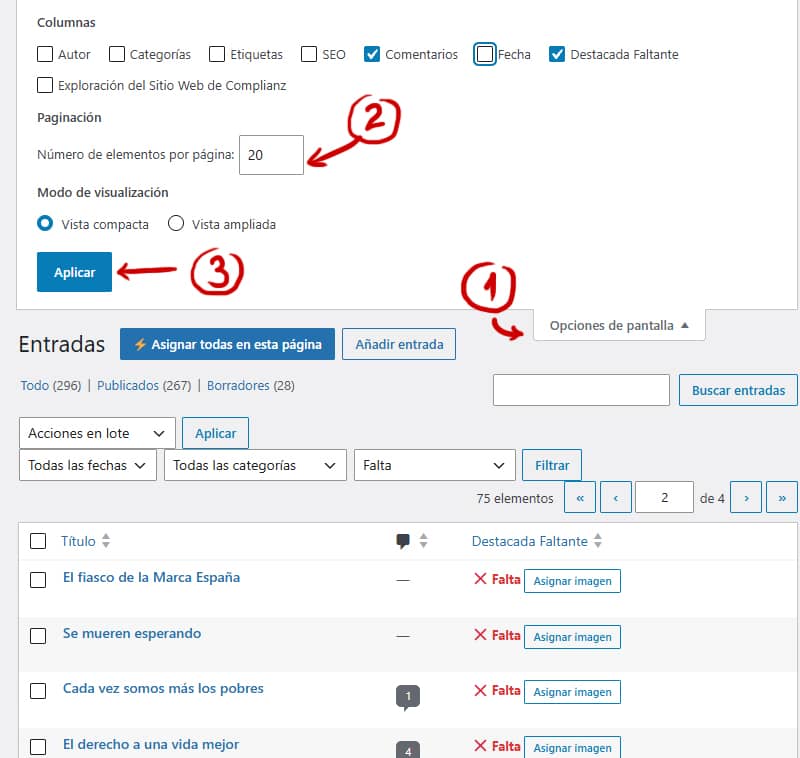
- 点击“缺失的重点内容”列标题,可对未处理的条目进行排序和分组。在筛选器中,您可以选择“包含”、“缺失”或“全部”。
- 一旦您确定已准备好开始批量分配缺失的特色图片,请点击标有 “为本页所有内容分配” ( )字样的蓝色按钮,然后等待级联处理完成该批图片缩略图的分配。如果您愿意,也可以逐一分配。
- 转到下一页,并重复此操作,直到整理完整个书库为止。
可选:自动赋值代码片段
为了避免将来重复执行此操作,您可以添加这段简短的代码片段。 该代码仅在您保存或发布文章时在后台运行:如果检测到您未手动选择特色图片,它会自动将内容中的第一张图片设为特色图片(或使用默认备用图片——您需要在$default_image_url = 中添加该图片)。
PHP
// Asignar imagen destacada automáticamente al publicar/guardar nuevas entradas
add_action( 'save_post_post', 'auto_set_featured_image_on_save', 10, 3 );
function auto_set_featured_image_on_save( $post_id, $post, $update ) {
    // Evitar autoguardados, revisiones o peticiones AJAX/REST innecesarias
    if ( defined( 'DOING_AUTOSAVE' ) && DOING_AUTOSAVE ) return;
    if ( wp_is_post_revision( $post_id ) || $post->post_status === 'auto-draft' ) return;

    // Si la entrada ya tiene imagen destacada marcada, no hacemos nada
    if ( has_post_thumbnail( $post_id ) ) return;

    $default_image_url = 'https://tu-dominio.com/wp-content/uploads/imagen-por-defecto.jpg';

    // 1. Buscar primera imagen en el contenido
    preg_match_all( '/<img.+?src=[\'"]([^\'"]+)[\'"]/i', $post->post_content, $matches );

    if ( isset( $matches[1][0] ) ) {
        $attachment_id = attachment_url_to_postid( $matches[1][0] );
        if ( $attachment_id ) {
            set_post_thumbnail( $post_id, $attachment_id );
            return;
        }
    }

    // 2. Si el post no tiene imágenes, asignar la imagen por defecto
    if ( ! empty( $default_image_url ) ) {
        $default_id = attachment_url_to_postid( $default_image_url );
        if ( $default_id ) {
            set_post_thumbnail( $post_id, $default_id );
        }
    }
}