A few days ago, I finished a long-overdue task that needed doing, but I’d been putting it off for ages. I retrievedallthe missing featured images and added all the missing alt text to the images. I also finished writing all the missing meta descriptions. In total, I added or edited over 15,000 records using three of my own one-off snippets. Today, I’m sharing the snippet for retrieving the missing featured images here, which I also used to carry out this task on other sites.
If you’ve been blogging for a while, it’s quite likely that you’ll have quite a few older posts without a featured image assigned to them. This used to happen a lot back in the days of the classic editor, when we’d insert the image directly into the body of the post but forget to select it in the ‘Featured Image’ box.
Leaving posts without a featured image is not just an aesthetic issue, amongst other things; it directly affects your site’s optimisation and the user experience:
- Social SEO and Open Graph: When sharing the post on social media, messaging apps or content aggregators, the Open Graph tags (
og:image) cannot find a clear resource to display, drastically reducing the CTR (click-through rate). - Visual consistency in the theme: Modern templates (such as those designed using GeneratePress or GenerateBlocks) rely on the featured image to build archive grids, lists of related posts or headers. Without it, the layout breaks or leaves misaligned gaps.
- Discovery and feeds (RSS / Google Discover): Tools such as Google Discover or RSS readers prioritise or require content with an associated high-resolution thumbnail to enhance the article card.
To sort this out without resorting to plugins (such as this one) or slow processes, I’ve created this simple, lightweight PHP snippet that automatically sets the first image in each post as the featured image, directly from the WordPress dashboard. If your post doesn’t have any images, you can assign a default one by adding its URL to the code.
What exactly does this snippet do?
The code adds a smart, built-in batch processing tool to the WordPress post list (wp-admin/edit.php):
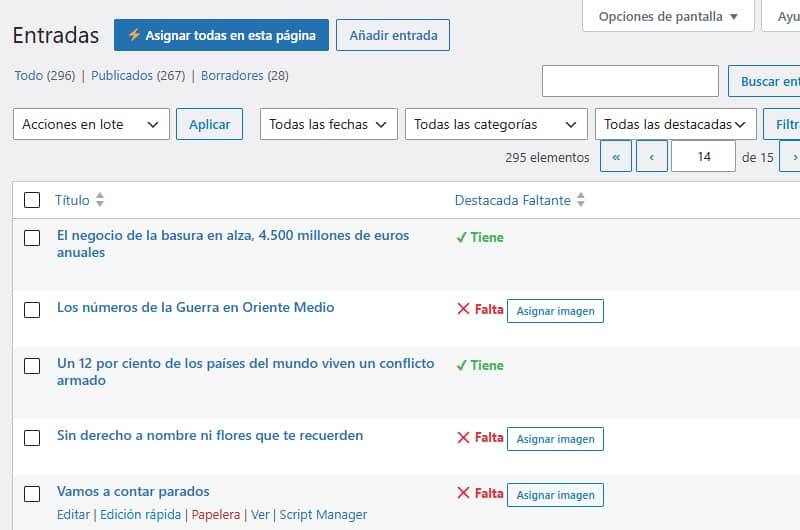
- Add a custom column: Create the ‘Missing Featured Image’ column in the list of posts to see at a glance which posts are missing a thumbnail.
- 3-layer processing: When you enable the assignment for a post, it searches for the image in this exact order:
- Check whether there are any images attached directly to the post in the Media Library.
- If there are no direct attachments (for example, if they were inserted via an image block or HTML), scan the content for the first
<img>tag to extract its ID usingattachment_url_to_postid(). - If the entry contains absolutely no images, it assigns a default (fallback) image specified in the configuration.
- AJAX bulk processing (batch processing): Includes a button in the header (“⚡ Assign all on this page”) which processes all entries visible on the screen in sequence using consecutive asynchronous requests. You can also do this manually using the individual button for each post in the list.
- Filter draughts: Automatically excludes entries in draught status so you can focus solely on published content.
- Sortable column: Allows you to sort the list so that all entries without a featured image are grouped together at the top.
Why is it so lightweight and does it not affect server performance?
A common concern when using this type of automated tool is the fear of locking up the database or overloading the PHP memory on sites with thousands of articles. This snippet has been designed in line with the following optimisation criteria:
1. It only runs in the Admin section (is_admin())
The code is packaged exclusively for the administration panel’s input screen (edit.php). It does not add a single line of overhead to requests on the public site. Your users and speed metrics will not be affected in any way.
2. Direct queries to the Meta Cache
To determine whether or not a post contains an image, the snippet does not carry out complex database searches for each row. It uses the _thumbnail_id metadata key, which WordPress loads into memory natively via the metadata cache when rendering the list. The table loads almost instantly.
3. Cascading asynchronous processing (sequential AJAX loop)
Rather than running a massive query on the database to update 700 or 1,000 entries in one go (which would cause a timeout or use up all the server’s memory), the ‘Assign All’ button processes the entries one by one using JavaScript promises:
POST 1 (AJAX)⟶OK response⟶POST 2 (AJAX)⟶OK response…
This ensures a stable and consistent use of resources, allowing you to see progress in real time, row by row.
4. No file duplication
The snippet does not download, recombine or duplicate images on your hard drive. It simply takes the ID of the image already in your Media Library and links it to the post by assigning the corresponding meta_value in the wp_postmeta table.
The Code (PHP + JavaScript)
You can add this code to the functions.php file of your child theme, to a custom plugin, or via a custom functions plugin such as Code Snippets or similar.
Note: Remember to set the
$default_image_urlvariable on line 56 to the full URL of the generic image you wish to assign to posts that do not contain any images in the text.
PHP
// 1. Añadir columna personalizada en el listado de entradas
add_filter( 'manage_posts_columns', 'custom_featured_status_column' );
function custom_featured_status_column( $columns )
    $columns['featured_missing'] = 'Destacada Faltante';
    return $columns;
}

// 2. Hacer la columna ordenable al hacer clic en el encabezado
add_filter( 'manage_edit-post_sortable_columns', 'custom_featured_sortable_column' );
function custom_featured_sortable_column( $columns ) {
    $columns['featured_missing'] = 'featured_missing';
    return $columns;
}

// 3. Modificar la consulta para ordenar por presencia de _thumbnail_id
add_action( 'pre_get_posts', 'custom_featured_column_orderby' );
function custom_featured_column_orderby( $query ) {
    if ( ! is_admin() || ! $query->is_main_query() ) return;

    if ( $query->get( 'orderby' ) === 'featured_missing' ) {
        $query->set( 'meta_key', '_thumbnail_id' );
        $query->set( 'orderby', 'meta_value_num' );
        $query->set( 'meta_compare', 'NOT EXISTS' );
    }
}

// 3.1. Añadir desplegable de filtro nativo en el listado de entradas
add_action( 'restrict_manage_posts', 'custom_featured_filter_dropdown' );
function custom_featured_filter_dropdown( $post_type ) {
    if ( $post_type !== 'post' ) return;

    $selected = isset( $_GET['filter_featured_status'] ) ? sanitize_text_field( $_GET['filter_featured_status'] ) : '';
    ?>
    <select name="filter_featured_status" id="filter_featured_status">
        <option value=""><?php _e( 'Todas las destacadas', 'textdomain' ); ?></option>
        <option value="has_img" <?php selected( $selected, 'has_img' ); ?>>Tiene</option>
        <option value="missing_img" <?php selected( $selected, 'missing_img' ); ?>>Falta</option>
    </select>
    <?php
}

// 3.2. Aplicar el filtro del desplegable a la consulta de WP_Query
add_filter( 'parse_query', 'custom_featured_filter_apply' );
function custom_featured_filter_apply( $query ) {
    global $pagenow;
    if ( ! is_admin() || $pagenow !== 'edit.php' || ! $query->is_main_query() ) return;

    if ( isset( $_GET['filter_featured_status'] ) && $_GET['filter_featured_status'] !== '' ) {
        $filter_value = sanitize_text_field( $_GET['filter_featured_status'] );
        $meta_query   = (array) $query->get( 'meta_query' );

        if ( $filter_value === 'has_img' ) {
            $meta_query[] = array(
                'key'     => '_thumbnail_id',
                'compare' => 'EXISTS',
            );
        } elseif ( $filter_value === 'missing_img' ) {
            $meta_query[] = array(
                'key'     => '_thumbnail_id',
                'compare' => 'NOT EXISTS',
            );
        }

        $query->set( 'meta_query', $meta_query );
    }
}

// 4. Mostrar el estado y el botón rápido en la columna (Excluyendo borradores)
add_action( 'manage_posts_custom_column', 'custom_featured_status_column_content', 10, 2 );
function custom_featured_status_column_content( $column, $post_id ) {
    if ( $column === 'featured_missing' ) {
        if ( get_post_type( $post_id ) !== 'post' || get_post_status( $post_id ) === 'draft' ) {
            echo '<span style="color: #999;">—</span>';
            return;
        }

        $has_thumbnail = get_post_meta( $post_id, '_thumbnail_id', true );

        if ( $has_thumbnail ) {
            echo '<span style="color: #46b450; font-weight: bold;">✔ Tiene</span>';
        } else {
            echo '<span style="color: #dc3232; font-weight: bold;">❌ Falta</span> ';
            echo '<button type="button" class="button button-small set-first-img-btn" data-postid="' . esc_attr( $post_id ) . '">Asignar imagen</button>';
            echo '<span class="set-img-status" style="margin-left:5px;"></span>';
        }
    }
}

// 5. Procesar la asignación por AJAX (con fallback a la imagen por defecto)
add_action( 'wp_ajax_set_first_image_as_featured', 'ajax_set_first_image_as_featured' );
function ajax_set_first_image_as_featured() {
    check_ajax_referer( 'set_first_image_nonce', 'nonce' );

    $post_id = isset( $_POST['post_id'] ) ? intval( $_POST['post_id'] ) : 0;
    if ( ! $post_id || ! current_user_can( 'edit_post', $post_id ) ) {
        wp_send_json_error( 'Sin permisos o ID inválido' );
    }

    if ( get_post_status( $post_id ) === 'draft' ) {
        wp_send_json_error( 'La entrada es un borrador' );
    }

    // =========================================================================
    // CONFIGURACIÓN: Reemplaza esta URL por la URL completa de tu imagen por defecto
    // =========================================================================
    $default_image_url = 'https://tu-dominio.com/wp-content/uploads/imagen-por-defecto.jpg';

    // A. Buscar adjuntos directos al post
    $attachments = get_posts( array(
        'post_type'      => 'attachment',
        'posts_per_page' => 1,
        'post_parent'    => $post_id,
        'post_mime_type' => 'image',
        'orderby'        => 'menu_order',
        'order'          => 'ASC',
        'fields'         => 'ids'
    ) );

    if ( ! empty( $attachments ) ) {
        set_post_thumbnail( $post_id, $attachments[0] );
        wp_send_json_success( '¡Asignada primera!' );
    }

    // B. Si no hay adjuntos, buscar <img> en el contenido
    $post = get_post( $post_id );
    preg_match_all( '/<img.+?src=[\'"]([^\'"]+)[\'"]/i', $post->post_content, $matches );

    if ( isset( $matches[1][0] ) ) {
        $attachment_id = attachment_url_to_postid( $matches[1][0] );
        if ( $attachment_id ) {
            set_post_thumbnail( $post_id, $attachment_id );
            wp_send_json_success( '¡Asignada primera!' );
        }
    }

    // C. Si no hay ninguna imagen en el post, asignar la imagen por defecto
    if ( ! empty( $default_image_url ) ) {
        $default_id = attachment_url_to_postid( $default_image_url );

        if ( $default_id ) {
            set_post_thumbnail( $post_id, $default_id );
            wp_send_json_success( '¡Asignada por defecto!' );
        }
    }

    wp_send_json_error( 'No se encontró ninguna imagen en el post ni ID de fallback' );
}

// 6. Cargar JS y botón masivo en el admin (edit.php)
add_action( 'admin_footer-edit.php', 'custom_featured_ajax_script' );
function custom_featured_ajax_script() {
    $screen = get_current_screen();
    if ( $screen->post_type !== 'post' ) return;

    $nonce = wp_create_nonce( 'set_first_image_nonce' );
    ?>
    <script>
    jQuery(document).ready(function($) {
        $('<button type="button" id="process-all-page-btn" class="page-title-action" style="margin-left:10px; background:#2271b1; color:#fff; border-color:#2271b1;">⚡ Asignar todas en esta página</button>')
            .insertAfter('.wp-heading-inline');

        function processButton($btn) {
            return new Promise(function(resolve) {
                var $status = $btn.siblings('.set-img-status');
                var postId = $btn.data('postid');

                $btn.prop('disabled', true).text('Procesando...');

                $.post(ajaxurl, {
                    action: 'set_first_image_as_featured',
                    post_id: postId,
                    nonce: '<?php echo $nonce; ?>'
                }, function(response) {
                    if (response.success) {
                        $btn.parent().html('<span style="color: #46b450; font-weight: bold;">✔ ' + response.data + '</span>');
                    } else {
                        $status.css('color', '#dc3232').text(response.data);
                        $btn.prop('disabled', false).text('Asignar imagen');
                    }
                    resolve();
                }).fail(function() {
                    $btn.prop('disabled', false).text('Error');
                    resolve();
                });
            });
        }

        $(document).on('click', '.set-first-img-btn', function(e) {
            e.preventDefault();
            processButton($(this));
        });

        $('#process-all-page-btn').on('click', async function(e) {
            e.preventDefault();
            var $batchBtn = $(this);
            var $pendingButtons = $('.set-first-img-btn:not(:disabled)');

            if ($pendingButtons.length === 0) {
                alert('No hay entradas pendientes de asignar en esta página.');
                return;
            }

            $batchBtn.prop('disabled', true).text('Procesando por lote...');

            for (var i = 0; i < $pendingButtons.length; i++) {
                await processButton($($pendingButtons[i]));
            }

            $batchBtn.text('¡Lote completado!').css('background', '#46b450');
            setTimeout(function() {
                $batchBtn.prop('disabled', false).text('⚡ Asignar todas en esta página').css('background', '#2271b1');
            }, 3000);
        });
    });
    </script>
    <?php
}
How do you use it?
- Go to the ‘Posts’ list in your admin panel.
- Open the ‘Display Options’ tab at the top and change the number of items to display to 50 or 100 per page. (Start by trying smaller numbers and increase them gradually if your server responds well.)
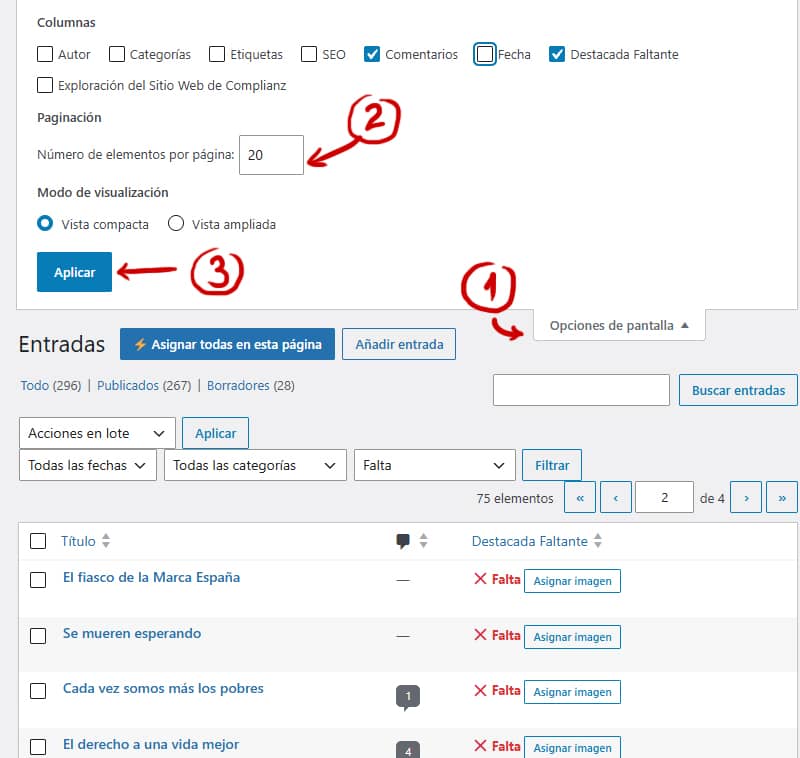
- Click on the ‘Missing Highlights’ column header to sort and group the outstanding entries. In the filters, you can choose between ‘Has’, ‘Missing’ or ‘All’
- Once you are sure you are ready to start assigning missing featured images in batches, click the blue ‘ ’ button labelled ‘Assign all on this page’ and let the cascading process finish assigning the thumbnails for that batch. If you prefer, you can assign them one by one.
- Go to the next page and repeat until you have finished tidying up your library.
Optional: automatic assignment snippet
To avoid having to repeat this task in future, you can add this short snippet. It runs in the background only when you save or publish a post: if it detects that you haven’t manually selected a featured image, it automatically assigns the first image in the content (or the default fallback image, which you’ll need to add in $default_image_url =).
PHP
// Asignar imagen destacada automáticamente al publicar/guardar nuevas entradas
add_action( 'save_post_post', 'auto_set_featured_image_on_save', 10, 3 );
function auto_set_featured_image_on_save( $post_id, $post, $update ) {
    // Evitar autoguardados, revisiones o peticiones AJAX/REST innecesarias
    if ( defined( 'DOING_AUTOSAVE' ) && DOING_AUTOSAVE ) return;
    if ( wp_is_post_revision( $post_id ) || $post->post_status === 'auto-draft' ) return;

    // Si la entrada ya tiene imagen destacada marcada, no hacemos nada
    if ( has_post_thumbnail( $post_id ) ) return;

    $default_image_url = 'https://tu-dominio.com/wp-content/uploads/imagen-por-defecto.jpg';

    // 1. Buscar primera imagen en el contenido
    preg_match_all( '/<img.+?src=[\'"]([^\'"]+)[\'"]/i', $post->post_content, $matches );

    if ( isset( $matches[1][0] ) ) {
        $attachment_id = attachment_url_to_postid( $matches[1][0] );
        if ( $attachment_id ) {
            set_post_thumbnail( $post_id, $attachment_id );
            return;
        }
    }

    // 2. Si el post no tiene imágenes, asignar la imagen por defecto
    if ( ! empty( $default_image_url ) ) {
        $default_id = attachment_url_to_postid( $default_image_url );
        if ( $default_id ) {
            set_post_thumbnail( $post_id, $default_id );
        }
    }
}