10 August 2026. This solution has now been turned into a plugin. See updated note.
It’s no secret that the WordPress search function is rubbish. Aesthetically speaking, it’s relatively easy to fix; however, its functionality is another matter entirely, as it offers no configuration options whatsoever – and to make matters worse, its performance is abysmal.
When a WordPress site accumulates thousands of posts, the built-in search function starts to fail. It slows down to the point where it becomes practically useless. When you carry out a search, WordPress runs a LIKE %word% query on the database, which scans the entire contents of the wp_posts table. This generates SQL queries that can take anywhere from a few seconds to an eternity, and cause memory spikes that end up crashing the server.
This is exactly what was already happening to me. With 6,040 posts published (in Spanish only), the response times for searches with lots of results were a real nightmare, taking over 10 seconds or more. And the day finally came to sort it out once and for all.
After giving it a lot of thought, I realised there were at least three ways to sort it out. The first and simplest was to use a paid plugin such as Relevanssi (the free version isn’t up to scratch) or an external service such as Algolia, which I ruled out straight away because what I’m looking for is to speed up searches natively.
Of the two remaining options, I tried creating a FULLTEXT index in MySQL using MATCH() AGAINST() queries and failed miserably. Despite adjusting the InnoDB engine parameters and optimising the indexes, MySQL kept getting bogged down when processing thousands of complex keywords, returning unacceptable response times and overloading the server. It was then that I completely ruled out placing the heavy load on the database and opted for the third approach: building a static index in JSON.
This tutorial aims to explain how to solve this problem by replacing resource-intensive MySQL queries with a static JSON file that acts as an ultra-fast search index.
Step 1: Identify and remove slow or redundant queries
Before implementing the JSON index, it is essential to clear the way. Many plugins (such as directory plugins, layout plugins or secondary search plugins) hook into the WordPress search process via hooks (pre_get_posts, posts_where, etc.), triggering additional and unnecessary queries to the database.
How can you identify these queries using Query Monitor?
- Install and activate the free Query Monitor plugin.
- Search anywhere on your website.
- Open the Query Monitor drop-down menu in the top bar and select ‘ Database Queries ’.
- Filter by ‘Slow queries’ or go through the list to identify the queries that take the longest to run. Whilst you’re at it, make a note of any duplicate queries and, if you can, sort those out as well.
- Take a look at the ‘Details’ column in the tables: there you’ll see exactly which plugin or file is running that query.
In my case, I had to sort out a handful of duplicate queries from the Name_Directory plugin, and a few GenerateBlocks blocks in the post template, but any plugin, custom code or added element could be generating queries that are slowing down the response.
How to disable those hooks via code
Once you have identified the name of the function or class causing the slow query, you can disable it in your functions.php file or using a code snippet plugin (such as Code Snippets, PerfmattersCode or similar):
* Note: In 1, you should add your hooks that generate slow queries.
/**
 * 1. Desactivar funciones invasivas o redundantes en las búsquedas globales de WP
 */
add_action('init', function() {
    // Ejemplo: Si Query Monitor muestra que un plugin de directorio se ejecuta en pre_get_posts:
    // remove_action('hook_de_wordpress', 'nombre_de_la_funcion_del_plugin', prioridad);
    remove_action('pre_get_posts', 'name_directory_search', 10);
    remove_filter('posts_where', 'name_directory_insert_sitewide_search_results', 10);
}, 20);

/**
 * 2. Bloquear la búsqueda SQL nativa tipo LIKE %palabra% en MySQL
 */
add_filter('posts_search', function($search, $wp_query) {
    if (!is_admin() && is_search()) {
        return ''; // Neutraliza el LIKE %palabra% en MySQL globalmente en páginas de búsqueda
    }
    return $search;
}, 10, 2);
Note: To unhook an action using `remove_action` or `remove_filter`, you must use exactly the same event name (`pre_get_posts`), the same function name that you identified in Query Monitor, and the same priority with which it was added (10 by default).
Step 2: Generate and keep the search JSON file up to date
To replace MySQL, we need to create a static file in JSON format containing the key data for our posts (ID, title and plain text). This file will be saved in the wp-content/uploads/ folder and will be updated automatically every time you create, edit or delete a post.
PHP
/**
 * Actualizar el archivo search-es.json automáticamente al guardar o borrar un post
 */
add_action('save_post', 'mi_sitio_actualizar_indice_busqueda_json', 10, 3);
add_action('deleted_post', 'mi_sitio_actualizar_indice_busqueda_json', 10, 1);

function mi_sitio_actualizar_indice_busqueda_json($post_id) {
    if (defined('DOING_AUTOSAVE') && DOING_AUTOSAVE) return;
    if (wp_is_post_revision($post_id)) return;

    $post = get_post($post_id);
    if (!$post || $post->post_type !== 'post') return;

    // Opcional: Filtrar por idioma si usas un plugin multilingüe como Polylang
    if (function_exists('pll_get_post_language') && pll_get_post_language($post_id) !== 'es') {
        return;
    }

    mi_sitio_reconstruir_indice_json_completo();
}

/**
 * Función que recorre todas las entradas publicadas y crea el JSON
 */
function mi_sitio_reconstruir_indice_json_completo() {
    $args = array(
        'post_type'      => 'post',
        'post_status'    => 'publish',
        'posts_per_page' => -1,
        'orderby'        => 'date',
        'order'          => 'ASC',
        'fields'         => 'ids', // Solo IDs para optimizar memoria
    );

    if (function_exists('pll_current_language')) {
        $args['lang'] = 'es';
    }

    $all_post_ids = get_posts($args);
    $indice = array();

    foreach ($all_post_ids as $id) {
        $titulo = get_the_title($id);
        $contenido = get_post_field('post_content', $id);

        $indice[] = array(
            'i' => (int)$id,
            't' => (string)$titulo,
            'k' => (string)wp_strip_all_tags($contenido),
        );
    }

    $upload_dir = wp_upload_dir();
    $json_path  = $upload_dir['basedir'] . '/search-es.json';

    file_put_contents($json_path, json_encode($indice, JSON_UNESCAPED_UNICODE));
}
Initialisation: The first time you install this snippet, you can temporarily run my_site_rebuild_full_json_index(); or simply save/update any existing post so that the search-es.json file is created for the first time. Once this is done, visit the wp-content/uploads/ directory to check that the file has been created and to find out its file size.
To give you an idea of the approximate size of this search-es.json file, for my 6,040 entries, a file of 3.41 Mb was generated – a fairly manageable size, as there’s no need to worry until it starts to exceed 15 or 20 MB (the equivalent of around 30,000 or 40,000 lengthy entries), there’s no need to worry, because static JSON files are loaded directly into the server’s cache or PHP’s cache (via`file_get_contents`) all at once, and a file of a few megabytes is read in less than a thousandth of a second; however, if the file grows excessively, every time a search is run, PHP will consume an unnecessary spike in RAM to load a gigantic JSON file, at which point it would be worth considering indexing only the titles and excerpts rather than the full content, or migrating to a dedicated database-indexed search solution.
Step 3: Auxiliary function for standardising searches (without accents)
To ensure that searches return results regardless of how the user types (with or without accents, or in upper or lower case), a sanitisation function is defined:
PHP
/**
 * Función auxiliar para eliminar acentos y pasar a minúsculas
 */
if (!function_exists('mi_sitio_limpiar_acentos')) {
    function mi_sitio_limpiar_acentos($cadena) {
        $cadena = mb_strtolower($cadena, 'UTF-8');
        $string = array(
            'á'=>'a', 'à'=>'a', 'ä'=>'a', 'â'=>'a', 'ª'=>'a', 'Á'=>'a', 'À'=>'a', 'Ä'=>'a', 'Â'=>'a',
            'é'=>'e', 'è'=>'e', 'ë'=>'e', 'ê'=>'e', 'É'=>'e', 'È'=>'e', 'Ë'=>'e', 'Ê'=>'e',
            'í'=>'i', 'ì'=>'i', 'ï'=>'i', 'î'=>'i', 'Í'=>'i', 'Ì'=>'i', 'Ï'=>'i', 'Î'=>'i',
            'ó'=>'o', 'ò'=>'o', 'ö'=>'o', 'ô'=>'o', 'Ó'=>'o', 'Ò'=>'o', 'Ö'=>'o', 'Ô'=>'o',
            'ú'=>'u', 'ù'=>'u', 'ü'=>'u', 'û'=>'u', 'Ú'=>'u', 'Ù'=>'u', 'Ü'=>'u', 'Û'=>'u',
            'ñ'=>'n', 'Ñ'=>'n'
        );
        return strtr($cadena, $string);
    }
}
Step 4: Intercept the main query using ` posts_pre_query`
Using the `posts_pre_query` filter, the WordPress search query is intercepted before it reaches the database. The JSON is parsed, the IDs matching the search terms are identified, and only those posts are returned to WordPress, specifying the relevant pagination.
PHP
/**
 * Interceptación de la búsqueda nativa leyendo el archivo JSON
 */
add_filter('posts_pre_query', function($posts, $wp_query) {
    if (!is_admin() && $wp_query->is_search() && $wp_query->is_main_query()) {

        if (function_exists('pll_current_language')) {
            if (pll_current_language() !== 'es') return $posts;
        }

        $s = $wp_query->get('s');
        if (empty($s)) return array();

        $upload_dir = wp_upload_dir();
        $json_path  = $upload_dir['basedir'] . '/search-es.json';

        if (!file_exists($json_path)) return $posts;

        $indice = json_decode(file_get_contents($json_path), true);
        if (!is_array($indice)) return $posts;

        $s_clean = mi_sitio_limpiar_acentos(wp_strip_all_tags($s));
        $palabras_buscadas = array_filter(explode(' ', $s_clean));

        if (empty($palabras_buscadas)) return array();

        $matched_ids = array();

        // Recorrer el índice acumulando coincidencias
        foreach ($indice as $item) {
            $titulo_clean = mi_sitio_limpiar_acentos($item['t']);
            $texto_clean  = mi_sitio_limpiar_acentos($item['k']);

            $coinciden = true;
            foreach ($palabras_buscadas as $palabra) {
                if (mb_strlen($palabra, 'UTF-8') < 2) continue; // Ignorar palabras de 1 letra

                if (mb_strpos($titulo_clean, $palabra) === false && mb_strpos($texto_clean, $palabra) === false) {
                    $coinciden = false;
                    break;
                }
            }

            if ($coinciden) {
                $matched_ids[] = (int)$item['i'];
            }
        }

        // Si no hay resultados, devolver array vacío
        if (empty($matched_ids)) {
            $wp_query->found_posts = 0;
            $wp_query->max_num_pages = 0;
            return array();
        }

        // Paginación
        $posts_per_page = (int)get_option('posts_per_page', 10);
        $paged = max(1, (int)$wp_query->get('paged'));

        $total_encontrados = count($matched_ids);

        $wp_query->found_posts = $total_encontrados;
        $wp_query->max_num_pages = ceil($total_encontrados / $posts_per_page);

        // Recuperar solo los objetos de los posts encontrados, ordenados por fecha
        return get_posts(array(
            'post__in'               => $matched_ids,
            'orderby'                => 'date',
            'order'                  => 'DESC',
            'posts_per_page'         => $posts_per_page,
            'paged'                  => $paged,
            'post_type'              => 'post',
            'no_found_rows'          => true,
            'cache_results'          => true,
            'update_post_meta_cache' => false,
            'update_post_term_cache' => false,
            'suppress_filters'       => true,
        ));
    }

    return $posts;
}, 10, 2);
Step 5: Verification of results
Once you have completed the steps above, carry out a test search and open Query Monitor:
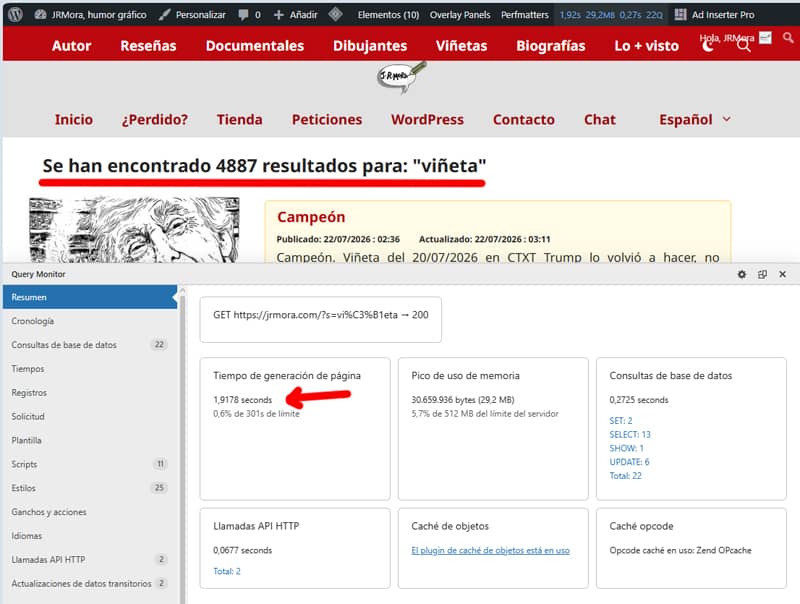
- Total database time: You’ll notice that it has now gone from several seconds to just a few milliseconds (usually between 0.03s and 0.2s).
- SQL queries: The LIKE %term% clause will have disappeared completely.
- RAM: Peak memory usage will remain exceptionally low (around 30 MB).
- Sorting: Posts will be displayed in strict descending chronological order (from the most recent to the oldest), whilst retaining WordPress’s native pagination.
I’m more than satisfied with the result. Not only have I sorted out a problem that’s been dragging on for years, but now the response is nothing short of spectacular. Even for one of the most demanding searches, such as this one with 4,887 results for‘viñeta’, the search engine responds very quickly. For searches with fewer results, you could say they appear instantly. You can check this for yourself by searching for anything else.