Well, it’s now available in the repository; it took them less than two days to review and approve it this time. You can tell the WordPress plugins team have really got their act together, just as they said they would.
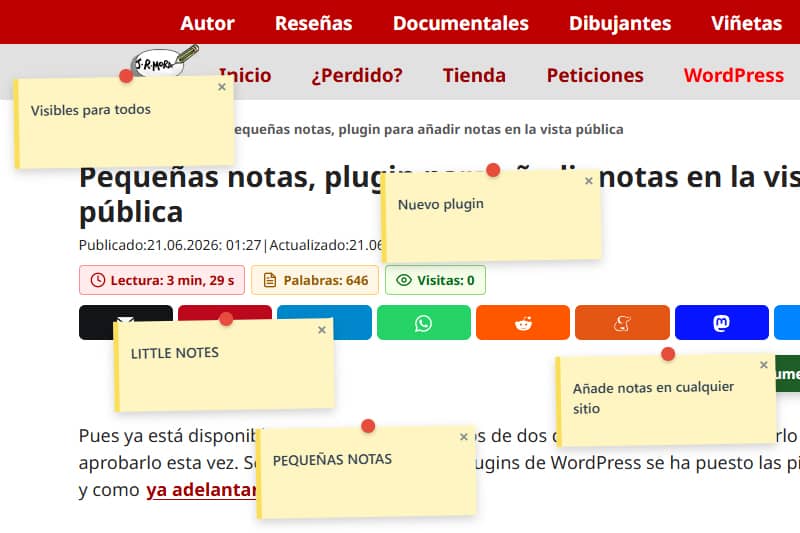
Little Notes ("Pequeñas Notas" for want of a better translation in spanish) is a plugin that does just one thing. A user logged in as an administrator can add a note anywhere on the page, and any visitor can view and close it. However, only an admin can permanently delete it.
This add-on arose from a specific need, for which I created a simple function.
The idea was to be able to leave notes with errors or suggestions for minor design changes for someone else, and to save myself the trouble of having to send them screenshots accompanied by instructions. When I no longer needed this feature, I thought it might be useful for other purposes, such as adding a visual call to action – asyou can add links (by typing the URL as https:// or http://) – for important notices or to add extra information on top of an image.
At the moment, it only works on desktop versions because I encountered a lot of issues getting it to position accurately on mobiles and tablets, and there were quite a few problems with some templates or blogs built using website builders. What’s more, on mobile, the notes were more of a hindrance than anything else. Even so, I haven’t ruled out continuing to look into a way of adding them to mobile as well, if I can get them to display properly without affecting usability and navigation.
There’s plenty of room for improvement, and I’ve got a few ideas in mind, such as adding a template system with at least two or three more designs for the notes, and the option to drag or collapse the notes if the user prefers to keep them on screen without closing them.
This is the ‘official’ description of the plugin.
‘Little Notes’ is a lightweight sticky note system that allows administrators to leave review notes with pixel-perfect precision directly in the public view using a simple keyboard shortcut.
Little Notes is designed for developers, designers and website owners who need a simple, lightweight way to post visual comments, reminders or informational alerts directly on a website’s public page.
Unlike other comment plugins that load huge scripts or alter your website’s design, Little Notes focuses strictly on performance. If there are no notes or the user is browsing from a mobile device, no code is loaded into the interface.
Key features:
Once the plugin has been installed, there is no need to configure anything. If you are logged in as an admin, simply hold down the ALT key and left-click anywhere on the public view of the page to place a new sticky note at that point.
Performance comes first: no impact on performance for regular desktop visitors when there are no active notes. The code is completely omitted from mobile layouts.
Elastic positioning: notes dynamically recalculate their position when the window is resized or scrolled, remaining fixed exactly where you placed them in the computer’s display windows.
Dashboard: Under Settings/Little Notes, you can view all active notes on your pages and posts in a centralised table within your WordPress dashboard, where you can delete notes added to a specific page or post, or delete them all in one go.