There are several plugins that do something similar, but almost all of them are designed for use when you’re designing or reviewing a website with clients (or for your own projects) to streamline the feedback process by allowing you to add notes in the post and page editor or on your WordPress dashboard.
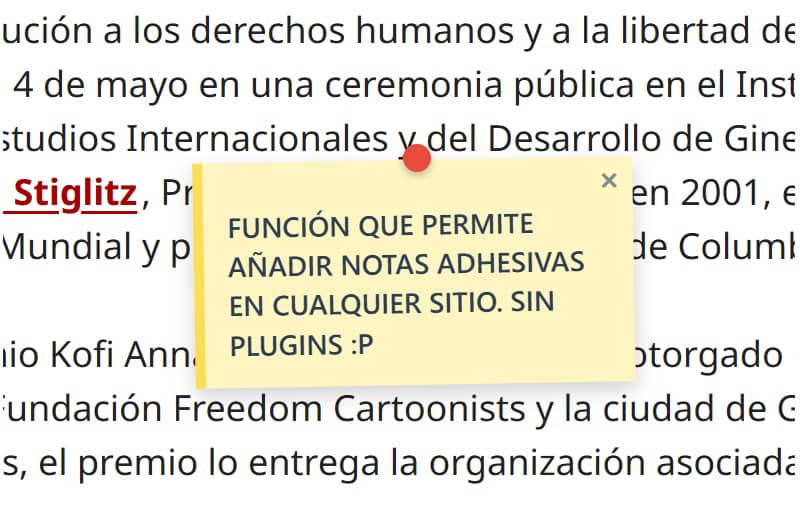
The concept behind this feature, which I had here for a very specific purpose, is essentially similar, but serves a different purpose: to display a note anywhere so that any visitor can view it and close it. It can be used as an alert or a call to action, as you can add links (by entering the URL as https://), for quick clarifications or corrections whilst you’re editing or updating. You could say it serves as both an informative note and a warning.
As I like simple plugins and features, they’re just as easy to use.
Once you’ve added the function – either as a snippet or in your theme’s functions.php file – there’s nothing else you need to do. Any user logged in as an administrator will be able to add a note by pressing ALT and clicking the left mouse button at the point where they want the note to appear.
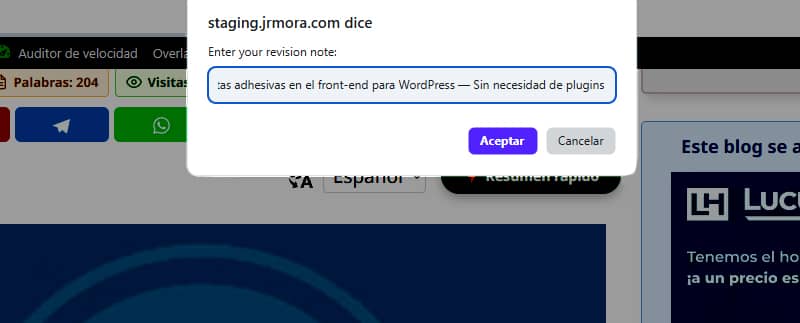
Notes, which can also be added to images, look like this.

I’m still fine-tuning this so that it aligns as closely as possible with the point where you press ALT and left-click, as at the moment the note appears a few millimetres higher or lower.
During my initial tests, I noticed that when I resized the browser windows, the notes would shift from their original positions. To sort this out, I had to seek help. The issue was resolved by actively listening for events (scroll and resize) using JavaScript, which dynamically recalculates the coordinates based on a fixed container. Now, the notes remain completely stationary and locked in their exact position, regardless of changes to the screen size."
You can add as many notes as you like, bearing in mind that the last one you add will always overlap the previous one if you place it very close to or on top of it, and you can’t drag them (yet) – you can only close them.

The control panel is also very basic. It simply displays a list showing the title of the post or page where notes have been added and the number of notes. There is a button to visit the URL and another to delete all the notes added to that page.
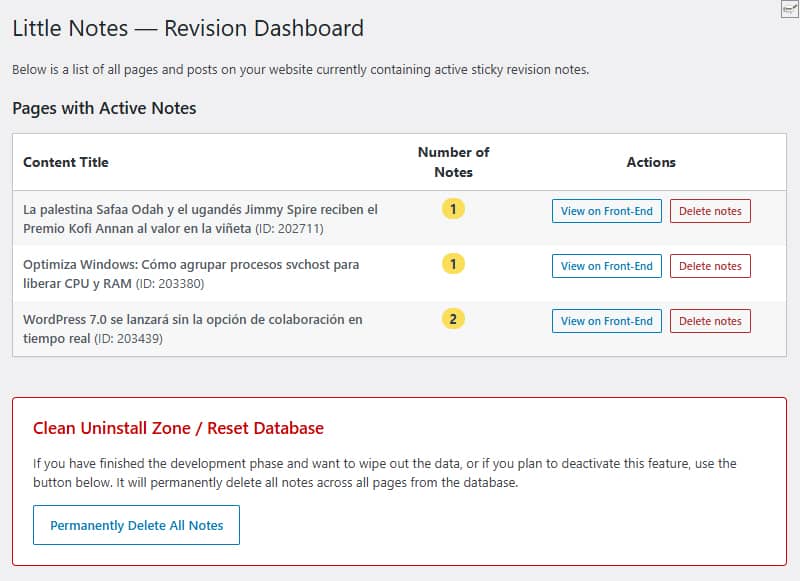
Below is the clean-up area where you can delete all entries in the database with a single click. Both the purge button and the individual delete button completely clear the rows from the database, ensuring no data is left behind on the site if you decide to stop using the feature.
No custom tables are created. Everything is stored natively using `update_option()` in the standard `wp_options ` table under the name ` little_notes_page_[ID]`.
Another issue I pay as much attention to as I can is performance. If the user is not logged in as an administrator and there are no notes on the page, absolutely no code is loaded. There is zero impact on the speed of your visits.
When using an absolutecanvas with `pointer-events: none`, the notes float across the webpage without affecting the CSS, margins or theme elements (tested so far on GeneratePress).
Although I haven’t found any errors, I’m still testing it to improve its security and debug it, with a view to turning it into a plugin to upload to the WordPress repository, so I’d recommend that, for the time being, you try it out in a test environment.
I’ve got a couple of improvements in mind. If you fancy giving it a go, you’re welcome to suggest any features you think are missing or that would be useful and/or necessary if it eventually becomes an official plugin for the repository. The working title for this potential plugin is Little Notes (Small notes or Simple notes).
In the meantime, if I update the function’s code, I’ll do so right here and change the date so you know it’s been modified.
Code
/**
* Función para sistema de notas adhesivas en front-end
* Prefijo único para PHP: little_notes / Prefijo único para CSS y JS: little-notes
* Las notas se añaden con ALT + clic izquierdo en cualquier punto logeado como admin
* Revisión 17/06/2026 - Versión con panel de control y borrado rápido desde admin en Ajustes/Little Notes
* Textos en inglés preparados para plugin
*/
if ( ! defined( 'ABSPATH' ) ) exit;
// 1. FRONT-END ASSETS & DATA LOADING
add_action( 'wp_enqueue_scripts', 'little_notes_cargar_assets' );
function little_notes_cargar_assets() {
$post_id = get_the_ID();
if ( ! $post_id ) return;
add_action( 'wp_footer', function() use ($post_id) {
$notas_actuales = get_option( 'little_notes_page_' . $post_id, array() );
$is_admin = current_user_can( 'manage_options' ) ? 1 : 0;
if ( ! $is_admin && empty( $notas_actuales ) ) return;
$nonce = wp_create_nonce( 'little_notes_seguridad' );
?>
<style id="little-notes-estilos">
#little-notes-canvas {
position: fixed;
top: 0;
left: 0;
width: 100vw;
height: 100vh;
pointer-events: none;
z-index: 999999;
}
.little-note-adhesiva {
position: absolute;
width: 220px;
min-height: 90px;
background: #fef5c1;
padding: 18px 12px 12px 12px;
box-shadow: 0 4px 10px rgba(0,0,0,0.18);
font-family: -apple-system, BlinkMacSystemFont, "Segoe UI", Roboto, Helvetica, Arial, sans-serif;
font-size: 14px;
font-weight: 500;
line-height: 1.4;
color: #2c3e50;
border-left: 5px solid #fade59;
transform: translate(-50%, -10px) rotate(-1deg);
transition: transform 0.15s ease, box-shadow 0.15s ease;
}
.little-note-adhesiva:hover {
transform: translate(-50%, -10px) rotate(0deg) scale(1.03);
box-shadow: 0 6px 14px rgba(0,0,0,0.22);
}
.little-note-texto a {
color: inherit !important;
text-decoration: underline !important;
word-break: break-all;
}
.little-note-pin {
position: absolute;
top: -8px;
left: 50%;
width: 14px;
height: 14px;
background: #e74c3c;
border-radius: 50%;
box-shadow: 0 2px 4px rgba(0,0,0,0.25);
transform: translateX(-50%);
}
.little-note-cerrar {
position: absolute;
top: 2px;
right: 6px;
cursor: pointer;
font-size: 16px;
font-weight: bold;
color: #7f8c8d;
user-select: none;
line-height: 1;
}
.little-note-cerrar:hover { color: #c0392b; }
.little-note-texto {
word-wrap: break-word;
white-space: pre-wrap;
margin-top: 4px;
}
</style>
<div id="little-notes-canvas"></div>
<script id="little-notes-js">
document.addEventListener("DOMContentLoaded", function() {
const canvas = document.getElementById('little-notes-canvas');
const isAdmin = <?php echo $is_admin; ?>;
const notasDB = <?php echo json_encode( $notas_actuales ); ?>;
const closedNotas = JSON.parse(localStorage.getItem('little_notes_cerradas') || '[]');
const ajaxUrl = '<?php echo admin_url( 'admin-ajax.php' ); ?>';
// Buscamos el contenedor principal de GeneratePress o el cuerpo del contenido (.entry-content)
const mainContainer = document.querySelector('.entry-content') || document.querySelector('#content') || document.body;
const deleteTooltip = "<?php echo esc_js( __('Delete permanently for everyone', 'little-notes') ); ?>";
const closeTooltip = "<?php echo esc_js( __('Close note', 'little-notes') ); ?>";
const promptMessage = "<?php echo esc_js( __('Enter your revision note:', 'little-notes') ); ?>";
const confirmDeleteMsg = "<?php echo esc_js( __('Do you want to permanently delete this note from the database?', 'little-notes') ); ?>";
const saveErrorMsg = "<?php echo esc_js( __('Server error while saving.', 'little-notes') ); ?>";
let listaNotasInstanciadas = [];
if (Array.isArray(notasDB)) {
notasDB.forEach(nota => {
if (!closedNotas.includes(nota.id)) {
renderizarNota(nota);
}
});
}
if (isAdmin) {
document.addEventListener('click', function(e) {
if (e.altKey) {
e.preventDefault();
// Medimos la posición relativa al contenedor principal en píxeles y porcentaje
const containerRect = mainContainer.getBoundingClientRect();
const containerAbsoluteLeft = containerRect.left + window.scrollX;
const pixelXRelative = e.pageX - containerAbsoluteLeft;
const pctX = (pixelXRelative / containerRect.width) * 100;
const absoluteY = e.pageY; // El eje Y sigue siendo absoluto al scroll vertical
const texto = prompt(promptMessage);
if (texto && texto.trim() !== "") {
guardarNotaBD(pctX, absoluteY, texto);
}
}
});
}
function autoConvertirEnlaces(texto) {
const expresionUrl = /(\b(https?|ftp|file):\/\/[-A-Z0-9+&@#\/%?=~_|!:,.;]*[-A-Z0-9+&@#\/%=~_|])/ig;
return texto.replace(expresionUrl, function(url) {
return `<a href="${url}" target="_blank" rel="noopener noreferrer">${url}</a>`;
});
}
function renderizarNota(nota) {
const div = document.createElement('div');
div.className = 'little-note-adhesiva';
div.id = nota.id;
div.style.pointerEvents = 'auto';
const textoProcesado = autoConvertirEnlaces(nota.texto);
const currentTooltip = isAdmin ? deleteTooltip : closeTooltip;
div.innerHTML = `
<div class="little-note-pin"></div>
<span class="little-note-cerrar" title="${currentTooltip}">×</span>
<div class="little-note-texto">${textoProcesado}</div>
`;
div.querySelector('.little-note-cerrar').addEventListener('click', function() {
if (isAdmin) {
if (confirm(confirmDeleteMsg)) {
borrarNotaBD(nota.id, div);
}
} else {
closedNotas.push(nota.id);
localStorage.setItem('little_notes_cerradas', JSON.stringify(closedNotas));
div.remove();
listaNotasInstanciadas = listaNotasInstanciadas.filter(n => n.id !== nota.id);
}
});
canvas.appendChild(div);
const objetoNota = { id: nota.id, element: div, pctX: nota.x, originalY: nota.y };
listaNotasInstanciadas.push(objetoNota);
posicionarElemento(objetoNota);
}
function posicionarElemento(objNota) {
const containerRect = mainContainer.getBoundingClientRect();
// Reconstruimos la coordenada X real multiplicando el porcentaje guardado por el ancho actual del bloque
const xCalculado = containerRect.left + (containerRect.width * (objNota.pctX / 100));
// Calculamos la Y restando la barra de scroll vertical del viewport fijo
const yCalculado = objNota.originalY - window.scrollY;
objNota.element.style.left = xCalculado + 'px';
objNota.element.style.top = yCalculado + 'px';
}
function actualizarPosiciones() {
listaNotasInstanciadas.forEach(posicionarElemento);
}
window.addEventListener('scroll', actualizarPosiciones, { passive: true });
window.addEventListener('resize', actualizarPosiciones, { passive: true });
function guardarNotaBD(x, y, texto) {
const formData = new FormData();
formData.append('action', 'little_notes_guardar');
formData.append('post_id', '<?php echo $post_id; ?>');
formData.append('x', x); // Aquí se envía el porcentaje elástico
formData.append('y', y);
formData.append('texto', texto);
formData.append('nonce', '<?php echo $nonce; ?>');
fetch(ajaxUrl, { method: 'POST', body: formData })
.then(res => res.json())
.then(res => {
if(res.success && res.data) {
renderizarNota(res.data);
} else {
alert(saveErrorMsg);
}
})
.catch(err => console.error("AJAX Error:", err));
}
function borrarNotaBD(id, elementoHtml) {
const formData = new FormData();
formData.append('action', 'little_notes_borrar');
formData.append('post_id', '<?php echo $post_id; ?>');
formData.append('nota_id', id);
formData.append('nonce', '<?php echo $nonce; ?>');
fetch(ajaxUrl, { method: 'POST', body: formData })
.then(res => res.json())
.then(res => {
if(res.success) {
elementoHtml.remove();
listaNotasInstanciadas = listaNotasInstanciadas.filter(n => n.id !== id);
}
});
}
});
</script>
<?php
}, 999);
}
// 2. INDEPENDENT AJAX PROCESSORS
add_action( 'wp_ajax_little_notes_guardar', 'little_notes_ajax_guardar_handler' );
function little_notes_ajax_guardar_handler() {
check_ajax_referer( 'little_notes_seguridad', 'nonce' );
if ( ! current_user_can( 'manage_options' ) ) wp_send_json_error( __('Unauthorized', 'little-notes') );
$post_id = intval( $_POST['post_id'] );
$notas = get_option( 'little_notes_page_' . $post_id, array() );
$nueva_nota = array(
'id' => uniqid('note_'),
'x' => floatval( $_POST['x'] ), // Guarda el valor flotante porcentual
'y' => floatval( $_POST['y'] ),
'texto' => sanitize_textarea_field( $_POST['texto'] )
);
$notas[] = $nueva_nota;
update_option( 'little_notes_page_' . $post_id, $notas );
wp_send_json_success( $nueva_nota );
}
add_action( 'wp_ajax_little_notes_borrar', 'little_notes_ajax_borrar_handler' );
function little_notes_ajax_borrar_handler() {
check_ajax_referer( 'little_notes_seguridad', 'nonce' );
if ( ! current_user_can( 'manage_options' ) ) wp_send_json_error( __('Unauthorized', 'little-notes') );
$post_id = intval( $_POST['post_id'] );
$nota_id = sanitize_text_field( $_POST['nota_id'] );
$notas = get_option( 'little_notes_page_' . $post_id, array() );
$notas = array_filter( $notas, function($n) use ($nota_id) {
return $n['id'] !== $nota_id;
});
if ( empty( $notas ) ) {
delete_option( 'little_notes_page_' . $post_id );
} else {
update_option( 'little_notes_page_' . $post_id, array_values($notas) );
}
wp_send_json_success();
}
// 3. ADMIN MENU & ACTIVE NOTES OVERVIEW
add_action( 'admin_menu', 'little_notes_crear_menu_admin' );
function little_notes_crear_menu_admin() {
add_options_page(
__('Little Notes Settings', 'little-notes'),
__('Little Notes', 'little-notes'),
'manage_options',
'little-notes-admin',
'little_notes_render_page_admin'
);
}
function little_notes_render_page_admin() {
if ( ! current_user_can( 'manage_options' ) ) return;
global $wpdb;
if ( isset($_POST['little_notes_delete_post_id']) ) {
check_admin_referer( 'little_notes_delete_post_action' );
$target_post_id = intval($_POST['little_notes_delete_post_id']);
delete_option( 'little_notes_page_' . $target_post_id );
echo '<div class="notice notice-success is-dismissible"><p><strong>' . esc_html__('Notes for this page have been successfully deleted.', 'little-notes') . '</strong></p></div>';
}
if ( isset($_POST['little_notes_purge_all']) ) {
check_admin_referer( 'little_notes_accion_purgar' );
$wpdb->query( "DELETE FROM {$wpdb->options} WHERE option_name LIKE 'little_notes_page_%'" );
echo '<div class="notice notice-success is-dismissible"><p><strong>' . esc_html__('Success! All revision notes have been cleanly deleted from the database.', 'little-notes') . '</strong></p></div>';
}
$resultados = $wpdb->get_results( "SELECT option_name, option_value FROM {$wpdb->options} WHERE option_name LIKE 'little_notes_page_%'" );
?>
<div class="wrap">
<h1><?php _e('Little Notes — Revision Dashboard', 'little-notes'); ?></h1>
<p><?php _e('Below is a list of all pages and posts on your website currently containing active sticky revision notes.', 'little-notes'); ?></p>
<h2 class="title" style="margin-top:20px;"><?php _e('Pages with Active Notes', 'little-notes'); ?></h2>
<table class="wp-list-table widefat fixed striped table-view-list" style="margin-top:10px; max-width: 850px;">
<thead>
<tr>
<th style="font-weight:bold; width: 50%;"><?php _e('Content Title', 'little-notes'); ?></th>
<th style="font-weight:bold; width: 15%; text-align:center;"><?php _e('Number of Notes', 'little-notes'); ?></th>
<th style="font-weight:bold; width: 35%; text-align:center;"><?php _e('Actions', 'little-notes'); ?></th>
</tr>
</thead>
<tbody>
<?php if ( empty( $resultados ) ) : ?>
<tr>
<td colspan="3"><?php _e('No active revision notes found on any page.', 'little-notes'); ?></td>
</tr>
<?php else :
foreach ( $resultados as $fila ) {
$post_id = intval( str_replace( 'little_notes_page_', '', $fila->option_name ) );
$titulo = get_the_title( $post_id );
if ( ! $titulo ) $titulo = sprintf( __('Content #ID %d (Or deleted)', 'little-notes'), $post_id );
$datos_notas = maybe_unserialize( $fila->option_value );
$cantidad = is_array( $datos_notas ) ? count( $datos_notas ) : 0;
if ( $cantidad === 0 ) continue;
?>
<tr>
<td><strong><?php echo esc_html( $titulo ); ?></strong> <span class="description">(ID: <?php echo $post_id; ?>)</span></td>
<td style="text-align:center;"><span class="update-plugins count-<?php echo $cantidad; ?>" style="background:#fade59; color:#2c3e50; font-weight:bold; padding:2px 8px; border-radius:10px;"><?php echo $cantidad; ?></span></td>
<td style="text-align:center;">
<div style="display: flex; gap: 8px; justify-content: center; align-items: center;">
<a href="<?php echo esc_url( get_permalink( $post_id ) ); ?>" target="_blank" class="button button-small"><?php _e('View on Front-End', 'little-notes'); ?></a>
<form method="post" action="" style="margin:0;" onsubmit="return confirm('<?php echo esc_js( sprintf(__('Are you sure you want to delete all notes for: %s?', 'little-notes'), $titulo) ); ?>');">
<?php wp_nonce_field( 'little_notes_delete_post_action' ); ?>
<input type="hidden" name="little_notes_delete_post_id" value="<?php echo $post_id; ?>">
<input type="submit" class="button button-small delete" style="color: #b32d2e; border-color: #b32d2e;" value="<?php esc_attr_e('Delete notes', 'little-notes'); ?>">
</form>
</div>
</td>
</tr>
<?php
}
endif; ?>
</tbody>
</table>
<div style="margin-top: 40px; padding: 20px; border: 1px solid #cc0000; background: #fff; max-width: 760px; border-radius: 4px;">
<h3 style="color: #cc0000; margin-top:0;"><?php _e('Clean Uninstall Zone / Reset Database', 'little-notes'); ?></h3>
<p><?php _e('If you have finished the development phase and want to wipe out the data, or if you plan to deactivate this feature, use the button below. It will permanently delete all notes across all pages from the database.', 'little-notes'); ?></p>
<?php
$confirm_js = esc_js( __('Are you absolutely sure you want to delete ALL revision notes from the database? This action cannot be undone.', 'little-notes') );
?>
<form method="post" action="" onsubmit="return confirm('<?php echo $confirm_js; ?>');">
<?php wp_nonce_field( 'little_notes_accion_purgar' ); ?>
<input type="hidden" name="little_notes_purge_all" value="1">
<?php submit_button( __('Permanently Delete All Notes', 'little-notes'), 'delete', 'submit', false ); ?>
</form>
</div>
</div>
<?php
}