Es gibt verschiedene Plugins, die etwas Ähnliches leisten, aber fast alle sind dafür gedacht, den Feedback-Prozess zu beschleunigen, wenn du eine Website gemeinsam mit Kunden (oder für deine eigenen Projekte) gestaltest oder überarbeitest, indem sie die Möglichkeit bieten, Notizen im Editor für Beiträge und Seiten oder auf dem WordPress-Dashboard hinzuzufügen.
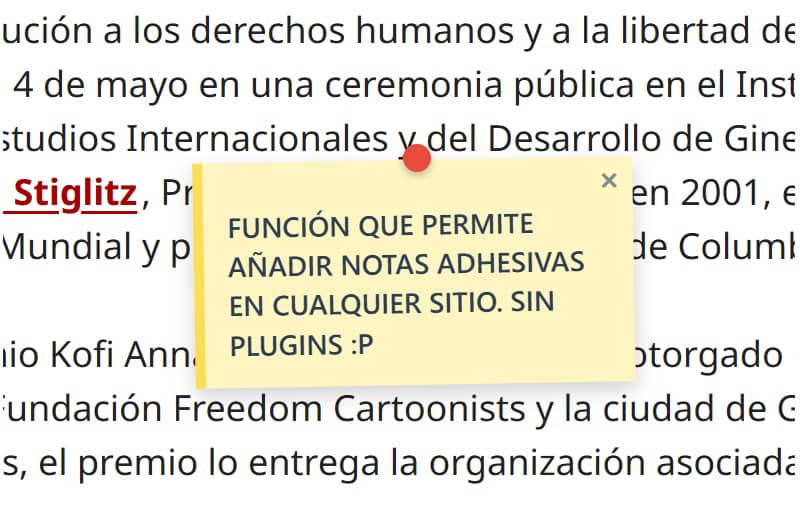
Das Konzept dieser Funktion, die ich hier ursprünglich für einen ganz bestimmten Zweck eingerichtet hatte, ist im Wesentlichen ähnlich, dient jedoch einem anderen Zweck: Es soll eine Notiz an beliebiger Stelle anzeigen, die jeder Besucher sehen und schließen kann. Sie kann als Hinweis oder als Aufruf zum Handeln genutzt werden, da Links hinzugefügt werden können (indem man die URL mit https:// eingibt), für schnelle Erläuterungen oder Korrekturen während der Bearbeitung oder Aktualisierung oder um zusätzliche Informationen zu einem Bild hinzuzufügen. Man kann sagen, dass sie sowohl als Informationsnotiz als auch als Hinweis dient.
Da ich einfache Plugins und Funktionen mag, ist auch deren Verwendung ganz einfach.
Sobald Sie die Funktion hinzugefügt haben – sei es als Snippet oder in der Datei „functions.php“ Ihres Themes –, müssen Sie nichts weiter tun. Ein als Administrator angemeldeter Benutzer kann eine Notiz hinzufügen, indem er die ALT-Taste gedrückt hält und mit der linken Maustaste an der Stelle klickt, an der die Notiz erscheinen soll.
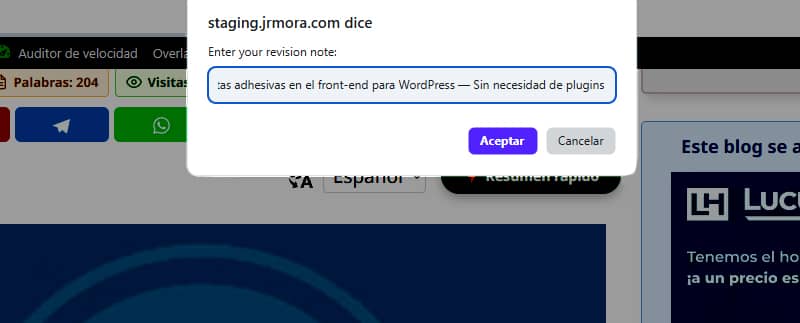
Die Notizen, die auch auf den Bildern hinzugefügt werden können, sehen so aus.

Ich bin noch dabei, das zu optimieren, damit es so genau wie möglich dem Punkt entspricht, an dem man ALT + Linksklick ausführt, da die Notiz derzeit je nach dem Element, auf das sie angefügt wird, etwa ein paar Millimeter tiefer oder höher erscheint.
Bei den ersten Tests stellte ich fest, dass sich die Notizen beim Ändern der Größe der Browserfenster von ihrer ursprünglichen Position verschoben. Um dieses Problem zu beheben, musste ich mir Hilfe holen. Das Problem wurde durch die aktive Überwachung von Ereignissen (Scroll und Resize) mittels JavaScript behoben, wodurch die Koordinaten dynamisch auf der Grundlage eines festen (fixed) Containers neu berechnet werden. Nun bleiben die Notizen völlig unbeweglich und genau an ihrer Stelle, unabhängig von Änderungen der Bildschirmgröße.
Du kannst so viele Notizen erstellen, wie du möchtest, wobei zu beachten ist, dass die zuletzt hinzugefügte Notiz die vorherige immer überlagert, wenn du sie sehr nah daneben oder darüber platzierst, und dass sie (noch) nicht verschoben, sondern nur geschlossen werden können.

Auch das Kontrollfeld ist sehr übersichtlich. Es zeigt lediglich eine Liste mit den Titeln der Beiträge oder Seiten an, zu denen Notizen hinzugefügt wurden, sowie die Anzahl der Notizen. Es gibt eine Schaltfläche zum Aufrufen der URL und eine weitere zum Löschen aller zu dieser Seite hinzugefügten Notizen.
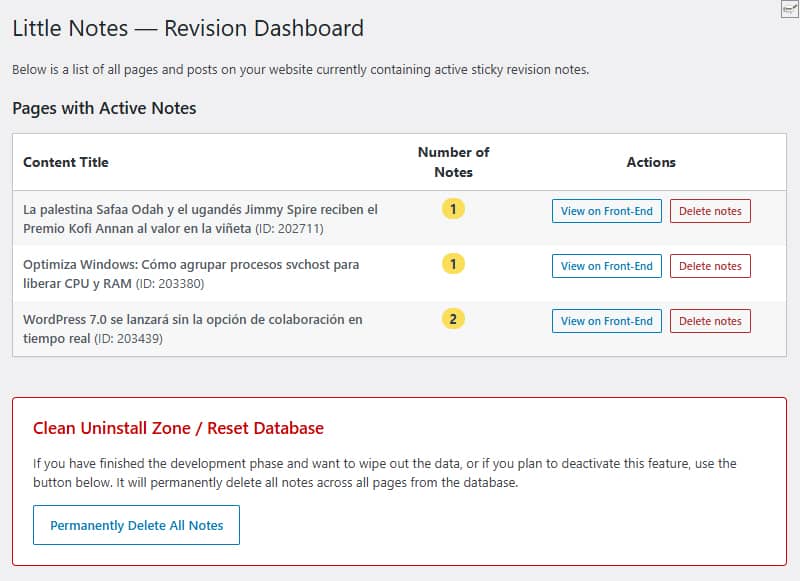
Darunter befindet sich der Bereinigungsbereich, in dem Sie alle Einträge in der Datenbank mit einem Klick löschen können. Sowohl die Schaltfläche „Leeren“ als auch die Schaltfläche „Einzeln löschen“ löschen die Zeilen in der Datenbank vollständig und verhindern so, dass Datenmüll auf der Website zurückbleibt, falls Sie die Funktion nicht mehr nutzen möchten.
Es werden keine benutzerdefinierten Tabellen erstellt. Alle Daten werden nativ mithilfe von `update_option()` in der Standardtabelle `wp_options ` unter dem Namen ` little_notes_page_[ID]` gespeichert.
Ein weiterer Aspekt, dem ich meine volle Aufmerksamkeit widme, ist die Leistung. Wenn der Benutzer nicht als Administrator angemeldet ist und keine Notizen auf der Seite vorhanden sind, wird überhaupt kein Code geladen. Das hat keinerlei Auswirkungen auf die Ladegeschwindigkeit Ihrer Seiten.
Bei Verwendung einer absoluten Leinwand (Canvas) mit „pointer-events: none“ schweben die Notizen auf der Webseite, ohne das CSS, die Ränder oder die Elemente des Themes zu verändern (bisher getestet mit GeneratePress).
Auch wenn ich bisher keine Fehler entdeckt habe, teste ich es weiterhin, um die Sicherheit zu verbessern und es zu optimieren, mit dem Ziel, daraus ein Plugin zu machen, das ich in das WordPress-Repository hochladen kann. Daher empfehle ich dir, es vorerst in einer Testumgebung auszuprobieren.
Ich habe ein paar Verbesserungen im Sinn. Wenn du Lust hast, es auszuprobieren, kannst du gerne Funktionen vorschlagen, die deiner Meinung nach noch fehlen oder die nützlich und/oder notwendig wären, falls es schließlich zu einem offiziellen Plugin für das Repository wird. Der vorläufige Titel für dieses voraussichtliche Plugin lautet „Little Notes“ (Kleine Notizen oder Einfache Notizen).
Wenn ich den Code der Funktion in der Zwischenzeit aktualisiere, werde ich das direkt hier tun und das Datum ändern, damit du weißt, dass er geändert wurde.
Code
/**
* Función para sistema de notas adhesivas en front-end
* Prefijo único para PHP: little_notes / Prefijo único para CSS y JS: little-notes
* Las notas se añaden con ALT + clic izquierdo en cualquier punto logeado como admin
* Revisión 17/06/2026 - Versión con panel de control y borrado rápido desde admin en Ajustes/Little Notes
* Textos en inglés preparados para plugin
*/
if ( ! defined( 'ABSPATH' ) ) exit;
// 1. FRONT-END ASSETS & DATA LOADING
add_action( 'wp_enqueue_scripts', 'little_notes_cargar_assets' );
function little_notes_cargar_assets() {
$post_id = get_the_ID();
if ( ! $post_id ) return;
add_action( 'wp_footer', function() use ($post_id) {
$notas_actuales = get_option( 'little_notes_page_' . $post_id, array() );
$is_admin = current_user_can( 'manage_options' ) ? 1 : 0;
if ( ! $is_admin && empty( $notas_actuales ) ) return;
$nonce = wp_create_nonce( 'little_notes_seguridad' );
?>
<style id="little-notes-estilos">
#little-notes-canvas {
position: fixed;
top: 0;
left: 0;
width: 100vw;
height: 100vh;
pointer-events: none;
z-index: 999999;
}
.little-note-adhesiva {
position: absolute;
width: 220px;
min-height: 90px;
background: #fef5c1;
padding: 18px 12px 12px 12px;
box-shadow: 0 4px 10px rgba(0,0,0,0.18);
font-family: -apple-system, BlinkMacSystemFont, "Segoe UI", Roboto, Helvetica, Arial, sans-serif;
font-size: 14px;
font-weight: 500;
line-height: 1.4;
color: #2c3e50;
border-left: 5px solid #fade59;
transform: translate(-50%, -10px) rotate(-1deg);
transition: transform 0.15s ease, box-shadow 0.15s ease;
}
.little-note-adhesiva:hover {
transform: translate(-50%, -10px) rotate(0deg) scale(1.03);
box-shadow: 0 6px 14px rgba(0,0,0,0.22);
}
.little-note-texto a {
color: inherit !important;
text-decoration: underline !important;
word-break: break-all;
}
.little-note-pin {
position: absolute;
top: -8px;
left: 50%;
width: 14px;
height: 14px;
background: #e74c3c;
border-radius: 50%;
box-shadow: 0 2px 4px rgba(0,0,0,0.25);
transform: translateX(-50%);
}
.little-note-cerrar {
position: absolute;
top: 2px;
right: 6px;
cursor: pointer;
font-size: 16px;
font-weight: bold;
color: #7f8c8d;
user-select: none;
line-height: 1;
}
.little-note-cerrar:hover { color: #c0392b; }
.little-note-texto {
word-wrap: break-word;
white-space: pre-wrap;
margin-top: 4px;
}
</style>
<div id="little-notes-canvas"></div>
<script id="little-notes-js">
document.addEventListener("DOMContentLoaded", function() {
const canvas = document.getElementById('little-notes-canvas');
const isAdmin = <?php echo $is_admin; ?>;
const notasDB = <?php echo json_encode( $notas_actuales ); ?>;
const closedNotas = JSON.parse(localStorage.getItem('little_notes_cerradas') || '[]');
const ajaxUrl = '<?php echo admin_url( 'admin-ajax.php' ); ?>';
// Buscamos el contenedor principal de GeneratePress o el cuerpo del contenido (.entry-content)
const mainContainer = document.querySelector('.entry-content') || document.querySelector('#content') || document.body;
const deleteTooltip = "<?php echo esc_js( __('Delete permanently for everyone', 'little-notes') ); ?>";
const closeTooltip = "<?php echo esc_js( __('Close note', 'little-notes') ); ?>";
const promptMessage = "<?php echo esc_js( __('Enter your revision note:', 'little-notes') ); ?>";
const confirmDeleteMsg = "<?php echo esc_js( __('Do you want to permanently delete this note from the database?', 'little-notes') ); ?>";
const saveErrorMsg = "<?php echo esc_js( __('Server error while saving.', 'little-notes') ); ?>";
let listaNotasInstanciadas = [];
if (Array.isArray(notasDB)) {
notasDB.forEach(nota => {
if (!closedNotas.includes(nota.id)) {
renderizarNota(nota);
}
});
}
if (isAdmin) {
document.addEventListener('click', function(e) {
if (e.altKey) {
e.preventDefault();
// Medimos la posición relativa al contenedor principal en píxeles y porcentaje
const containerRect = mainContainer.getBoundingClientRect();
const containerAbsoluteLeft = containerRect.left + window.scrollX;
const pixelXRelative = e.pageX - containerAbsoluteLeft;
const pctX = (pixelXRelative / containerRect.width) * 100;
const absoluteY = e.pageY; // El eje Y sigue siendo absoluto al scroll vertical
const texto = prompt(promptMessage);
if (texto && texto.trim() !== "") {
guardarNotaBD(pctX, absoluteY, texto);
}
}
});
}
function autoConvertirEnlaces(texto) {
const expresionUrl = /(\b(https?|ftp|file):\/\/[-A-Z0-9+&@#\/%?=~_|!:,.;]*[-A-Z0-9+&@#\/%=~_|])/ig;
return texto.replace(expresionUrl, function(url) {
return `<a href="${url}" target="_blank" rel="noopener noreferrer">${url}</a>`;
});
}
function renderizarNota(nota) {
const div = document.createElement('div');
div.className = 'little-note-adhesiva';
div.id = nota.id;
div.style.pointerEvents = 'auto';
const textoProcesado = autoConvertirEnlaces(nota.texto);
const currentTooltip = isAdmin ? deleteTooltip : closeTooltip;
div.innerHTML = `
<div class="little-note-pin"></div>
<span class="little-note-cerrar" title="${currentTooltip}">×</span>
<div class="little-note-texto">${textoProcesado}</div>
`;
div.querySelector('.little-note-cerrar').addEventListener('click', function() {
if (isAdmin) {
if (confirm(confirmDeleteMsg)) {
borrarNotaBD(nota.id, div);
}
} else {
closedNotas.push(nota.id);
localStorage.setItem('little_notes_cerradas', JSON.stringify(closedNotas));
div.remove();
listaNotasInstanciadas = listaNotasInstanciadas.filter(n => n.id !== nota.id);
}
});
canvas.appendChild(div);
const objetoNota = { id: nota.id, element: div, pctX: nota.x, originalY: nota.y };
listaNotasInstanciadas.push(objetoNota);
posicionarElemento(objetoNota);
}
function posicionarElemento(objNota) {
const containerRect = mainContainer.getBoundingClientRect();
// Reconstruimos la coordenada X real multiplicando el porcentaje guardado por el ancho actual del bloque
const xCalculado = containerRect.left + (containerRect.width * (objNota.pctX / 100));
// Calculamos la Y restando la barra de scroll vertical del viewport fijo
const yCalculado = objNota.originalY - window.scrollY;
objNota.element.style.left = xCalculado + 'px';
objNota.element.style.top = yCalculado + 'px';
}
function actualizarPosiciones() {
listaNotasInstanciadas.forEach(posicionarElemento);
}
window.addEventListener('scroll', actualizarPosiciones, { passive: true });
window.addEventListener('resize', actualizarPosiciones, { passive: true });
function guardarNotaBD(x, y, texto) {
const formData = new FormData();
formData.append('action', 'little_notes_guardar');
formData.append('post_id', '<?php echo $post_id; ?>');
formData.append('x', x); // Aquí se envía el porcentaje elástico
formData.append('y', y);
formData.append('texto', texto);
formData.append('nonce', '<?php echo $nonce; ?>');
fetch(ajaxUrl, { method: 'POST', body: formData })
.then(res => res.json())
.then(res => {
if(res.success && res.data) {
renderizarNota(res.data);
} else {
alert(saveErrorMsg);
}
})
.catch(err => console.error("AJAX Error:", err));
}
function borrarNotaBD(id, elementoHtml) {
const formData = new FormData();
formData.append('action', 'little_notes_borrar');
formData.append('post_id', '<?php echo $post_id; ?>');
formData.append('nota_id', id);
formData.append('nonce', '<?php echo $nonce; ?>');
fetch(ajaxUrl, { method: 'POST', body: formData })
.then(res => res.json())
.then(res => {
if(res.success) {
elementoHtml.remove();
listaNotasInstanciadas = listaNotasInstanciadas.filter(n => n.id !== id);
}
});
}
});
</script>
<?php
}, 999);
}
// 2. INDEPENDENT AJAX PROCESSORS
add_action( 'wp_ajax_little_notes_guardar', 'little_notes_ajax_guardar_handler' );
function little_notes_ajax_guardar_handler() {
check_ajax_referer( 'little_notes_seguridad', 'nonce' );
if ( ! current_user_can( 'manage_options' ) ) wp_send_json_error( __('Unauthorized', 'little-notes') );
$post_id = intval( $_POST['post_id'] );
$notas = get_option( 'little_notes_page_' . $post_id, array() );
$nueva_nota = array(
'id' => uniqid('note_'),
'x' => floatval( $_POST['x'] ), // Guarda el valor flotante porcentual
'y' => floatval( $_POST['y'] ),
'texto' => sanitize_textarea_field( $_POST['texto'] )
);
$notas[] = $nueva_nota;
update_option( 'little_notes_page_' . $post_id, $notas );
wp_send_json_success( $nueva_nota );
}
add_action( 'wp_ajax_little_notes_borrar', 'little_notes_ajax_borrar_handler' );
function little_notes_ajax_borrar_handler() {
check_ajax_referer( 'little_notes_seguridad', 'nonce' );
if ( ! current_user_can( 'manage_options' ) ) wp_send_json_error( __('Unauthorized', 'little-notes') );
$post_id = intval( $_POST['post_id'] );
$nota_id = sanitize_text_field( $_POST['nota_id'] );
$notas = get_option( 'little_notes_page_' . $post_id, array() );
$notas = array_filter( $notas, function($n) use ($nota_id) {
return $n['id'] !== $nota_id;
});
if ( empty( $notas ) ) {
delete_option( 'little_notes_page_' . $post_id );
} else {
update_option( 'little_notes_page_' . $post_id, array_values($notas) );
}
wp_send_json_success();
}
// 3. ADMIN MENU & ACTIVE NOTES OVERVIEW
add_action( 'admin_menu', 'little_notes_crear_menu_admin' );
function little_notes_crear_menu_admin() {
add_options_page(
__('Little Notes Settings', 'little-notes'),
__('Little Notes', 'little-notes'),
'manage_options',
'little-notes-admin',
'little_notes_render_page_admin'
);
}
function little_notes_render_page_admin() {
if ( ! current_user_can( 'manage_options' ) ) return;
global $wpdb;
if ( isset($_POST['little_notes_delete_post_id']) ) {
check_admin_referer( 'little_notes_delete_post_action' );
$target_post_id = intval($_POST['little_notes_delete_post_id']);
delete_option( 'little_notes_page_' . $target_post_id );
echo '<div class="notice notice-success is-dismissible"><p><strong>' . esc_html__('Notes for this page have been successfully deleted.', 'little-notes') . '</strong></p></div>';
}
if ( isset($_POST['little_notes_purge_all']) ) {
check_admin_referer( 'little_notes_accion_purgar' );
$wpdb->query( "DELETE FROM {$wpdb->options} WHERE option_name LIKE 'little_notes_page_%'" );
echo '<div class="notice notice-success is-dismissible"><p><strong>' . esc_html__('Success! All revision notes have been cleanly deleted from the database.', 'little-notes') . '</strong></p></div>';
}
$resultados = $wpdb->get_results( "SELECT option_name, option_value FROM {$wpdb->options} WHERE option_name LIKE 'little_notes_page_%'" );
?>
<div class="wrap">
<h1><?php _e('Little Notes — Revision Dashboard', 'little-notes'); ?></h1>
<p><?php _e('Below is a list of all pages and posts on your website currently containing active sticky revision notes.', 'little-notes'); ?></p>
<h2 class="title" style="margin-top:20px;"><?php _e('Pages with Active Notes', 'little-notes'); ?></h2>
<table class="wp-list-table widefat fixed striped table-view-list" style="margin-top:10px; max-width: 850px;">
<thead>
<tr>
<th style="font-weight:bold; width: 50%;"><?php _e('Content Title', 'little-notes'); ?></th>
<th style="font-weight:bold; width: 15%; text-align:center;"><?php _e('Number of Notes', 'little-notes'); ?></th>
<th style="font-weight:bold; width: 35%; text-align:center;"><?php _e('Actions', 'little-notes'); ?></th>
</tr>
</thead>
<tbody>
<?php if ( empty( $resultados ) ) : ?>
<tr>
<td colspan="3"><?php _e('No active revision notes found on any page.', 'little-notes'); ?></td>
</tr>
<?php else :
foreach ( $resultados as $fila ) {
$post_id = intval( str_replace( 'little_notes_page_', '', $fila->option_name ) );
$titulo = get_the_title( $post_id );
if ( ! $titulo ) $titulo = sprintf( __('Content #ID %d (Or deleted)', 'little-notes'), $post_id );
$datos_notas = maybe_unserialize( $fila->option_value );
$cantidad = is_array( $datos_notas ) ? count( $datos_notas ) : 0;
if ( $cantidad === 0 ) continue;
?>
<tr>
<td><strong><?php echo esc_html( $titulo ); ?></strong> <span class="description">(ID: <?php echo $post_id; ?>)</span></td>
<td style="text-align:center;"><span class="update-plugins count-<?php echo $cantidad; ?>" style="background:#fade59; color:#2c3e50; font-weight:bold; padding:2px 8px; border-radius:10px;"><?php echo $cantidad; ?></span></td>
<td style="text-align:center;">
<div style="display: flex; gap: 8px; justify-content: center; align-items: center;">
<a href="<?php echo esc_url( get_permalink( $post_id ) ); ?>" target="_blank" class="button button-small"><?php _e('View on Front-End', 'little-notes'); ?></a>
<form method="post" action="" style="margin:0;" onsubmit="return confirm('<?php echo esc_js( sprintf(__('Are you sure you want to delete all notes for: %s?', 'little-notes'), $titulo) ); ?>');">
<?php wp_nonce_field( 'little_notes_delete_post_action' ); ?>
<input type="hidden" name="little_notes_delete_post_id" value="<?php echo $post_id; ?>">
<input type="submit" class="button button-small delete" style="color: #b32d2e; border-color: #b32d2e;" value="<?php esc_attr_e('Delete notes', 'little-notes'); ?>">
</form>
</div>
</td>
</tr>
<?php
}
endif; ?>
</tbody>
</table>
<div style="margin-top: 40px; padding: 20px; border: 1px solid #cc0000; background: #fff; max-width: 760px; border-radius: 4px;">
<h3 style="color: #cc0000; margin-top:0;"><?php _e('Clean Uninstall Zone / Reset Database', 'little-notes'); ?></h3>
<p><?php _e('If you have finished the development phase and want to wipe out the data, or if you plan to deactivate this feature, use the button below. It will permanently delete all notes across all pages from the database.', 'little-notes'); ?></p>
<?php
$confirm_js = esc_js( __('Are you absolutely sure you want to delete ALL revision notes from the database? This action cannot be undone.', 'little-notes') );
?>
<form method="post" action="" onsubmit="return confirm('<?php echo $confirm_js; ?>');">
<?php wp_nonce_field( 'little_notes_accion_purgar' ); ?>
<input type="hidden" name="little_notes_purge_all" value="1">
<?php submit_button( __('Permanently Delete All Notes', 'little-notes'), 'delete', 'submit', false ); ?>
</form>
</div>
</div>
<?php
}