มีปลั๊กอินหลายตัวที่ทำหน้าที่คล้ายกัน แต่เกือบทั้งหมดถูกออกแบบมาเพื่อใช้เมื่อคุณกำลังออกแบบหรือตรวจสอบเว็บไซต์กับลูกค้า (หรือสำหรับโปรเจกต์ของคุณเอง) เพื่อทำให้กระบวนการให้ข้อเสนอแนะมีประสิทธิภาพมากขึ้น โดยให้คุณสามารถเพิ่มบันทึกในตัวแก้ไขโพสต์และหน้า หรือบนแดชบอร์ด WordPress ของคุณได้
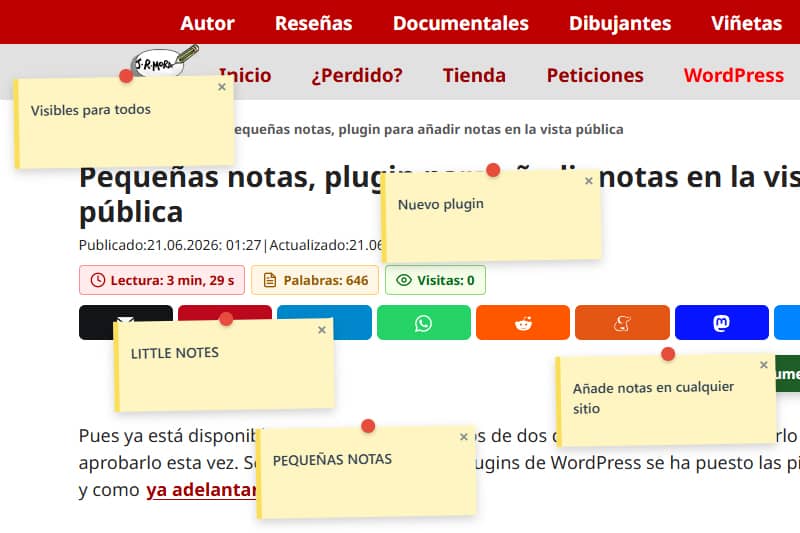
แนวคิดเบื้องหลังคุณสมบัตินี้ ซึ่งผมมีไว้เพื่อวัตถุประสงค์ที่เฉพาะเจาะจงมากนั้น แท้จริงแล้วมีความคล้ายคลึงกัน แต่มีวัตถุประสงค์ที่ต่างกัน: คือการแสดงบันทึกไว้ที่ใดก็ได้เพื่อให้ผู้เยี่ยมชมทุกคนสามารถมองเห็นและปิดได้ สามารถใช้เป็นการแจ้งเตือนหรือเป็นการเรียกร้องให้ดำเนินการได้ เนื่องจากคุณสามารถเพิ่มลิงก์ได้(โดยการป้อน URL เป็น https://) สำหรับการชี้แจงหรือแก้ไขอย่างรวดเร็วในขณะที่คุณกำลังแก้ไขหรืออัปเดต หรือเพื่อเพิ่มข้อมูลเพิ่มเติมเกี่ยวกับรูปภาพ อาจกล่าวได้ว่าทำหน้าที่เป็นทั้งบันทึกข้อมูลและคำเตือน
เนื่องจากฉันชอบปลั๊กอินและฟีเจอร์ที่เรียบง่าย จึงใช้งานได้ง่ายเช่นกัน
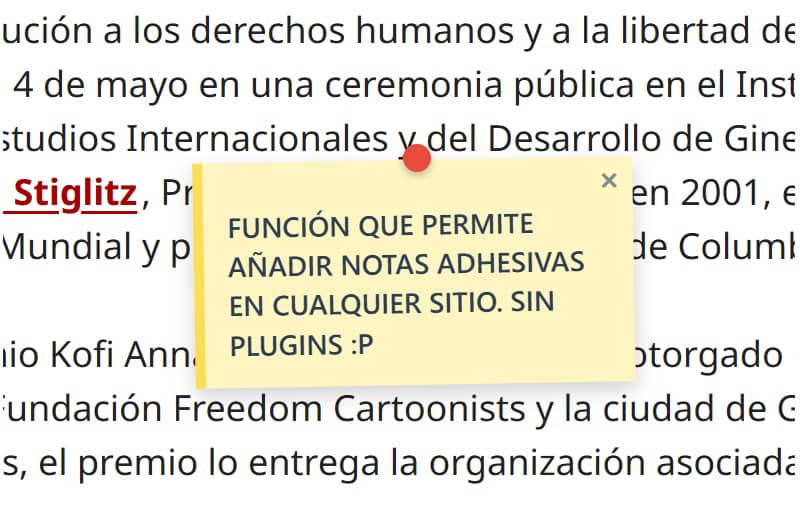
เมื่อคุณเพิ่มฟังก์ชันแล้ว – ไม่ว่าจะเป็นการเพิ่มเป็นสแนปช็อตหรือในไฟล์ functions.php ของธีม – คุณไม่ต้องทำอะไรเพิ่มเติมอีกแล้ว ผู้ใช้ที่เข้าสู่ระบบในฐานะผู้ดูแลระบบจะสามารถเพิ่มบันทึกได้โดยการกดALT และคลิกปุ่มซ้ายของเมาส์ที่ตำแหน่งที่ต้องการให้บันทึกปรากฏขึ้น
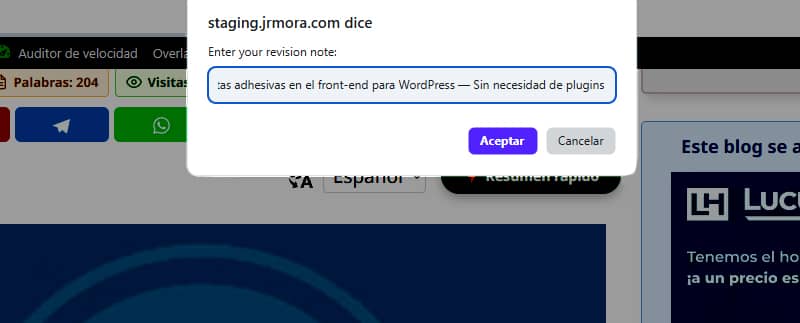
บันทึก ซึ่งสามารถเพิ่มลงในรูปภาพได้ด้วย มีลักษณะดังนี้

ผมกำลังปรับแต่งสิ่งนี้ให้ละเอียดเพื่อให้ตรงกับจุดที่คุณกด ALT + คลิกซ้ายมากที่สุดเท่าที่จะเป็นไปได้ เนื่องจากในขณะนี้โน้ตจะปรากฏสูงหรือต่ำกว่าเล็กน้อยขึ้นอยู่กับองค์ประกอบที่คุณกำลังเพิ่มเข้าไป
ในระหว่างการทดสอบครั้งแรกของฉัน ฉันสังเกตเห็นว่าเมื่อฉันปรับขนาดหน้าต่างเบราว์เซอร์ บันทึกจะเลื่อนออกจากตำแหน่งเดิม เพื่อแก้ไขปัญหานี้ ฉันต้องขอความช่วยเหลือ ปัญหาได้รับการแก้ไขโดยการฟังเหตุการณ์อย่างกระตือรือร้น (การเลื่อนและการปรับขนาด) โดยใช้ JavaScript ซึ่งจะคำนวณพิกัดใหม่แบบไดนามิกตามคอนเทนเนอร์ที่คงที่ ตอนนี้ โน้ตจะคงที่และล็อกอยู่ในตำแหน่งที่แน่นอนโดยไม่เปลี่ยนแปลง แม้จะมีการเปลี่ยนแปลงขนาดหน้าจอ
คุณสามารถเพิ่มบันทึกได้มากเท่าที่ต้องการ โดยคำนึงว่าบันทึกที่คุณเพิ่มล่าสุดจะซ้อนทับกับบันทึกก่อนหน้าเสมอหากคุณวางไว้ใกล้หรือทับกัน และคุณไม่สามารถลากบันทึกเหล่านั้นได้ (ยังไม่สามารถทำได้) – คุณสามารถปิดบันทึกได้เท่านั้น

แผงควบคุมก็มีความพื้นฐานมากเช่นกัน แสดงเพียงรายการที่แสดงชื่อของโพสต์หรือหน้าที่มีการเพิ่มบันทึกและจำนวนบันทึก มีปุ่มสำหรับเข้าชม URL และอีกปุ่มสำหรับลบบันทึกทั้งหมดที่เพิ่มในหน้านั้น
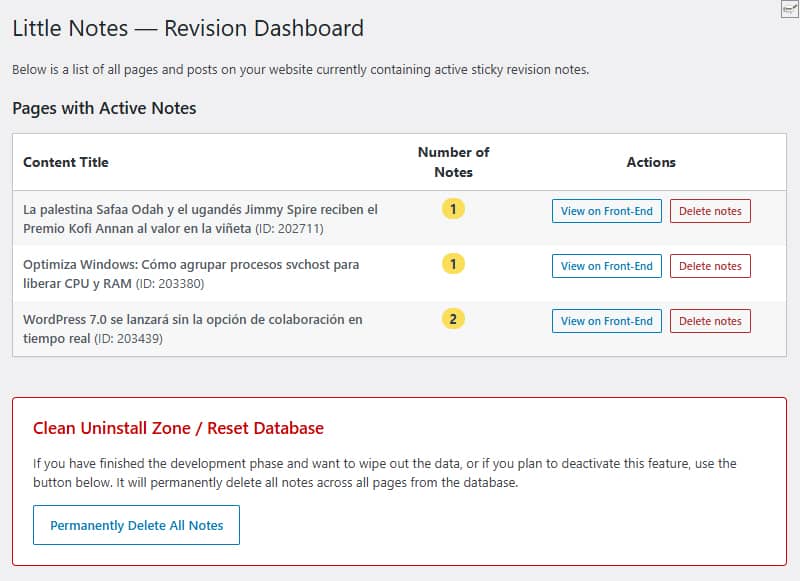
ด้านล่างนี้คือพื้นที่สำหรับการล้างข้อมูล ซึ่งคุณสามารถลบข้อมูลทั้งหมดในฐานข้อมูลได้ด้วยการคลิกเพียงครั้งเดียว ทั้งปุ่ม 'ล้างทั้งหมด' และปุ่ม 'ลบทีละรายการ' จะทำการลบแถวข้อมูลออกจากฐานข้อมูลอย่างสมบูรณ์ เพื่อให้แน่ใจว่าไม่มีข้อมูลใดหลงเหลืออยู่ในเว็บไซต์หากคุณตัดสินใจที่จะหยุดใช้ฟีเจอร์นี้
ไม่มีการสร้างตารางที่กำหนดเอง ทุกอย่างถูกเก็บไว้โดยตรงโดยใช้`update_option()`ในตารางมาตรฐาน `wp_options` ภายใต้ชื่อ `little_notes_page_[ID]`
อีกประเด็นหนึ่งที่ฉันให้ความสำคัญไม่แพ้กันคือประสิทธิภาพการทำงาน หากผู้ใช้ไม่ได้เข้าสู่ระบบในฐานะผู้ดูแลระบบและไม่มีบันทึกใดๆ บนหน้าเว็บ จะไม่มีการโหลดโค้ดใดๆ เลย ไม่มีผลกระทบต่อความเร็วในการเข้าชมของคุณเลย
เมื่อใช้แคนวาสแบบสัมบูรณ์กับ `pointer-events: none` โน้ตจะลอยข้ามหน้าเว็บโดยไม่ส่งผลต่อ CSS, ขอบเขต หรือองค์ประกอบของธีม (ทดสอบแล้วบน GeneratePress)
แม้ว่าฉันจะยังไม่พบข้อผิดพลาดใด ๆ แต่ฉันยังคงทดสอบเพื่อปรับปรุงความปลอดภัยและแก้ไขข้อบกพร่อง โดยมีเป้าหมายที่จะพัฒนาให้เป็นปลั๊กอินเพื่ออัปโหลดไปยังคลัง WordPress ดังนั้นฉันขอแนะนำว่าในขณะนี้คุณควรทดลองใช้ในสภาพแวดล้อมทดสอบก่อน
ผมมีข้อเสนอแนะในการปรับปรุงอยู่สองสามข้อ หากคุณสนใจที่จะลองดู คุณสามารถแนะนำฟีเจอร์ใด ๆ ที่คุณคิดว่าขาดหายไปหรือจะเป็นประโยชน์และ/หรือจำเป็นหากมันกลายเป็นปลั๊กอินอย่างเป็นทางการสำหรับคลังเก็บในอนาคต ชื่อที่ใช้ในการทำงานสำหรับปลั๊กอินนี้คือLittle Notes(บันทึกเล็ก ๆ หรือบันทึกง่าย ๆ)
ในระหว่างนี้ หากฉันอัปเดตโค้ดของฟังก์ชัน ฉันจะดำเนินการที่นี่เลยและเปลี่ยนวันที่เพื่อให้คุณทราบว่ามีการแก้ไขแล้ว
โค้ด
/**
* Función para sistema de notas adhesivas en front-end
* Prefijo único para PHP: little_notes / Prefijo único para CSS y JS: little-notes
* Las notas se añaden con ALT + clic izquierdo en cualquier punto logeado como admin
* Revisión 17/06/2026 - Versión con panel de control y borrado rápido desde admin en Ajustes/Little Notes
* Textos en inglés preparados para plugin
*/
if ( ! defined( 'ABSPATH' ) ) exit;
// 1. FRONT-END ASSETS & DATA LOADING
add_action( 'wp_enqueue_scripts', 'little_notes_cargar_assets' );
function little_notes_cargar_assets() {
$post_id = get_the_ID();
if ( ! $post_id ) return;
add_action( 'wp_footer', function() use ($post_id) {
$notas_actuales = get_option( 'little_notes_page_' . $post_id, array() );
$is_admin = current_user_can( 'manage_options' ) ? 1 : 0;
if ( ! $is_admin && empty( $notas_actuales ) ) return;
$nonce = wp_create_nonce( 'little_notes_seguridad' );
?>
<style id="little-notes-estilos">
#little-notes-canvas {
position: fixed;
top: 0;
left: 0;
width: 100vw;
height: 100vh;
pointer-events: none;
z-index: 999999;
}
.little-note-adhesiva {
position: absolute;
width: 220px;
min-height: 90px;
background: #fef5c1;
padding: 18px 12px 12px 12px;
box-shadow: 0 4px 10px rgba(0,0,0,0.18);
font-family: -apple-system, BlinkMacSystemFont, "Segoe UI", Roboto, Helvetica, Arial, sans-serif;
font-size: 14px;
font-weight: 500;
line-height: 1.4;
color: #2c3e50;
border-left: 5px solid #fade59;
transform: translate(-50%, -10px) rotate(-1deg);
transition: transform 0.15s ease, box-shadow 0.15s ease;
}
.little-note-adhesiva:hover {
transform: translate(-50%, -10px) rotate(0deg) scale(1.03);
box-shadow: 0 6px 14px rgba(0,0,0,0.22);
}
.little-note-texto a {
color: inherit !important;
text-decoration: underline !important;
word-break: break-all;
}
.little-note-pin {
position: absolute;
top: -8px;
left: 50%;
width: 14px;
height: 14px;
background: #e74c3c;
border-radius: 50%;
box-shadow: 0 2px 4px rgba(0,0,0,0.25);
transform: translateX(-50%);
}
.little-note-cerrar {
position: absolute;
top: 2px;
right: 6px;
cursor: pointer;
font-size: 16px;
font-weight: bold;
color: #7f8c8d;
user-select: none;
line-height: 1;
}
.little-note-cerrar:hover { color: #c0392b; }
.little-note-texto {
word-wrap: break-word;
white-space: pre-wrap;
margin-top: 4px;
}
</style>
<div id="little-notes-canvas"></div>
<script id="little-notes-js">
document.addEventListener("DOMContentLoaded", function() {
const canvas = document.getElementById('little-notes-canvas');
const isAdmin = <?php echo $is_admin; ?>;
const notasDB = <?php echo json_encode( $notas_actuales ); ?>;
const closedNotas = JSON.parse(localStorage.getItem('little_notes_cerradas') || '[]');
const ajaxUrl = '<?php echo admin_url( 'admin-ajax.php' ); ?>';
// Buscamos el contenedor principal de GeneratePress o el cuerpo del contenido (.entry-content)
const mainContainer = document.querySelector('.entry-content') || document.querySelector('#content') || document.body;
const deleteTooltip = "<?php echo esc_js( __('Delete permanently for everyone', 'little-notes') ); ?>";
const closeTooltip = "<?php echo esc_js( __('Close note', 'little-notes') ); ?>";
const promptMessage = "<?php echo esc_js( __('Enter your revision note:', 'little-notes') ); ?>";
const confirmDeleteMsg = "<?php echo esc_js( __('Do you want to permanently delete this note from the database?', 'little-notes') ); ?>";
const saveErrorMsg = "<?php echo esc_js( __('Server error while saving.', 'little-notes') ); ?>";
let listaNotasInstanciadas = [];
if (Array.isArray(notasDB)) {
notasDB.forEach(nota => {
if (!closedNotas.includes(nota.id)) {
renderizarNota(nota);
}
});
}
if (isAdmin) {
document.addEventListener('click', function(e) {
if (e.altKey) {
e.preventDefault();
// Medimos la posición relativa al contenedor principal en píxeles y porcentaje
const containerRect = mainContainer.getBoundingClientRect();
const containerAbsoluteLeft = containerRect.left + window.scrollX;
const pixelXRelative = e.pageX - containerAbsoluteLeft;
const pctX = (pixelXRelative / containerRect.width) * 100;
const absoluteY = e.pageY; // El eje Y sigue siendo absoluto al scroll vertical
const texto = prompt(promptMessage);
if (texto && texto.trim() !== "") {
guardarNotaBD(pctX, absoluteY, texto);
}
}
});
}
function autoConvertirEnlaces(texto) {
const expresionUrl = /(\b(https?|ftp|file):\/\/[-A-Z0-9+&@#\/%?=~_|!:,.;]*[-A-Z0-9+&@#\/%=~_|])/ig;
return texto.replace(expresionUrl, function(url) {
return `<a href="${url}" target="_blank" rel="noopener noreferrer">${url}</a>`;
});
}
function renderizarNota(nota) {
const div = document.createElement('div');
div.className = 'little-note-adhesiva';
div.id = nota.id;
div.style.pointerEvents = 'auto';
const textoProcesado = autoConvertirEnlaces(nota.texto);
const currentTooltip = isAdmin ? deleteTooltip : closeTooltip;
div.innerHTML = `
<div class="little-note-pin"></div>
<span class="little-note-cerrar" title="${currentTooltip}">×</span>
<div class="little-note-texto">${textoProcesado}</div>
`;
div.querySelector('.little-note-cerrar').addEventListener('click', function() {
if (isAdmin) {
if (confirm(confirmDeleteMsg)) {
borrarNotaBD(nota.id, div);
}
} else {
closedNotas.push(nota.id);
localStorage.setItem('little_notes_cerradas', JSON.stringify(closedNotas));
div.remove();
listaNotasInstanciadas = listaNotasInstanciadas.filter(n => n.id !== nota.id);
}
});
canvas.appendChild(div);
const objetoNota = { id: nota.id, element: div, pctX: nota.x, originalY: nota.y };
listaNotasInstanciadas.push(objetoNota);
posicionarElemento(objetoNota);
}
function posicionarElemento(objNota) {
const containerRect = mainContainer.getBoundingClientRect();
// Reconstruimos la coordenada X real multiplicando el porcentaje guardado por el ancho actual del bloque
const xCalculado = containerRect.left + (containerRect.width * (objNota.pctX / 100));
// Calculamos la Y restando la barra de scroll vertical del viewport fijo
const yCalculado = objNota.originalY - window.scrollY;
objNota.element.style.left = xCalculado + 'px';
objNota.element.style.top = yCalculado + 'px';
}
function actualizarPosiciones() {
listaNotasInstanciadas.forEach(posicionarElemento);
}
window.addEventListener('scroll', actualizarPosiciones, { passive: true });
window.addEventListener('resize', actualizarPosiciones, { passive: true });
function guardarNotaBD(x, y, texto) {
const formData = new FormData();
formData.append('action', 'little_notes_guardar');
formData.append('post_id', '<?php echo $post_id; ?>');
formData.append('x', x); // Aquí se envía el porcentaje elástico
formData.append('y', y);
formData.append('texto', texto);
formData.append('nonce', '<?php echo $nonce; ?>');
fetch(ajaxUrl, { method: 'POST', body: formData })
.then(res => res.json())
.then(res => {
if(res.success && res.data) {
renderizarNota(res.data);
} else {
alert(saveErrorMsg);
}
})
.catch(err => console.error("AJAX Error:", err));
}
function borrarNotaBD(id, elementoHtml) {
const formData = new FormData();
formData.append('action', 'little_notes_borrar');
formData.append('post_id', '<?php echo $post_id; ?>');
formData.append('nota_id', id);
formData.append('nonce', '<?php echo $nonce; ?>');
fetch(ajaxUrl, { method: 'POST', body: formData })
.then(res => res.json())
.then(res => {
if(res.success) {
elementoHtml.remove();
listaNotasInstanciadas = listaNotasInstanciadas.filter(n => n.id !== id);
}
});
}
});
</script>
<?php
}, 999);
}
// 2. INDEPENDENT AJAX PROCESSORS
add_action( 'wp_ajax_little_notes_guardar', 'little_notes_ajax_guardar_handler' );
function little_notes_ajax_guardar_handler() {
check_ajax_referer( 'little_notes_seguridad', 'nonce' );
if ( ! current_user_can( 'manage_options' ) ) wp_send_json_error( __('Unauthorized', 'little-notes') );
$post_id = intval( $_POST['post_id'] );
$notas = get_option( 'little_notes_page_' . $post_id, array() );
$nueva_nota = array(
'id' => uniqid('note_'),
'x' => floatval( $_POST['x'] ), // Guarda el valor flotante porcentual
'y' => floatval( $_POST['y'] ),
'texto' => sanitize_textarea_field( $_POST['texto'] )
);
$notas[] = $nueva_nota;
update_option( 'little_notes_page_' . $post_id, $notas );
wp_send_json_success( $nueva_nota );
}
add_action( 'wp_ajax_little_notes_borrar', 'little_notes_ajax_borrar_handler' );
function little_notes_ajax_borrar_handler() {
check_ajax_referer( 'little_notes_seguridad', 'nonce' );
if ( ! current_user_can( 'manage_options' ) ) wp_send_json_error( __('Unauthorized', 'little-notes') );
$post_id = intval( $_POST['post_id'] );
$nota_id = sanitize_text_field( $_POST['nota_id'] );
$notas = get_option( 'little_notes_page_' . $post_id, array() );
$notas = array_filter( $notas, function($n) use ($nota_id) {
return $n['id'] !== $nota_id;
});
if ( empty( $notas ) ) {
delete_option( 'little_notes_page_' . $post_id );
} else {
update_option( 'little_notes_page_' . $post_id, array_values($notas) );
}
wp_send_json_success();
}
// 3. ADMIN MENU & ACTIVE NOTES OVERVIEW
add_action( 'admin_menu', 'little_notes_crear_menu_admin' );
function little_notes_crear_menu_admin() {
add_options_page(
__('Little Notes Settings', 'little-notes'),
__('Little Notes', 'little-notes'),
'manage_options',
'little-notes-admin',
'little_notes_render_page_admin'
);
}
function little_notes_render_page_admin() {
if ( ! current_user_can( 'manage_options' ) ) return;
global $wpdb;
if ( isset($_POST['little_notes_delete_post_id']) ) {
check_admin_referer( 'little_notes_delete_post_action' );
$target_post_id = intval($_POST['little_notes_delete_post_id']);
delete_option( 'little_notes_page_' . $target_post_id );
echo '<div class="notice notice-success is-dismissible"><p><strong>' . esc_html__('Notes for this page have been successfully deleted.', 'little-notes') . '</strong></p></div>';
}
if ( isset($_POST['little_notes_purge_all']) ) {
check_admin_referer( 'little_notes_accion_purgar' );
$wpdb->query( "DELETE FROM {$wpdb->options} WHERE option_name LIKE 'little_notes_page_%'" );
echo '<div class="notice notice-success is-dismissible"><p><strong>' . esc_html__('Success! All revision notes have been cleanly deleted from the database.', 'little-notes') . '</strong></p></div>';
}
$resultados = $wpdb->get_results( "SELECT option_name, option_value FROM {$wpdb->options} WHERE option_name LIKE 'little_notes_page_%'" );
?>
<div class="wrap">
<h1><?php _e('Little Notes — Revision Dashboard', 'little-notes'); ?></h1>
<p><?php _e('Below is a list of all pages and posts on your website currently containing active sticky revision notes.', 'little-notes'); ?></p>
<h2 class="title" style="margin-top:20px;"><?php _e('Pages with Active Notes', 'little-notes'); ?></h2>
<table class="wp-list-table widefat fixed striped table-view-list" style="margin-top:10px; max-width: 850px;">
<thead>
<tr>
<th style="font-weight:bold; width: 50%;"><?php _e('Content Title', 'little-notes'); ?></th>
<th style="font-weight:bold; width: 15%; text-align:center;"><?php _e('Number of Notes', 'little-notes'); ?></th>
<th style="font-weight:bold; width: 35%; text-align:center;"><?php _e('Actions', 'little-notes'); ?></th>
</tr>
</thead>
<tbody>
<?php if ( empty( $resultados ) ) : ?>
<tr>
<td colspan="3"><?php _e('No active revision notes found on any page.', 'little-notes'); ?></td>
</tr>
<?php else :
foreach ( $resultados as $fila ) {
$post_id = intval( str_replace( 'little_notes_page_', '', $fila->option_name ) );
$titulo = get_the_title( $post_id );
if ( ! $titulo ) $titulo = sprintf( __('Content #ID %d (Or deleted)', 'little-notes'), $post_id );
$datos_notas = maybe_unserialize( $fila->option_value );
$cantidad = is_array( $datos_notas ) ? count( $datos_notas ) : 0;
if ( $cantidad === 0 ) continue;
?>
<tr>
<td><strong><?php echo esc_html( $titulo ); ?></strong> <span class="description">(ID: <?php echo $post_id; ?>)</span></td>
<td style="text-align:center;"><span class="update-plugins count-<?php echo $cantidad; ?>" style="background:#fade59; color:#2c3e50; font-weight:bold; padding:2px 8px; border-radius:10px;"><?php echo $cantidad; ?></span></td>
<td style="text-align:center;">
<div style="display: flex; gap: 8px; justify-content: center; align-items: center;">
<a href="<?php echo esc_url( get_permalink( $post_id ) ); ?>" target="_blank" class="button button-small"><?php _e('View on Front-End', 'little-notes'); ?></a>
<form method="post" action="" style="margin:0;" onsubmit="return confirm('<?php echo esc_js( sprintf(__('Are you sure you want to delete all notes for: %s?', 'little-notes'), $titulo) ); ?>');">
<?php wp_nonce_field( 'little_notes_delete_post_action' ); ?>
<input type="hidden" name="little_notes_delete_post_id" value="<?php echo $post_id; ?>">
<input type="submit" class="button button-small delete" style="color: #b32d2e; border-color: #b32d2e;" value="<?php esc_attr_e('Delete notes', 'little-notes'); ?>">
</form>
</div>
</td>
</tr>
<?php
}
endif; ?>
</tbody>
</table>
<div style="margin-top: 40px; padding: 20px; border: 1px solid #cc0000; background: #fff; max-width: 760px; border-radius: 4px;">
<h3 style="color: #cc0000; margin-top:0;"><?php _e('Clean Uninstall Zone / Reset Database', 'little-notes'); ?></h3>
<p><?php _e('If you have finished the development phase and want to wipe out the data, or if you plan to deactivate this feature, use the button below. It will permanently delete all notes across all pages from the database.', 'little-notes'); ?></p>
<?php
$confirm_js = esc_js( __('Are you absolutely sure you want to delete ALL revision notes from the database? This action cannot be undone.', 'little-notes') );
?>
<form method="post" action="" onsubmit="return confirm('<?php echo $confirm_js; ?>');">
<?php wp_nonce_field( 'little_notes_accion_purgar' ); ?>
<input type="hidden" name="little_notes_purge_all" value="1">
<?php submit_button( __('Permanently Delete All Notes', 'little-notes'), 'delete', 'submit', false ); ?>
</form>
</div>
</div>
<?php
}