Számos olyan bővítmény létezik, amely hasonló funkciót lát el, de szinte mindegyik arra szolgál, hogy amikor ügyfelekkel együtt tervezel vagy ellenőrizel egy weboldalt (vagy a saját projektjeidet), megkönnyítse a visszajelzési folyamatot azzal, hogy lehetőséget nyújt megjegyzések hozzáadására a bejegyzés- és oldalszerkesztőben, illetve a WordPress irányítópultján.
Ennek a funkciónak a koncepciója – amelyet itt egy nagyon konkrét célra használtam – lényegében hasonló, de más célra szolgál: egy megjegyzés megjelenítése bárhol, amelyet minden látogató megtekinthet és bezárhat. Használható figyelmeztetésként, cselekvésre ösztönző felhívásként, mivel linkeket is hozzáadhatunk (az URL-t https:// formában írva), gyors pontosításokra vagy javításokra szerkesztés vagy frissítés közben, illetve egy képhez kapcsolódó kiegészítő információk megadására. Mondhatjuk, hogy egyaránt szolgál tájékoztató megjegyzésként és figyelmeztetésként is.
Mivel szeretem az egyszerű bővítményeket és funkciókat, a használatuk is egyszerű.
Miután hozzáadtad a függvényt – akár kódrészletként, akár a sablonod functions.php fájljában –, nincs más teendőd. Az adminisztrátorként bejelentkezett felhasználó az ALT billentyű és az egér bal gombjának egyidejű lenyomásával jegyzetet adhat hozzá arra a helyre, ahol azt megjelenni szeretné.
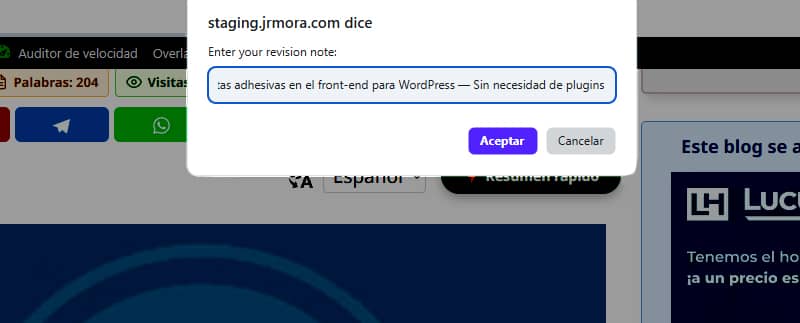
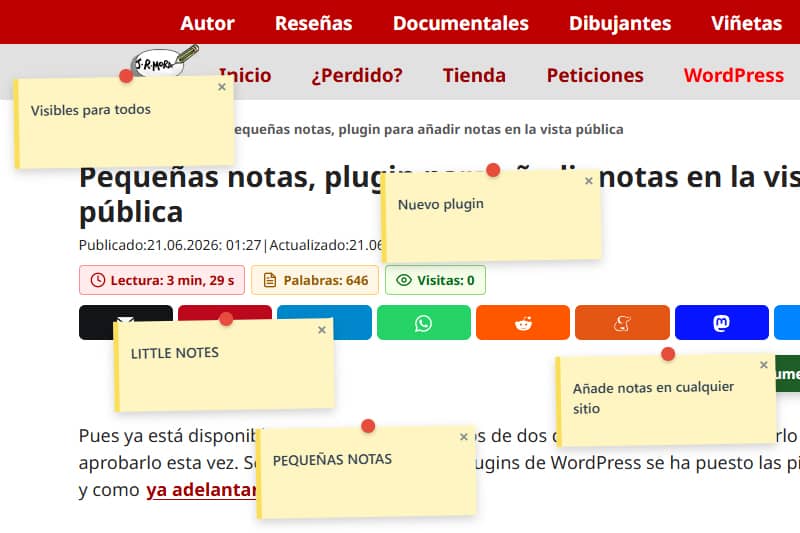
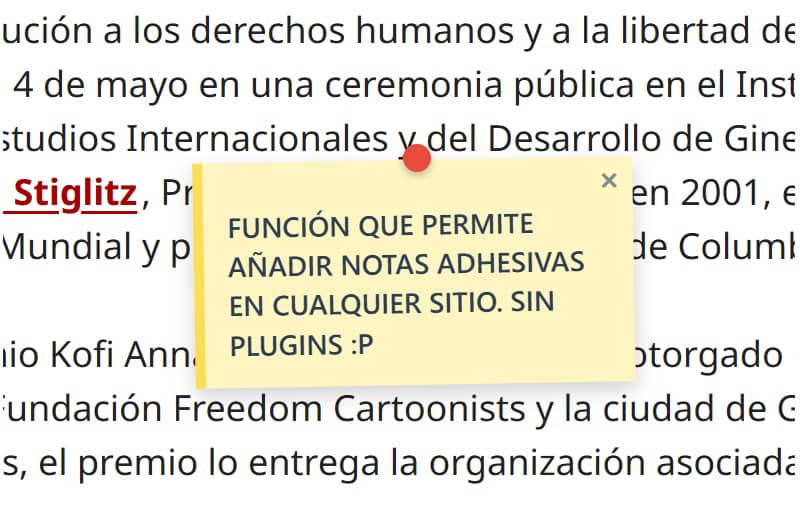
A jegyzetek, amelyeket a képekre is fel lehet tenni, így néznek ki.

Még mindig finomítom ezt, hogy a lehető legjobban illeszkedjen ahhoz a ponthoz, ahol az ALT + bal egérgombbal kattintunk, mivel jelenleg a jegyzet néhány milliméterrel lejjebb vagy feljebb jelenik meg, attól függően, hogy melyik elemre adjuk hozzá.
Az első tesztelések során észrevettem, hogy a böngészőablakok átméretezésekor a jegyzetek elmozdultak eredeti helyükről. A probléma megoldásához segítséget kellett kérnem. A problémát úgy oldottam meg, hogy JavaScript segítségével aktívan figyeltem az eseményeket (scroll és resize), amelyek dinamikusan újraszámolják a koordinátákat egy rögzített (fixed) konténer alapján. Most a jegyzetek teljesen mozdulatlanok maradnak, és pontosan a helyükön maradnak, függetlenül a képernyő méretének változásától.
Annyi jegyzetet tehetsz fel, amennyit csak akarsz, de ne feledd, hogy az utoljára hozzáadott jegyzet mindig átfedi az előzőt, ha túl közel helyezed el hozzá vagy rá, és (egyelőre) nem lehet őket húzogatni, csak bezárni.

A vezérlőpanel szintén nagyon egyszerű. Csak egy listát jelenít meg, amely tartalmazza a bejegyzés vagy oldal címét, ahová jegyzeteket fűztek, valamint a jegyzetek számát. Van egy gomb az URL megnyitásához, és egy másik az adott oldalhoz fűzött összes jegyzet törléséhez.
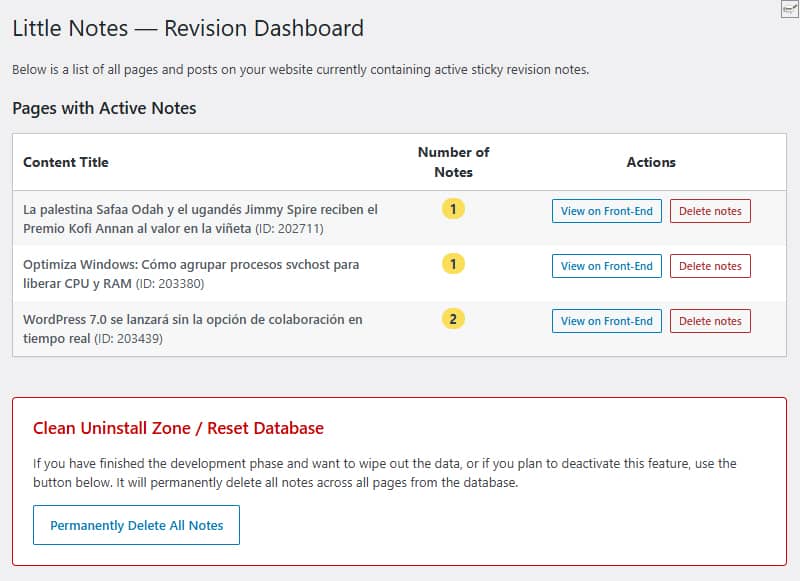
Alul található a tisztítási terület, ahol egy kattintással eltávolíthatók az adatbázisban található összes jegyzet. Mind a tömeges törlés, mind az egyedi törlés gomb teljes mértékben megtisztítja az adatbázis sorait, így nem maradnak felesleges adatok a webhelyen, ha úgy döntesz, hogy többé nem használod a funkciót.
Nem jönnek létre egyéni táblák. Minden adat natív módon, az update_option() függvény segítségével kerül tárolásra a wp_options nevű standard táblában, a little_notes_page_[ID] névvel.
Egy másik kérdés, amelyre a lehető legnagyobb figyelmet fordítom, a teljesítmény. Ha a felhasználó nem rendszergazdaként jelentkezett be, és nincsenek megjegyzések az oldalon, akkor egyáltalán nem töltődik be kód. Ez egyáltalán nem befolyásolja a látogatóid oldalbetöltési sebességét.
Ha egy abszolút méretű vásznat (canvas) használunk a ` pointer-events: none` beállítással, a jegyzetek a weboldalon lebegnek anélkül, hogy megváltoztatnák a CSS-t, a margókat vagy a téma elemeit (jelenleg a GeneratePress-en tesztelve).
Bár nem találtam hibákat, továbbra is tesztelem a programot a biztonság növelése és a hibajavítás érdekében, azzal a szándékkal, hogy bővítményként feltöltsem a WordPress-tárházba; ezért azt javaslom, hogy egyelőre egy tesztkörnyezetben próbáld ki.
Van pár fejlesztési ötletem. Ha kedved támad kipróbálni, javasolhatsz olyan funkciókat, amelyek szerinted hiányoznak belőle, vagy amelyek hasznosak és/vagy szükségesek lennének, ha végül hivatalos bővítményként felkerülne a tárolóba. A lehetséges bővítmény ideiglenes címe: Little Notes (Kis jegyzetek vagy Egyszerű jegyzetek).
Addig is, ha frissítem a függvény kódját, azt itt fogom megtenni, és megváltoztatom a dátumot, hogy tudd, hogy módosult.
Kód
/**
* Función para sistema de notas adhesivas en front-end
* Prefijo único para PHP: little_notes / Prefijo único para CSS y JS: little-notes
* Las notas se añaden con ALT + clic izquierdo en cualquier punto logeado como admin
* Revisión 17/06/2026 - Versión con panel de control y borrado rápido desde admin en Ajustes/Little Notes
* Textos en inglés preparados para plugin
*/
if ( ! defined( 'ABSPATH' ) ) exit;
// 1. FRONT-END ASSETS & DATA LOADING
add_action( 'wp_enqueue_scripts', 'little_notes_cargar_assets' );
function little_notes_cargar_assets() {
$post_id = get_the_ID();
if ( ! $post_id ) return;
add_action( 'wp_footer', function() use ($post_id) {
$notas_actuales = get_option( 'little_notes_page_' . $post_id, array() );
$is_admin = current_user_can( 'manage_options' ) ? 1 : 0;
if ( ! $is_admin && empty( $notas_actuales ) ) return;
$nonce = wp_create_nonce( 'little_notes_seguridad' );
?>
<style id="little-notes-estilos">
#little-notes-canvas {
position: fixed;
top: 0;
left: 0;
width: 100vw;
height: 100vh;
pointer-events: none;
z-index: 999999;
}
.little-note-adhesiva {
position: absolute;
width: 220px;
min-height: 90px;
background: #fef5c1;
padding: 18px 12px 12px 12px;
box-shadow: 0 4px 10px rgba(0,0,0,0.18);
font-family: -apple-system, BlinkMacSystemFont, "Segoe UI", Roboto, Helvetica, Arial, sans-serif;
font-size: 14px;
font-weight: 500;
line-height: 1.4;
color: #2c3e50;
border-left: 5px solid #fade59;
transform: translate(-50%, -10px) rotate(-1deg);
transition: transform 0.15s ease, box-shadow 0.15s ease;
}
.little-note-adhesiva:hover {
transform: translate(-50%, -10px) rotate(0deg) scale(1.03);
box-shadow: 0 6px 14px rgba(0,0,0,0.22);
}
.little-note-texto a {
color: inherit !important;
text-decoration: underline !important;
word-break: break-all;
}
.little-note-pin {
position: absolute;
top: -8px;
left: 50%;
width: 14px;
height: 14px;
background: #e74c3c;
border-radius: 50%;
box-shadow: 0 2px 4px rgba(0,0,0,0.25);
transform: translateX(-50%);
}
.little-note-cerrar {
position: absolute;
top: 2px;
right: 6px;
cursor: pointer;
font-size: 16px;
font-weight: bold;
color: #7f8c8d;
user-select: none;
line-height: 1;
}
.little-note-cerrar:hover { color: #c0392b; }
.little-note-texto {
word-wrap: break-word;
white-space: pre-wrap;
margin-top: 4px;
}
</style>
<div id="little-notes-canvas"></div>
<script id="little-notes-js">
document.addEventListener("DOMContentLoaded", function() {
const canvas = document.getElementById('little-notes-canvas');
const isAdmin = <?php echo $is_admin; ?>;
const notasDB = <?php echo json_encode( $notas_actuales ); ?>;
const closedNotas = JSON.parse(localStorage.getItem('little_notes_cerradas') || '[]');
const ajaxUrl = '<?php echo admin_url( 'admin-ajax.php' ); ?>';
// Buscamos el contenedor principal de GeneratePress o el cuerpo del contenido (.entry-content)
const mainContainer = document.querySelector('.entry-content') || document.querySelector('#content') || document.body;
const deleteTooltip = "<?php echo esc_js( __('Delete permanently for everyone', 'little-notes') ); ?>";
const closeTooltip = "<?php echo esc_js( __('Close note', 'little-notes') ); ?>";
const promptMessage = "<?php echo esc_js( __('Enter your revision note:', 'little-notes') ); ?>";
const confirmDeleteMsg = "<?php echo esc_js( __('Do you want to permanently delete this note from the database?', 'little-notes') ); ?>";
const saveErrorMsg = "<?php echo esc_js( __('Server error while saving.', 'little-notes') ); ?>";
let listaNotasInstanciadas = [];
if (Array.isArray(notasDB)) {
notasDB.forEach(nota => {
if (!closedNotas.includes(nota.id)) {
renderizarNota(nota);
}
});
}
if (isAdmin) {
document.addEventListener('click', function(e) {
if (e.altKey) {
e.preventDefault();
// Medimos la posición relativa al contenedor principal en píxeles y porcentaje
const containerRect = mainContainer.getBoundingClientRect();
const containerAbsoluteLeft = containerRect.left + window.scrollX;
const pixelXRelative = e.pageX - containerAbsoluteLeft;
const pctX = (pixelXRelative / containerRect.width) * 100;
const absoluteY = e.pageY; // El eje Y sigue siendo absoluto al scroll vertical
const texto = prompt(promptMessage);
if (texto && texto.trim() !== "") {
guardarNotaBD(pctX, absoluteY, texto);
}
}
});
}
function autoConvertirEnlaces(texto) {
const expresionUrl = /(\b(https?|ftp|file):\/\/[-A-Z0-9+&@#\/%?=~_|!:,.;]*[-A-Z0-9+&@#\/%=~_|])/ig;
return texto.replace(expresionUrl, function(url) {
return `<a href="${url}" target="_blank" rel="noopener noreferrer">${url}</a>`;
});
}
function renderizarNota(nota) {
const div = document.createElement('div');
div.className = 'little-note-adhesiva';
div.id = nota.id;
div.style.pointerEvents = 'auto';
const textoProcesado = autoConvertirEnlaces(nota.texto);
const currentTooltip = isAdmin ? deleteTooltip : closeTooltip;
div.innerHTML = `
<div class="little-note-pin"></div>
<span class="little-note-cerrar" title="${currentTooltip}">×</span>
<div class="little-note-texto">${textoProcesado}</div>
`;
div.querySelector('.little-note-cerrar').addEventListener('click', function() {
if (isAdmin) {
if (confirm(confirmDeleteMsg)) {
borrarNotaBD(nota.id, div);
}
} else {
closedNotas.push(nota.id);
localStorage.setItem('little_notes_cerradas', JSON.stringify(closedNotas));
div.remove();
listaNotasInstanciadas = listaNotasInstanciadas.filter(n => n.id !== nota.id);
}
});
canvas.appendChild(div);
const objetoNota = { id: nota.id, element: div, pctX: nota.x, originalY: nota.y };
listaNotasInstanciadas.push(objetoNota);
posicionarElemento(objetoNota);
}
function posicionarElemento(objNota) {
const containerRect = mainContainer.getBoundingClientRect();
// Reconstruimos la coordenada X real multiplicando el porcentaje guardado por el ancho actual del bloque
const xCalculado = containerRect.left + (containerRect.width * (objNota.pctX / 100));
// Calculamos la Y restando la barra de scroll vertical del viewport fijo
const yCalculado = objNota.originalY - window.scrollY;
objNota.element.style.left = xCalculado + 'px';
objNota.element.style.top = yCalculado + 'px';
}
function actualizarPosiciones() {
listaNotasInstanciadas.forEach(posicionarElemento);
}
window.addEventListener('scroll', actualizarPosiciones, { passive: true });
window.addEventListener('resize', actualizarPosiciones, { passive: true });
function guardarNotaBD(x, y, texto) {
const formData = new FormData();
formData.append('action', 'little_notes_guardar');
formData.append('post_id', '<?php echo $post_id; ?>');
formData.append('x', x); // Aquí se envía el porcentaje elástico
formData.append('y', y);
formData.append('texto', texto);
formData.append('nonce', '<?php echo $nonce; ?>');
fetch(ajaxUrl, { method: 'POST', body: formData })
.then(res => res.json())
.then(res => {
if(res.success && res.data) {
renderizarNota(res.data);
} else {
alert(saveErrorMsg);
}
})
.catch(err => console.error("AJAX Error:", err));
}
function borrarNotaBD(id, elementoHtml) {
const formData = new FormData();
formData.append('action', 'little_notes_borrar');
formData.append('post_id', '<?php echo $post_id; ?>');
formData.append('nota_id', id);
formData.append('nonce', '<?php echo $nonce; ?>');
fetch(ajaxUrl, { method: 'POST', body: formData })
.then(res => res.json())
.then(res => {
if(res.success) {
elementoHtml.remove();
listaNotasInstanciadas = listaNotasInstanciadas.filter(n => n.id !== id);
}
});
}
});
</script>
<?php
}, 999);
}
// 2. INDEPENDENT AJAX PROCESSORS
add_action( 'wp_ajax_little_notes_guardar', 'little_notes_ajax_guardar_handler' );
function little_notes_ajax_guardar_handler() {
check_ajax_referer( 'little_notes_seguridad', 'nonce' );
if ( ! current_user_can( 'manage_options' ) ) wp_send_json_error( __('Unauthorized', 'little-notes') );
$post_id = intval( $_POST['post_id'] );
$notas = get_option( 'little_notes_page_' . $post_id, array() );
$nueva_nota = array(
'id' => uniqid('note_'),
'x' => floatval( $_POST['x'] ), // Guarda el valor flotante porcentual
'y' => floatval( $_POST['y'] ),
'texto' => sanitize_textarea_field( $_POST['texto'] )
);
$notas[] = $nueva_nota;
update_option( 'little_notes_page_' . $post_id, $notas );
wp_send_json_success( $nueva_nota );
}
add_action( 'wp_ajax_little_notes_borrar', 'little_notes_ajax_borrar_handler' );
function little_notes_ajax_borrar_handler() {
check_ajax_referer( 'little_notes_seguridad', 'nonce' );
if ( ! current_user_can( 'manage_options' ) ) wp_send_json_error( __('Unauthorized', 'little-notes') );
$post_id = intval( $_POST['post_id'] );
$nota_id = sanitize_text_field( $_POST['nota_id'] );
$notas = get_option( 'little_notes_page_' . $post_id, array() );
$notas = array_filter( $notas, function($n) use ($nota_id) {
return $n['id'] !== $nota_id;
});
if ( empty( $notas ) ) {
delete_option( 'little_notes_page_' . $post_id );
} else {
update_option( 'little_notes_page_' . $post_id, array_values($notas) );
}
wp_send_json_success();
}
// 3. ADMIN MENU & ACTIVE NOTES OVERVIEW
add_action( 'admin_menu', 'little_notes_crear_menu_admin' );
function little_notes_crear_menu_admin() {
add_options_page(
__('Little Notes Settings', 'little-notes'),
__('Little Notes', 'little-notes'),
'manage_options',
'little-notes-admin',
'little_notes_render_page_admin'
);
}
function little_notes_render_page_admin() {
if ( ! current_user_can( 'manage_options' ) ) return;
global $wpdb;
if ( isset($_POST['little_notes_delete_post_id']) ) {
check_admin_referer( 'little_notes_delete_post_action' );
$target_post_id = intval($_POST['little_notes_delete_post_id']);
delete_option( 'little_notes_page_' . $target_post_id );
echo '<div class="notice notice-success is-dismissible"><p><strong>' . esc_html__('Notes for this page have been successfully deleted.', 'little-notes') . '</strong></p></div>';
}
if ( isset($_POST['little_notes_purge_all']) ) {
check_admin_referer( 'little_notes_accion_purgar' );
$wpdb->query( "DELETE FROM {$wpdb->options} WHERE option_name LIKE 'little_notes_page_%'" );
echo '<div class="notice notice-success is-dismissible"><p><strong>' . esc_html__('Success! All revision notes have been cleanly deleted from the database.', 'little-notes') . '</strong></p></div>';
}
$resultados = $wpdb->get_results( "SELECT option_name, option_value FROM {$wpdb->options} WHERE option_name LIKE 'little_notes_page_%'" );
?>
<div class="wrap">
<h1><?php _e('Little Notes — Revision Dashboard', 'little-notes'); ?></h1>
<p><?php _e('Below is a list of all pages and posts on your website currently containing active sticky revision notes.', 'little-notes'); ?></p>
<h2 class="title" style="margin-top:20px;"><?php _e('Pages with Active Notes', 'little-notes'); ?></h2>
<table class="wp-list-table widefat fixed striped table-view-list" style="margin-top:10px; max-width: 850px;">
<thead>
<tr>
<th style="font-weight:bold; width: 50%;"><?php _e('Content Title', 'little-notes'); ?></th>
<th style="font-weight:bold; width: 15%; text-align:center;"><?php _e('Number of Notes', 'little-notes'); ?></th>
<th style="font-weight:bold; width: 35%; text-align:center;"><?php _e('Actions', 'little-notes'); ?></th>
</tr>
</thead>
<tbody>
<?php if ( empty( $resultados ) ) : ?>
<tr>
<td colspan="3"><?php _e('No active revision notes found on any page.', 'little-notes'); ?></td>
</tr>
<?php else :
foreach ( $resultados as $fila ) {
$post_id = intval( str_replace( 'little_notes_page_', '', $fila->option_name ) );
$titulo = get_the_title( $post_id );
if ( ! $titulo ) $titulo = sprintf( __('Content #ID %d (Or deleted)', 'little-notes'), $post_id );
$datos_notas = maybe_unserialize( $fila->option_value );
$cantidad = is_array( $datos_notas ) ? count( $datos_notas ) : 0;
if ( $cantidad === 0 ) continue;
?>
<tr>
<td><strong><?php echo esc_html( $titulo ); ?></strong> <span class="description">(ID: <?php echo $post_id; ?>)</span></td>
<td style="text-align:center;"><span class="update-plugins count-<?php echo $cantidad; ?>" style="background:#fade59; color:#2c3e50; font-weight:bold; padding:2px 8px; border-radius:10px;"><?php echo $cantidad; ?></span></td>
<td style="text-align:center;">
<div style="display: flex; gap: 8px; justify-content: center; align-items: center;">
<a href="<?php echo esc_url( get_permalink( $post_id ) ); ?>" target="_blank" class="button button-small"><?php _e('View on Front-End', 'little-notes'); ?></a>
<form method="post" action="" style="margin:0;" onsubmit="return confirm('<?php echo esc_js( sprintf(__('Are you sure you want to delete all notes for: %s?', 'little-notes'), $titulo) ); ?>');">
<?php wp_nonce_field( 'little_notes_delete_post_action' ); ?>
<input type="hidden" name="little_notes_delete_post_id" value="<?php echo $post_id; ?>">
<input type="submit" class="button button-small delete" style="color: #b32d2e; border-color: #b32d2e;" value="<?php esc_attr_e('Delete notes', 'little-notes'); ?>">
</form>
</div>
</td>
</tr>
<?php
}
endif; ?>
</tbody>
</table>
<div style="margin-top: 40px; padding: 20px; border: 1px solid #cc0000; background: #fff; max-width: 760px; border-radius: 4px;">
<h3 style="color: #cc0000; margin-top:0;"><?php _e('Clean Uninstall Zone / Reset Database', 'little-notes'); ?></h3>
<p><?php _e('If you have finished the development phase and want to wipe out the data, or if you plan to deactivate this feature, use the button below. It will permanently delete all notes across all pages from the database.', 'little-notes'); ?></p>
<?php
$confirm_js = esc_js( __('Are you absolutely sure you want to delete ALL revision notes from the database? This action cannot be undone.', 'little-notes') );
?>
<form method="post" action="" onsubmit="return confirm('<?php echo $confirm_js; ?>');">
<?php wp_nonce_field( 'little_notes_accion_purgar' ); ?>
<input type="hidden" name="little_notes_purge_all" value="1">
<?php submit_button( __('Permanently Delete All Notes', 'little-notes'), 'delete', 'submit', false ); ?>
</form>
</div>
</div>
<?php
}