ऐसे कई प्लगइन्स हैं जो कुछ इसी तरह का काम करते हैं, लेकिन इनमें से लगभग सभी का उद्देश्य तब उपयोग करना है जब आप क्लाइंट्स के साथ (या अपने स्वयं के प्रोजेक्ट्स के लिए) किसी वेबसाइट को डिजाइन या समीक्षा कर रहे हों, ताकि पोस्ट और पेज एडिटर में या अपने वर्डप्रेस डैशबोर्ड पर नोट्स जोड़कर फीडबैक प्रक्रिया को सुगम बनाया जा सके।
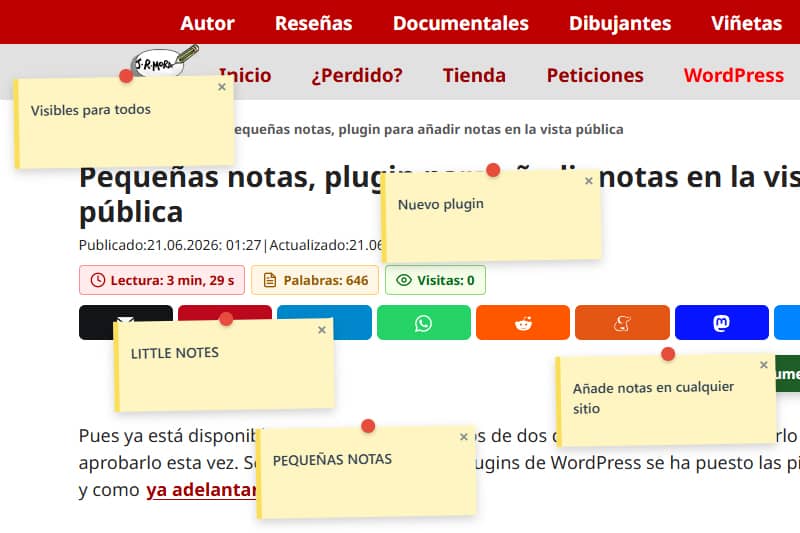
इस सुविधा के पीछे की अवधारणा, जिसे मैंने यहाँ एक बहुत ही विशिष्ट उद्देश्य के लिए स्थापित किया था, मूल रूप से समान है, लेकिन इसका उद्देश्य अलग है: साइट पर कहीं भी एक नोट प्रदर्शित करना जिसे कोई भी आगंतुक देख और बंद कर सकता है। इसे अलर्ट या कॉल टू एक्शन के रूप में इस्तेमाल किया जा सकता है, क्योंकि आप लिंक जोड़ सकते हैं (https:// के रूप में URL दर्ज करके), संपादन या अपडेट करते समय त्वरित स्पष्टीकरण या सुधार के लिए, या किसी छवि के बारे में अतिरिक्त जानकारी जोड़ने के लिए। इसे सूचनात्मक नोट और चेतावनी दोनों के रूप में कहा जा सकता है।
चूंकि मुझे सरल प्लगइन्स और फ़ंक्शन्स पसंद हैं, इसलिए उनका उपयोग करना भी उतना ही आसान है।
एक बार जब आप फ़ंक्शन जोड़ देते हैं – चाहे वह स्निपेट के रूप में हो या आपके थीम की functions.php फ़ाइल में – तो आपको और कुछ करने की ज़रूरत नहीं है।प्रशासक के रूप में लॉग इन किया कोई भी उपयोगकर्ता ALT दबाकर और उस बिंदु पर बाएँ माउस बटन पर क्लिक करके जहाँ वे नोट दिखाना चाहते हैं, एक नोट जोड़ सकता है।
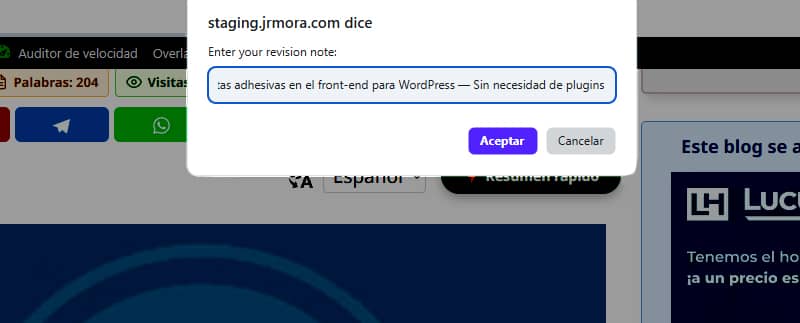
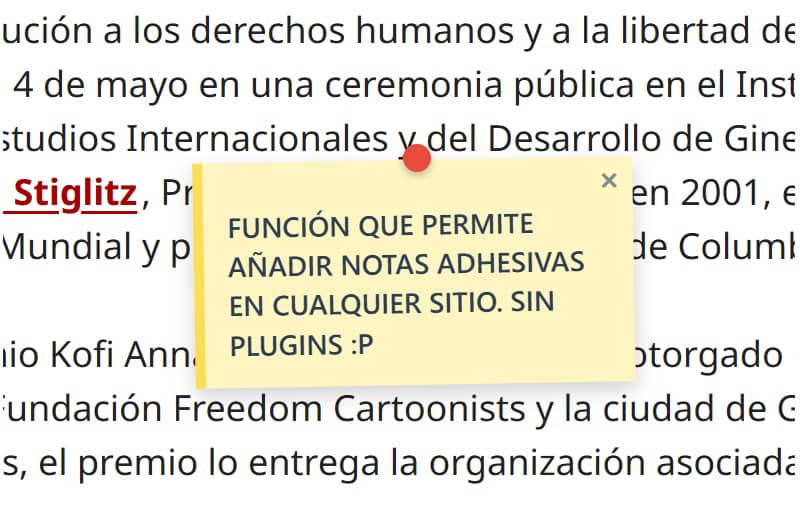
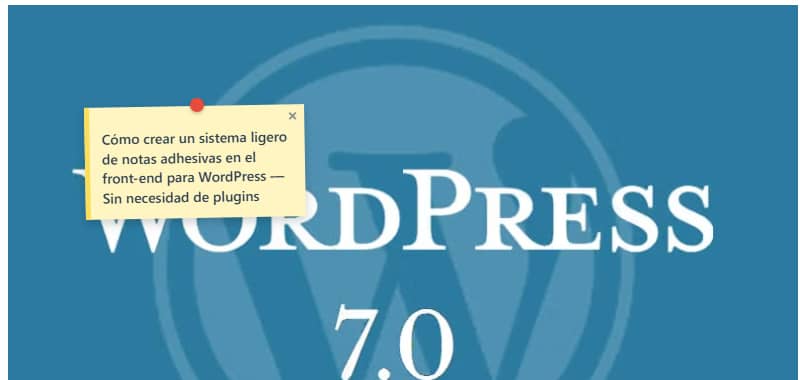
नोट्स, जिन्हें छवियों में भी जोड़ा जा सकता है, इस तरह दिखते हैं।
मैं अभी भी इसे परिष्कृत कर रहा हूँ ताकि यह ALT दबाकर बाएँ-क्लिक करने वाले बिंदु के जितना संभव हो उतना सटीक मेल खाए, क्योंकि फिलहाल नोट उस तत्व के आधार पर कुछ मिलीमीटर ऊपर या नीचे दिखाई देता है जिसमें आप इसे जोड़ रहे हैं।
मेरे प्रारंभिक परीक्षणों के दौरान, मैंने देखा कि जब मैं ब्राउज़र विंडो का आकार बदलता था, तो नोट्स अपनी मूल स्थिति से हट जाते थे। इसे ठीक करने के लिए, मुझे मदद लेनी पड़ी। समस्या का समाधान जावास्क्रिप्ट का उपयोग करके इवेंट्स (स्क्रॉल और रिसाइज़) को सक्रिय रूप से सुनने से हुआ, जो एक स्थिर कंटेनर के आधार पर निर्देशांकों की गतिशील रूप से पुनर्गणना करता है। अब, नोट्स स्क्रीन के आकार में बदलाव के बावजूद पूरी तरह स्थिर और अपनी सटीक स्थिति में लॉक रहते हैं।
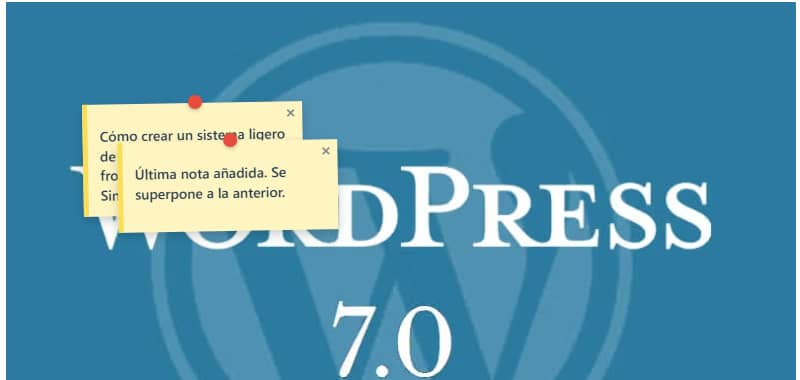
आप जितनी चाहें उतनी नोट्स जोड़ सकते हैं, लेकिन ध्यान रखें कि जब आप आखिरी नोट को बहुत करीब या ऊपर रखेंगे, तो वह हमेशा पिछले नोट पर ओवरलैप हो जाएगी, और आप अभी उन्हें ड्रैग नहीं कर सकते – आप केवल उन्हें बंद कर सकते हैं।
कंट्रोल पैनल भी बहुत ही बुनियादी है। यह केवल एक सूची दिखाता है जिसमें उस पोस्ट या पेज का शीर्षक होता है जहाँ नोट्स जोड़े गए हैं और नोट्स की संख्या होती है। एक बटन URL पर जाने के लिए है और दूसरा उस पेज पर जोड़े गए सभी नोट्स को हटाने के लिए है।
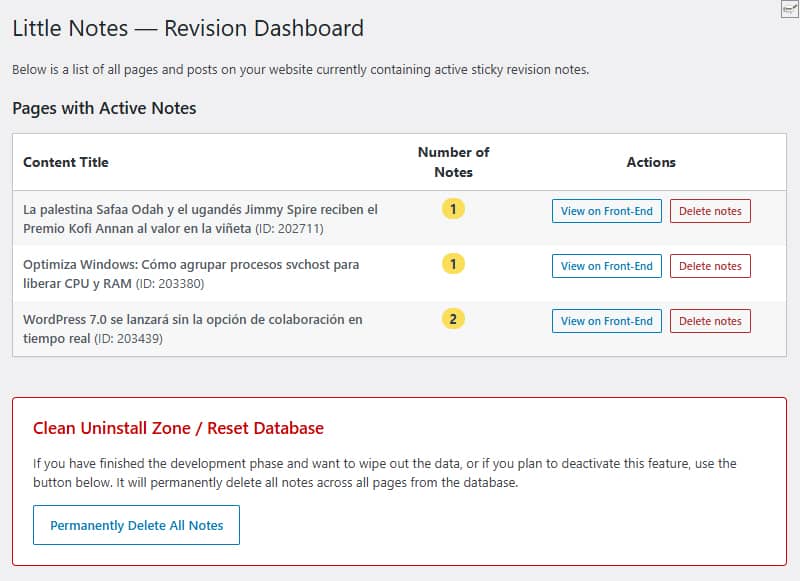
नीचे सफाई क्षेत्र है जहाँ आप एक ही क्लिक में डेटाबेस की सभी प्रविष्टियाँ हटा सकते हैं। 'Purge' बटन और 'Delete individually' बटन दोनों डेटाबेस से पंक्तियों को पूरी तरह से हटा देते हैं, जिससे यदि आप इस सुविधा का उपयोग बंद करने का निर्णय लेते हैं तो साइट पर कोई भी डेटा शेष नहीं रहता।
कोई कस्टम टेबल नहीं बनाई जाती। सब कुछ मूल रूप से मानक `wp_options ` टेबल में `update_option()` का उपयोग करके `little_notes_page_[ID]` नाम के अंतर्गत संग्रहीत किया जाता है।
एक और मुद्दा जिस पर मैं जितना हो सके उतना ध्यान देता हूँ, वह है प्रदर्शन। यदि उपयोगकर्ता प्रशासक के रूप में लॉग इन नहीं है और पृष्ठ पर कोई नोट्स नहीं हैं, तो बिल्कुल भी कोई कोड लोड नहीं होता। आपके विज़िट्स की गति पर इसका कोई प्रभाव नहीं पड़ता।
जब `pointer-events: none` के साथ एक एब्सोल्यूटकैनवास का उपयोग किया जाता है, तो नोट्स वेबपेज पर तैरते हैं बिना CSS, मार्जिन या थीम एलिमेंट्स को प्रभावित किए (अब तक GeneratePress पर परीक्षण किया गया)।
हालांकि मुझे इसमें कोई त्रुटि नहीं मिली है, मैं इसकी सुरक्षा बढ़ाने और इसे डीबग करने के लिए अभी भी इसका परीक्षण कर रहा हूँ, ताकि इसे एक प्लगइन में बदलकर वर्डप्रेस रिपॉजिटरी पर अपलोड किया जा सके। इसलिए फिलहाल मैं आपको इसे एक परीक्षण वातावरण में आज़माने की सलाह दूँगा।
मेरे मन में कुछ सुधारों के विचार हैं। यदि आप इसे आज़माना चाहें, तो आप कोई भी ऐसी सुविधाएँ सुझा सकते हैं जो आपको लगती हैं कि गायब हैं या जो उपयोगी और/या आवश्यक होंगी यदि यह अंततः रिपॉजिटरी के लिए एक आधिकारिक प्लगइन बन जाता है। इस संभावित प्लगइन का कार्यशील शीर्षक Little Notes (Small notes या Simple notes) है।
इस बीच, अगर मैं फ़ंक्शन का कोड अपडेट करता हूँ, तो मैं यहीं करूँगा और तारीख बदल दूँगा ताकि आपको पता चल जाए कि इसमें बदलाव किया गया है।
कोड
/**
* Función para sistema de notas adhesivas en front-end
* Prefijo único para PHP: little_notes / Prefijo único para CSS y JS: little-notes
* Las notas se añaden con ALT + clic izquierdo en cualquier punto logeado como admin
* Revisión 17/06/2026 - Versión con panel de control y borrado rápido desde admin en Ajustes/Little Notes
* Textos en inglés preparados para plugin
*/
if ( ! defined( 'ABSPATH' ) ) exit;
// 1. FRONT-END ASSETS & DATA LOADING
add_action( 'wp_enqueue_scripts', 'little_notes_cargar_assets' );
function little_notes_cargar_assets() {
$post_id = get_the_ID();
if ( ! $post_id ) return;
add_action( 'wp_footer', function() use ($post_id) {
$notas_actuales = get_option( 'little_notes_page_' . $post_id, array() );
$is_admin = current_user_can( 'manage_options' ) ? 1 : 0;
if ( ! $is_admin && empty( $notas_actuales ) ) return;
$nonce = wp_create_nonce( 'little_notes_seguridad' );
?>
<style id="little-notes-estilos">
#little-notes-canvas {
position: fixed;
top: 0;
left: 0;
width: 100vw;
height: 100vh;
pointer-events: none;
z-index: 999999;
}
.little-note-adhesiva {
position: absolute;
width: 220px;
min-height: 90px;
background: #fef5c1;
padding: 18px 12px 12px 12px;
box-shadow: 0 4px 10px rgba(0,0,0,0.18);
font-family: -apple-system, BlinkMacSystemFont, "Segoe UI", Roboto, Helvetica, Arial, sans-serif;
font-size: 14px;
font-weight: 500;
line-height: 1.4;
color: #2c3e50;
border-left: 5px solid #fade59;
transform: translate(-50%, -10px) rotate(-1deg);
transition: transform 0.15s ease, box-shadow 0.15s ease;
}
.little-note-adhesiva:hover {
transform: translate(-50%, -10px) rotate(0deg) scale(1.03);
box-shadow: 0 6px 14px rgba(0,0,0,0.22);
}
.little-note-texto a {
color: inherit !important;
text-decoration: underline !important;
word-break: break-all;
}
.little-note-pin {
position: absolute;
top: -8px;
left: 50%;
width: 14px;
height: 14px;
background: #e74c3c;
border-radius: 50%;
box-shadow: 0 2px 4px rgba(0,0,0,0.25);
transform: translateX(-50%);
}
.little-note-cerrar {
position: absolute;
top: 2px;
right: 6px;
cursor: pointer;
font-size: 16px;
font-weight: bold;
color: #7f8c8d;
user-select: none;
line-height: 1;
}
.little-note-cerrar:hover { color: #c0392b; }
.little-note-texto {
word-wrap: break-word;
white-space: pre-wrap;
margin-top: 4px;
}
</style>
<div id="little-notes-canvas"></div>
<script id="little-notes-js">
document.addEventListener("DOMContentLoaded", function() {
const canvas = document.getElementById('little-notes-canvas');
const isAdmin = <?php echo $is_admin; ?>;
const notasDB = <?php echo json_encode( $notas_actuales ); ?>;
const closedNotas = JSON.parse(localStorage.getItem('little_notes_cerradas') || '[]');
const ajaxUrl = '<?php echo admin_url( 'admin-ajax.php' ); ?>';
// Buscamos el contenedor principal de GeneratePress o el cuerpo del contenido (.entry-content)
const mainContainer = document.querySelector('.entry-content') || document.querySelector('#content') || document.body;
const deleteTooltip = "<?php echo esc_js( __('Delete permanently for everyone', 'little-notes') ); ?>";
const closeTooltip = "<?php echo esc_js( __('Close note', 'little-notes') ); ?>";
const promptMessage = "<?php echo esc_js( __('Enter your revision note:', 'little-notes') ); ?>";
const confirmDeleteMsg = "<?php echo esc_js( __('Do you want to permanently delete this note from the database?', 'little-notes') ); ?>";
const saveErrorMsg = "<?php echo esc_js( __('Server error while saving.', 'little-notes') ); ?>";
let listaNotasInstanciadas = [];
if (Array.isArray(notasDB)) {
notasDB.forEach(nota => {
if (!closedNotas.includes(nota.id)) {
renderizarNota(nota);
}
});
}
if (isAdmin) {
document.addEventListener('click', function(e) {
if (e.altKey) {
e.preventDefault();
// Medimos la posición relativa al contenedor principal en píxeles y porcentaje
const containerRect = mainContainer.getBoundingClientRect();
const containerAbsoluteLeft = containerRect.left + window.scrollX;
const pixelXRelative = e.pageX - containerAbsoluteLeft;
const pctX = (pixelXRelative / containerRect.width) * 100;
const absoluteY = e.pageY; // El eje Y sigue siendo absoluto al scroll vertical
const texto = prompt(promptMessage);
if (texto && texto.trim() !== "") {
guardarNotaBD(pctX, absoluteY, texto);
}
}
});
}
function autoConvertirEnlaces(texto) {
const expresionUrl = /(\b(https?|ftp|file):\/\/[-A-Z0-9+&@#\/%?=~_|!:,.;]*[-A-Z0-9+&@#\/%=~_|])/ig;
return texto.replace(expresionUrl, function(url) {
return `<a href="${url}" target="_blank" rel="noopener noreferrer">${url}</a>`;
});
}
function renderizarNota(nota) {
const div = document.createElement('div');
div.className = 'little-note-adhesiva';
div.id = nota.id;
div.style.pointerEvents = 'auto';
const textoProcesado = autoConvertirEnlaces(nota.texto);
const currentTooltip = isAdmin ? deleteTooltip : closeTooltip;
div.innerHTML = `
<div class="little-note-pin"></div>
<span class="little-note-cerrar" title="${currentTooltip}">×</span>
<div class="little-note-texto">${textoProcesado}</div>
`;
div.querySelector('.little-note-cerrar').addEventListener('click', function() {
if (isAdmin) {
if (confirm(confirmDeleteMsg)) {
borrarNotaBD(nota.id, div);
}
} else {
closedNotas.push(nota.id);
localStorage.setItem('little_notes_cerradas', JSON.stringify(closedNotas));
div.remove();
listaNotasInstanciadas = listaNotasInstanciadas.filter(n => n.id !== nota.id);
}
});
canvas.appendChild(div);
const objetoNota = { id: nota.id, element: div, pctX: nota.x, originalY: nota.y };
listaNotasInstanciadas.push(objetoNota);
posicionarElemento(objetoNota);
}
function posicionarElemento(objNota) {
const containerRect = mainContainer.getBoundingClientRect();
// Reconstruimos la coordenada X real multiplicando el porcentaje guardado por el ancho actual del bloque
const xCalculado = containerRect.left + (containerRect.width * (objNota.pctX / 100));
// Calculamos la Y restando la barra de scroll vertical del viewport fijo
const yCalculado = objNota.originalY - window.scrollY;
objNota.element.style.left = xCalculado + 'px';
objNota.element.style.top = yCalculado + 'px';
}
function actualizarPosiciones() {
listaNotasInstanciadas.forEach(posicionarElemento);
}
window.addEventListener('scroll', actualizarPosiciones, { passive: true });
window.addEventListener('resize', actualizarPosiciones, { passive: true });
function guardarNotaBD(x, y, texto) {
const formData = new FormData();
formData.append('action', 'little_notes_guardar');
formData.append('post_id', '<?php echo $post_id; ?>');
formData.append('x', x); // Aquí se envía el porcentaje elástico
formData.append('y', y);
formData.append('texto', texto);
formData.append('nonce', '<?php echo $nonce; ?>');
fetch(ajaxUrl, { method: 'POST', body: formData })
.then(res => res.json())
.then(res => {
if(res.success && res.data) {
renderizarNota(res.data);
} else {
alert(saveErrorMsg);
}
})
.catch(err => console.error("AJAX Error:", err));
}
function borrarNotaBD(id, elementoHtml) {
const formData = new FormData();
formData.append('action', 'little_notes_borrar');
formData.append('post_id', '<?php echo $post_id; ?>');
formData.append('nota_id', id);
formData.append('nonce', '<?php echo $nonce; ?>');
fetch(ajaxUrl, { method: 'POST', body: formData })
.then(res => res.json())
.then(res => {
if(res.success) {
elementoHtml.remove();
listaNotasInstanciadas = listaNotasInstanciadas.filter(n => n.id !== id);
}
});
}
});
</script>
<?php
}, 999);
}
// 2. INDEPENDENT AJAX PROCESSORS
add_action( 'wp_ajax_little_notes_guardar', 'little_notes_ajax_guardar_handler' );
function little_notes_ajax_guardar_handler() {
check_ajax_referer( 'little_notes_seguridad', 'nonce' );
if ( ! current_user_can( 'manage_options' ) ) wp_send_json_error( __('Unauthorized', 'little-notes') );
$post_id = intval( $_POST['post_id'] );
$notas = get_option( 'little_notes_page_' . $post_id, array() );
$nueva_nota = array(
'id' => uniqid('note_'),
'x' => floatval( $_POST['x'] ), // Guarda el valor flotante porcentual
'y' => floatval( $_POST['y'] ),
'texto' => sanitize_textarea_field( $_POST['texto'] )
);
$notas[] = $nueva_nota;
update_option( 'little_notes_page_' . $post_id, $notas );
wp_send_json_success( $nueva_nota );
}
add_action( 'wp_ajax_little_notes_borrar', 'little_notes_ajax_borrar_handler' );
function little_notes_ajax_borrar_handler() {
check_ajax_referer( 'little_notes_seguridad', 'nonce' );
if ( ! current_user_can( 'manage_options' ) ) wp_send_json_error( __('Unauthorized', 'little-notes') );
$post_id = intval( $_POST['post_id'] );
$nota_id = sanitize_text_field( $_POST['nota_id'] );
$notas = get_option( 'little_notes_page_' . $post_id, array() );
$notas = array_filter( $notas, function($n) use ($nota_id) {
return $n['id'] !== $nota_id;
});
if ( empty( $notas ) ) {
delete_option( 'little_notes_page_' . $post_id );
} else {
update_option( 'little_notes_page_' . $post_id, array_values($notas) );
}
wp_send_json_success();
}
// 3. ADMIN MENU & ACTIVE NOTES OVERVIEW
add_action( 'admin_menu', 'little_notes_crear_menu_admin' );
function little_notes_crear_menu_admin() {
add_options_page(
__('Little Notes Settings', 'little-notes'),
__('Little Notes', 'little-notes'),
'manage_options',
'little-notes-admin',
'little_notes_render_page_admin'
);
}
function little_notes_render_page_admin() {
if ( ! current_user_can( 'manage_options' ) ) return;
global $wpdb;
if ( isset($_POST['little_notes_delete_post_id']) ) {
check_admin_referer( 'little_notes_delete_post_action' );
$target_post_id = intval($_POST['little_notes_delete_post_id']);
delete_option( 'little_notes_page_' . $target_post_id );
echo '<div class="notice notice-success is-dismissible"><p><strong>' . esc_html__('Notes for this page have been successfully deleted.', 'little-notes') . '</strong></p></div>';
}
if ( isset($_POST['little_notes_purge_all']) ) {
check_admin_referer( 'little_notes_accion_purgar' );
$wpdb->query( "DELETE FROM {$wpdb->options} WHERE option_name LIKE 'little_notes_page_%'" );
echo '<div class="notice notice-success is-dismissible"><p><strong>' . esc_html__('Success! All revision notes have been cleanly deleted from the database.', 'little-notes') . '</strong></p></div>';
}
$resultados = $wpdb->get_results( "SELECT option_name, option_value FROM {$wpdb->options} WHERE option_name LIKE 'little_notes_page_%'" );
?>
<div class="wrap">
<h1><?php _e('Little Notes — Revision Dashboard', 'little-notes'); ?></h1>
<p><?php _e('Below is a list of all pages and posts on your website currently containing active sticky revision notes.', 'little-notes'); ?></p>
<h2 class="title" style="margin-top:20px;"><?php _e('Pages with Active Notes', 'little-notes'); ?></h2>
<table class="wp-list-table widefat fixed striped table-view-list" style="margin-top:10px; max-width: 850px;">
<thead>
<tr>
<th style="font-weight:bold; width: 50%;"><?php _e('Content Title', 'little-notes'); ?></th>
<th style="font-weight:bold; width: 15%; text-align:center;"><?php _e('Number of Notes', 'little-notes'); ?></th>
<th style="font-weight:bold; width: 35%; text-align:center;"><?php _e('Actions', 'little-notes'); ?></th>
</tr>
</thead>
<tbody>
<?php if ( empty( $resultados ) ) : ?>
<tr>
<td colspan="3"><?php _e('No active revision notes found on any page.', 'little-notes'); ?></td>
</tr>
<?php else :
foreach ( $resultados as $fila ) {
$post_id = intval( str_replace( 'little_notes_page_', '', $fila->option_name ) );
$titulo = get_the_title( $post_id );
if ( ! $titulo ) $titulo = sprintf( __('Content #ID %d (Or deleted)', 'little-notes'), $post_id );
$datos_notas = maybe_unserialize( $fila->option_value );
$cantidad = is_array( $datos_notas ) ? count( $datos_notas ) : 0;
if ( $cantidad === 0 ) continue;
?>
<tr>
<td><strong><?php echo esc_html( $titulo ); ?></strong> <span class="description">(ID: <?php echo $post_id; ?>)</span></td>
<td style="text-align:center;"><span class="update-plugins count-<?php echo $cantidad; ?>" style="background:#fade59; color:#2c3e50; font-weight:bold; padding:2px 8px; border-radius:10px;"><?php echo $cantidad; ?></span></td>
<td style="text-align:center;">
<div style="display: flex; gap: 8px; justify-content: center; align-items: center;">
<a href="<?php echo esc_url( get_permalink( $post_id ) ); ?>" target="_blank" class="button button-small"><?php _e('View on Front-End', 'little-notes'); ?></a>
<form method="post" action="" style="margin:0;" onsubmit="return confirm('<?php echo esc_js( sprintf(__('Are you sure you want to delete all notes for: %s?', 'little-notes'), $titulo) ); ?>');">
<?php wp_nonce_field( 'little_notes_delete_post_action' ); ?>
<input type="hidden" name="little_notes_delete_post_id" value="<?php echo $post_id; ?>">
<input type="submit" class="button button-small delete" style="color: #b32d2e; border-color: #b32d2e;" value="<?php esc_attr_e('Delete notes', 'little-notes'); ?>">
</form>
</div>
</td>
</tr>
<?php
}
endif; ?>
</tbody>
</table>
<div style="margin-top: 40px; padding: 20px; border: 1px solid #cc0000; background: #fff; max-width: 760px; border-radius: 4px;">
<h3 style="color: #cc0000; margin-top:0;"><?php _e('Clean Uninstall Zone / Reset Database', 'little-notes'); ?></h3>
<p><?php _e('If you have finished the development phase and want to wipe out the data, or if you plan to deactivate this feature, use the button below. It will permanently delete all notes across all pages from the database.', 'little-notes'); ?></p>
<?php
$confirm_js = esc_js( __('Are you absolutely sure you want to delete ALL revision notes from the database? This action cannot be undone.', 'little-notes') );
?>
<form method="post" action="" onsubmit="return confirm('<?php echo $confirm_js; ?>');">
<?php wp_nonce_field( 'little_notes_accion_purgar' ); ?>
<input type="hidden" name="little_notes_purge_all" value="1">
<?php submit_button( __('Permanently Delete All Notes', 'little-notes'), 'delete', 'submit', false ); ?>
</form>
</div>
</div>
<?php
}