You know that saying that Microsoft always releases a good Windows and then a bad one. So Windows 10 was the last good one, but it also has an even better version.
When Microsoft announced the death of Windows 10 with the end of its official support for October 14, 2025, I started to search and read about alternatives. The thing is that since then I had something to do with my 2012 machine with an ASUS Sabertooth Z77 motherboard and an Intel Core i7 3770K processor, both already incompatible with Windows 11, and I came across hundreds of references to LTSC versions.
Having ruled out Linux (for that I already have a Raspberry Pi 400) because I need to use editing tools that don't have a very good alternative in Linux and I don't want to mess around with drivers and virtual machines and the hassle of installing Windows on Linux, I opted for an LTSC version of Windows 10.
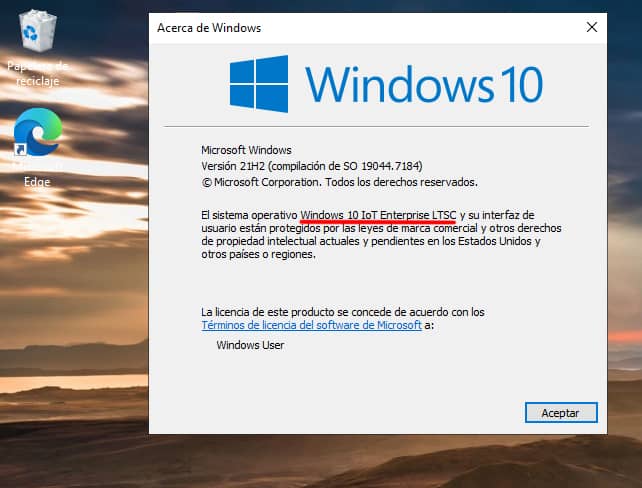
Windows 10 IoT Enterprise LTSC 2021 is like Windows 11 should have been in the first place. No pre-installed junk, very light, stable and can be installed on almost any old machine.
The minimum requirements are really minimal:
Component | Preferred minimum requirements | Optional 64-bit minimum requirements | Optional 32-bit minimum requirements |
|---|---|---|---|
| Processor | 1 GHz or faster | 1 GHz or faster | 1 GHz or faster |
| System memory | x64: 2 GB | 2 GB | 1 GB |
| Storage size | 20 GB | 20 GB | 16 GB |
| TPM | TPM 2.0 | Optional | Optional |
| Show | Diagonal 7" 800x600 SVGA | Optional | Optional |
| Graphics | DirectX 9 or later | Optional | Optional |
| Networks | Ethernet or Wi-Fi | Optional | Optional |
Goodbye to that continuous barrage of updates for unnecessary new features and fixes for things that break other things. It only gets fixes, security patches and security intelligence updates from Windows Defender (now called Windows Security). The operating system won't change its appearance until it dies in 2032.
IoT stands for Internet of Things and LTSC (Long-Term Servicing Channel) is the long-term servicing channel designed for enterprise use cases where the key requirement is that the functionality and features of the operating system do not change over time, such as medical systems, industrial process controllers and air traffic control devices, as well as kiosks, point-of-sale or ATMs, etc.
The features of Windows 10 IoT Enterprise LTSC 2021 are the same as Windows 10 version 21H2. Although it is intended for enterprise use, it is identical to Windows 10 except for a few tools that you won't need and probably won't even see. I've been using it for almost a week now and I haven't found a single downside or missed anything that wasn't installed. I highly recommend it, it's by far the best and lightest version of Windows I've tried.
No rubbish
Let's start with the list of all those things that are not installed (and don't need to be).
Unlike Windows 10 Pro or Home, the LTSC version comes with no bloatware. The Microsoft Store is not installed and all UWP (Modern Apps) are removed: Mail, Calendar, Weather, News, Voice Recorder or the Modern Calculator (it brings the classic Win7 one).
The Photos application is not installed either, it is supposed to use the old photo viewer, but in my installation the photos were opened with the old and mythical "Paint", which I also uninstalled and added the classic Windows 7 photo viewer.
No ads in the start menu, no app "suggestions" on the lock screen, no crappy pre-installed games. Goodbye Xbox Services: no Game Bar, no Xbox Live integration. If you're a Game Pass user you can get these features back, but I didn't waste two minutes researching this as this machine wasn't going to be used for gaming.
Nor does it include Copilot or any of today's lame generative AI integrations. One Drive won't be pre-installed or integrated into the default file explorer either (although if you want to use it you can install it manually). Forget about aggressive telemetry and a bunch of shitty processes running in the background.
You don't need a Microsoft account anymore either, you can use your machine with a local account.
Even lighter
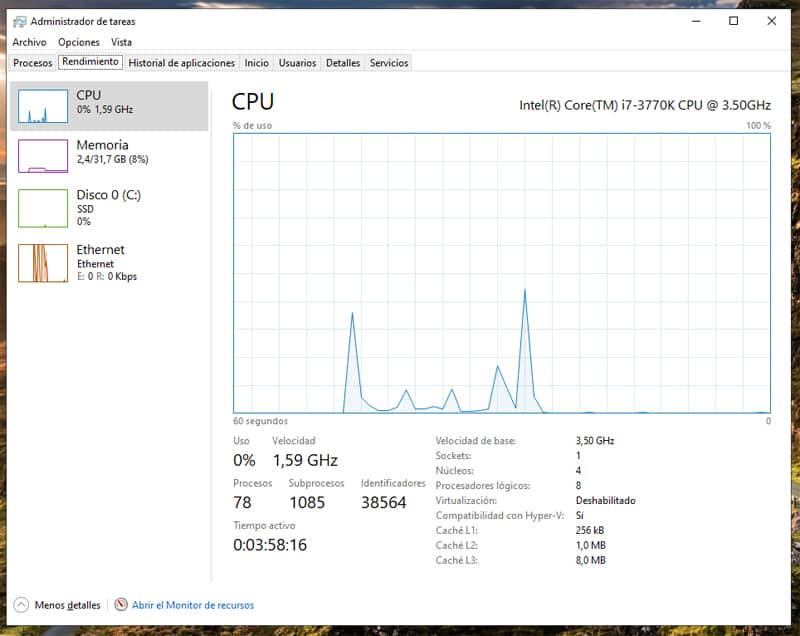
Thanks to all this, it is estimated that the operating system consumes between 20% and 30% less RAM at idle than a Home/Pro version. The first thing you notice is that you have far fewer idle processes. In my case, only 78 processes are running, compared to more than 240 in Windows 11.
But don't go away just yet, there's more. If you're a fan of optimisation, you can make it even lighter in two ways. By removing specific function packs or by pulling Compact OS, which installs the operating system files as compressed files and allows you to run the operating system from the compressed files to save disk space. Compact OS can be enabled or disabled on the fly and is compatible with UEFI and BIOS-based devices.
And the best thing about this version is that you will be able to install it on almost any machine, no matter how old or modest, and you will have support for security fixes and updates until 13 January 2032.
Once installed, all you'll see on your desktop is the recycle bin and a shortcut to Microsoft Edge, which you can use to install your favourite browser.
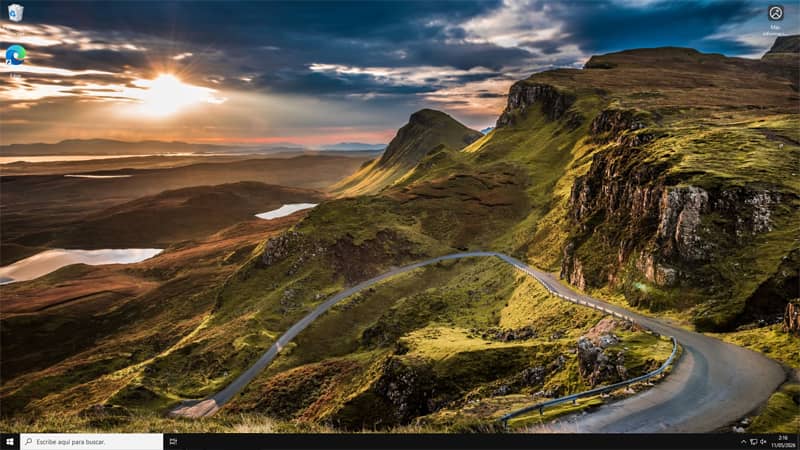
So far the advantages outweigh the disadvantages.
Getting an official ISO (there is a copy in Archive) of Windows 10 IoT Enterprise LTSC 2021 and other versions is very easy, what is not so easy is to get a license, as they are intended for companies and are sold in batches (they are not cheap) and Microsoft offers them only in very specific channels, but there are already a thousand places where you can buy an original and legal one for a few euros.
I bought it for €13.60 and had no problems with activation. Buying a licence can be a bit of a lottery, but at least, if it doesn't work, you can ask for a refund or get a new key sent to you. Your best bet is to go to more reliable sites like Keysfan or Gvgmall first.
Be that as it may, this version works without any limitation without the need to add the licence activation key for more than enough time to find the best place to buy it.
There are more "informal" activation options, which I will skip because I consider them too risky for the health of your machine and with no certainty of success or claim if you break something.
Another use for which I would not install this version would be on a computer that is used for gaming. While it can be used to run games without problems, just like a "normal" version of Windows 10, it is to be expected that as time goes on, game developers will stop considering this operating system as it is a version that has exhausted its life cycle and the remaining LTSCs are supposed to be for purely business use.
Installation
We recommend installing Windows 10 IoT Enterprise LTSC 2021 from scratch. A clean install will ensure the stability of your computer. Here are the steps:
- Download the English ISO, make sure it is the exact version Windows 10 IoT Enterprise LTSC 2021 (once the installation is complete you can add the English language pack).
- You plug a clean USB stick of at least 8GB into a Windows computer.
- Download and run Rufus. It's free and doesn't even install.
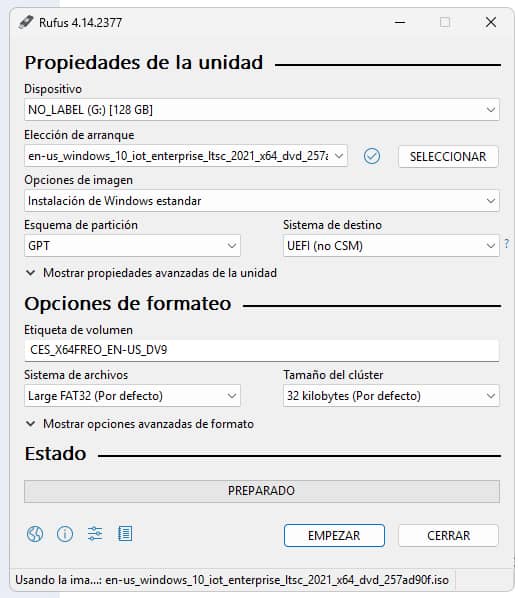
- Under "Device" you select your USB stick. Click on "Select" and add your ISO. Under "Volume Label" you can leave it as it appears or give it any name you want. The rest you can leave it as shown in the screenshots and click "START".
Before the recording process starts, a final window will open with these three options:
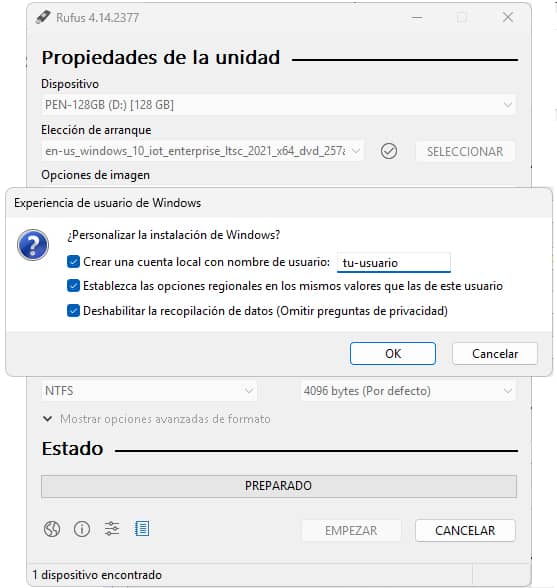
By checking the first option you can create a local user account by typing in the user name. The account will be created without a password, but you can add it later. If you prefer to use your Microsoft account, uncheck this option and the option will appear during the installation process.
In the regional options box, the same country and time zone values of the user of the computer from which you are performing this process will be used.
And checking "Disable data collection" will save you from having to reject all those options box by box during installation.
To finish, press OK and the progress bar will start to move. When it is finished you will have your bootable USB flash drive ready to be plugged in wherever you want to install your new operating system. When you turn on your machine with the USB stick inserted and selected as the first boot drive, the usual process of installing your new version of Windows 10 LTSC IoT will start.
Error: BIOS/Legacy Boot of UEFI-Only Media
A common error that you can find, if you haven't made sure to check the boot beforehand, and which Rufus will warn you about with a message, is this one, which kept me entertained for quite a while. In my case, I was in a hurry. As the computer had no power supply and no disk, when I installed the new power supply and disk, I rushed to install it like hell without checking anything.
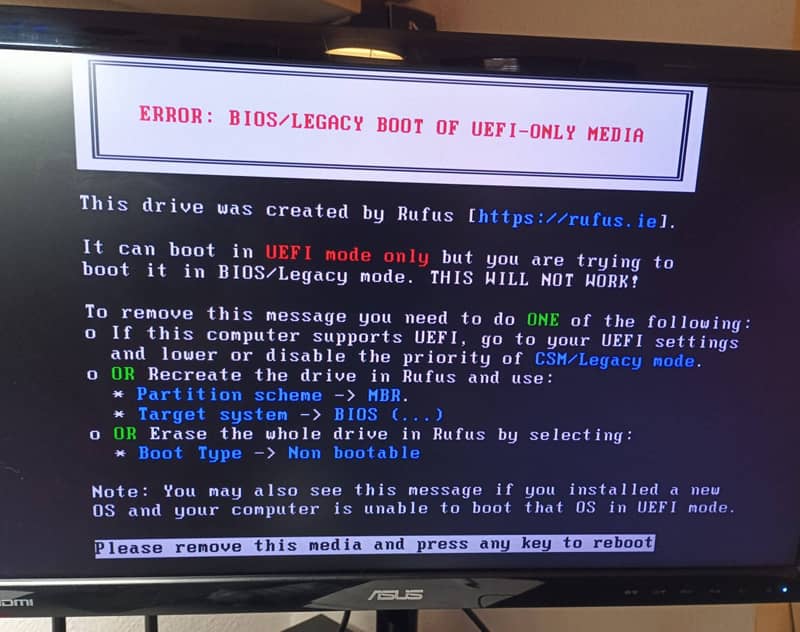
This message is a visual "help" that Rufus adds when it detects a critical incompatibility. To put it simply: the USB is configured for the future(UEFI), but the PC is still in the past(BIOS/Legacy).
The best solution is to adjust the BIOS. Don't waste time re-writing the USB by switching from GPT to MBR and so on. The quickest way is to update the boot behaviour of your motherboard by following these steps:
- You take out the USB to reboot.
- You enter the BIOS (by pressing F2, F12 or Del on power-up, or whichever is appropriate for your board).
- Find the Boot menu or access it from Advanced Settings, which is usually opened with F7.
- Locate the CSM option.
- Look for"Boot from Storage Devices" or"Boot Device Control" (every BIOS presents it with variants). Here is the key. Go in there and select "Only UEFI or both, UEFI first". This will cause the Rufus flash drive to be recognised correctly.
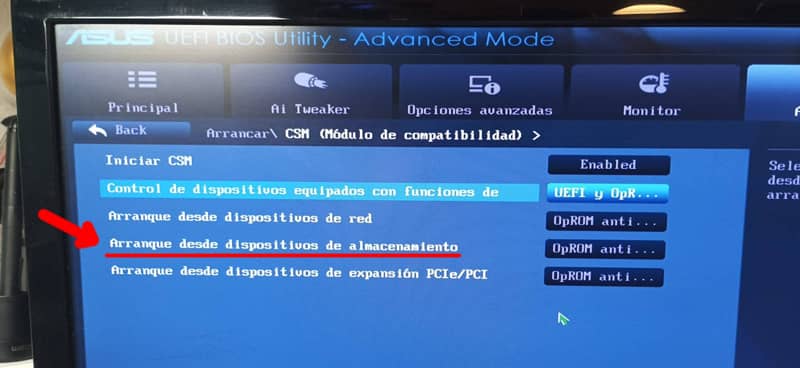
- Re-insert your bootable USB stick.
- Save changes (F10) and restart.
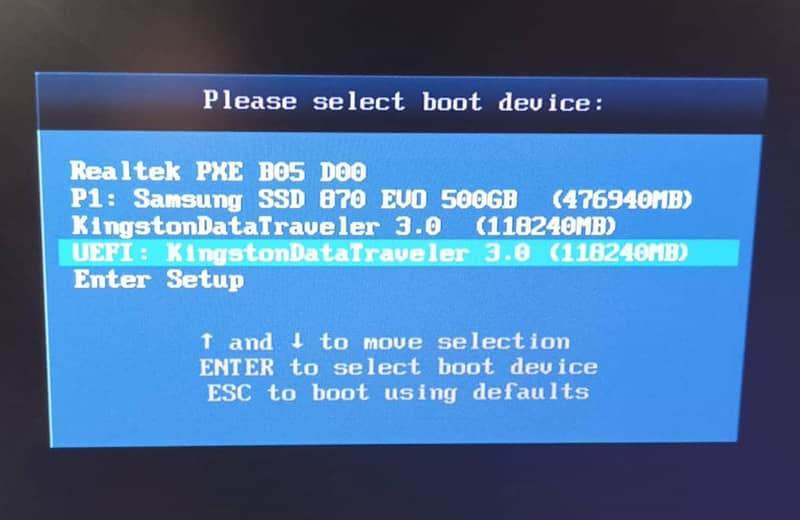
Now you will see that the process will be as usual. You select your bootable USB from the list, which will appear as EUFI and some reference to the make or model, and the rest is just click and sing.
Once installed, add the Spanish language pack and download and install all the updates, including the optional ones you may need for those silly drivers that are pending installation or update.